

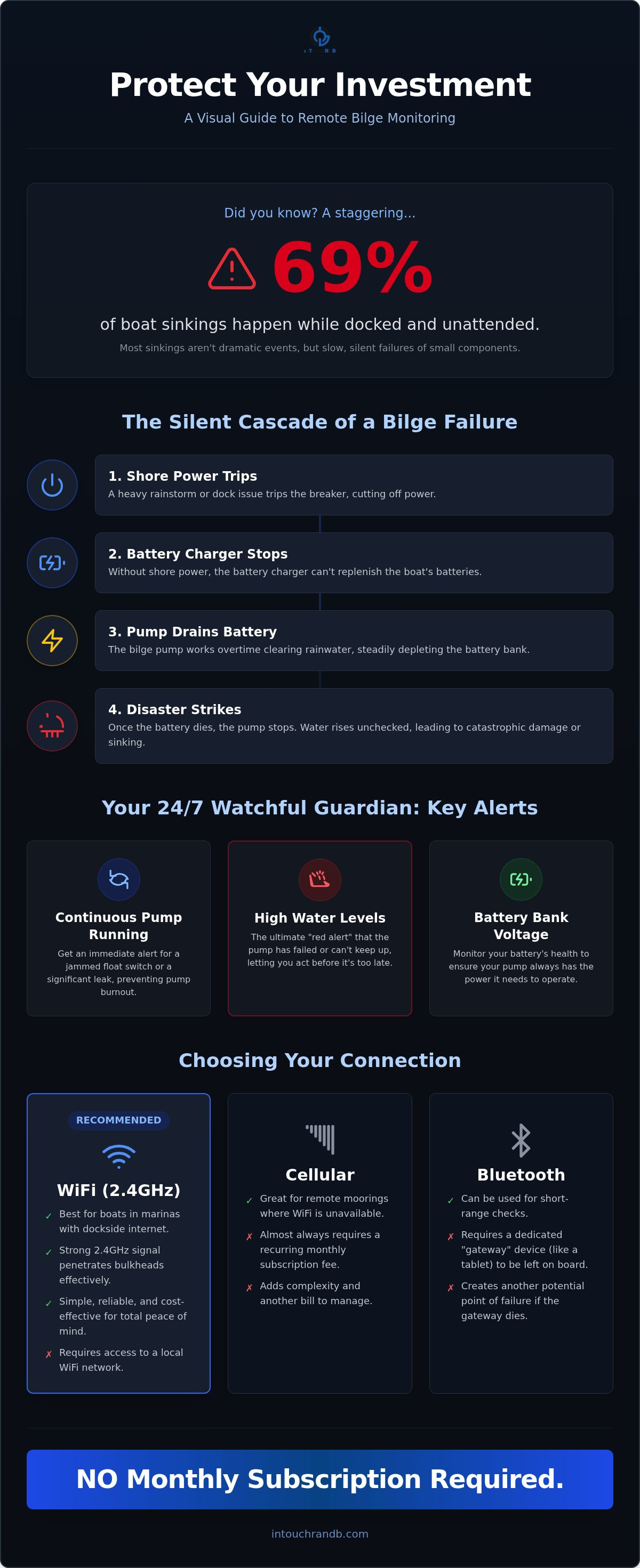
Did you know that 69% of boat sinkings happen while the vessel is supposedly safe at the dock? It's a staggering figure from BoatU.S. that highlights a reality every boat owner fears: returning to the marina only to find your pride and joy submerged. Most of us have felt that familiar pang of anxiety after a heavy rain, wondering how to monitor bilge pump remotely so we don't have to worry about a failed battery or a stuck float switch while we're away.
We believe you deserve better than a "hope for the best" strategy. In this guide, we'll show you how to set up a protective, watchful system using a standard 2.4GHz WiFi connection that provides total peace of mind without any recurring fees. We're going to walk through the simple installation steps and show you how to configure a reliable alert system that keeps you, and even your marina manager, informed. This setup ensures that if a problem occurs, you're the first to know, allowing you to act before a small leak becomes a disaster.
Key Takeaways
- Discover why 24/7 monitoring is essential for preventing the most common causes of boat sinkings at the dock.
- Compare the benefits of WiFi and cellular systems to choose the best communication method for your vessel's location.
- Master the process of how to monitor bilge pump remotely by configuring real-time text and email alerts through a simple setup portal.
- Learn to identify critical warning signs, like a pump that runs continuously, before it drains your battery or fails.
- Build a proactive safety plan by including secondary contacts, such as marina staff, in your emergency notification list.
Why Remote Bilge Monitoring is Essential for Every Boat Owner
For many of us, the boat is a sanctuary, but it's also a significant investment that spends most of its time unattended. You might visit the marina once a week to check the lines and peer into the engine room, but a lot can go wrong in those few days between visits. According to BoatU.S. statistics, a staggering 69% of all boat sinkings occur while the vessel is docked. This isn't usually the result of a dramatic storm; it's often a slow, quiet failure of a small component. Understanding what is a bilge pump and how it functions is the first step toward security, but the real key is knowing how its status changes when you aren't there.
Learning how to monitor bilge pump remotely shifts your approach from reactive repairs to proactive protection. If you only discover a leak when you arrive at the dock to find the floorboards floating, it's already too late. By then, you're looking at secondary damage like pervasive mold and ruined electronics, which can be just as costly as the hull repair itself. A remote system acts as a watchful guardian, giving you the chance to intervene before the situation escalates.
The Chain Reaction of a Bilge Failure
A bilge failure is rarely a single, isolated event. It's usually a chain reaction of small failures. For example, a heavy rainstorm might trip the shore power breaker at the dock. Without shore power, your battery charger stops working. Your pump then works overtime to clear the rainwater until the battery bank is exhausted. Once the battery dies, the pump stops, and the water begins to rise unchecked. The cost of a professional salvage operation far exceeds the investment in a reliable bilge monitoring sensor. Keeping an eye on these variables ensures you can stop the chain reaction before it finishes.
What Does a Remote System Actually Track?
A modern remote system provides specific data points that tell the story of your boat's health in real-time. Most systems utilize a 2.4GHz WiFi connection to send these updates directly to your phone. A comprehensive setup typically monitors:
- Continuous pump running: This alert helps you identify if a float switch is jammed or if there's a significant hull breach that the pump is struggling to keep up with.
- High water levels: This is the ultimate "red alert" indicating that water has reached a level the pump cannot handle or that the pump has failed entirely.
- Battery bank voltage: Monitoring voltage ensures your system has the electrical pressure needed to run the pump and, eventually, start your engines.
When you understand how to monitor bilge pump remotely, you gain the ability to catch these issues at the "trigger" stage rather than the "catastrophe" stage. It's about maintaining a sense of protective vigilance over your asset, even when you're miles away from the marina.
Evaluating Remote Monitoring Technologies: WiFi, Cellular, and Bluetooth
When you're deciding how to monitor bilge pump remotely, you'll encounter three primary types of technology: WiFi, cellular, and Bluetooth. Each has its place, but the right choice depends on where you keep your vessel and your budget. WiFi-based systems are often the most practical choice for boats kept in marinas with dockside internet. These systems typically operate on a 2.4GHz frequency. This frequency is the industry standard because it penetrates fiberglass and heavy bulkheads much better than higher-frequency 5GHz signals, ensuring your connection stays stable even deep in the engine room.
Cellular monitors are a common alternative for boats on remote moorings or trailers where WiFi isn't available. They offer great range, but they usually come with recurring costs. Bluetooth mesh systems are another option, though they often require a dedicated gateway, like a tablet, to be left powered on and connected at all times. This creates a potential point of failure if the tablet dies or loses its connection. If you're looking for a balance of simplicity and reliability, exploring dependable remote monitoring solutions is the best way to start protecting your asset.
While U.S. Coast Guard regulations focus on the physical requirements for dewatering equipment, they don't specify how you should stay informed about its status. Adding a remote layer ensures that your equipment is actually doing the job it's required to do. It's about maintaining a sense of protective vigilance over your boat without needing to be physically present at the dock every day.
The Hidden Cost of Subscriptions
Many "smart" marine monitors look affordable at first glance, but the long-term costs can be surprising. Some manufacturers require monthly "cloud plans" or cellular data fees that can add up to hundreds of dollars over a few years. When researching how to monitor bilge pump remotely, you should compare the total cost of ownership. You can check the comparison matrix to see how different systems stack up regarding one-time hardware costs versus ongoing monthly fees.
Reliability Factors for Marine Environments
A monitoring system is only as good as its ability to deliver a message when things go wrong. Reliability in a marine environment depends on a secure cloud server that handles the notification handoff. You don't want a system that relies on a direct connection to your phone; you want a system that sends a trigger to a server, which then alerts you via text or email. This setup ensures no alert is ever lost. Practicality also means having a backup. A robust system allows for multi-recipient alerts so your marina manager can be notified if you're unavailable to respond to an emergency.
How to Install and Configure Your Remote Bilge Monitoring System
Installing a remote monitoring system doesn't have to be a technical headache or require professional cabling. Unlike complex systems that demand an engineering degree to navigate, modern sensors are designed for a straightforward DIY approach. The process begins with mounting your hardware. You'll typically choose between wired sensors for permanent placement or wireless versions for easier routing. If you're using the Bilge Minder, you should mount the high-level sensor just above your primary pump's activation point. This proactive placement ensures you receive an alert before water reaches your engines or expensive batteries.
Once the sensors are mounted, the next step in learning how to monitor bilge pump remotely is connecting to the communication hub. You'll use your smartphone to bridge the gap between the device and your marina's internet. During this stage, you'll configure your SSID and WiFi password. It's vital to select a 2.4GHz network. While 5GHz is common in homes, 2.4GHz is the industry standard for boats because the signal travels much better through fiberglass, wood, and metal bulkheads. Finally, personalize your alerts by naming your boat and the specific sensor location. Receiving a text that says "High Water: Sea Dancer Aft Bilge" is much more helpful than a generic notification.
Using the Captive Portal for Easy Setup
The brain of the system is accessed through a "Captive Portal," which is simply a temporary setup webpage hosted by the device itself. To get started, connect your phone to the device's WiFi signal and type 192.168.4.1 into your browser's address bar. You'll be prompted to enter a "YES" acknowledgement to accept the terms and conditions before proceeding. A key step here is setting your Time Zone so your alert logs are accurate. For example, if you're on the East Coast, you'll enter "-5" for EST. This ensures that if a pump runs at 2:00 AM, your notification history shows the correct time.
Reading the LED Status Indicators
Your hardware uses simple light patterns to tell you exactly what it's doing. When you first apply power, a Green LED startup sequence confirms the internal hardware is healthy. The Blue LED is your primary guide for connectivity. If you see two short blinks, the device is actively searching for your router. Once it successfully connects and is fully functioning, it will transition to one long blink. If you have trouble maintaining a connection, check for interference. Large electronics like microwaves or certain power inverters can occasionally disrupt the signal; moving your hub just a few inches can often clear up the communication path.
Understanding Your Alerts: What Your Bilge Pump is Telling You
Once you've successfully navigated the setup, the real value of the system lies in how you interpret the data it provides. Knowing how to monitor bilge pump remotely is only half the battle; the other half is understanding the difference between a minor nuisance and a sinking emergency. Your system acts as a translator for your boat's health, turning electrical signals into actionable information that keeps your vessel safe.
The "Continuous Run" alert is one of the most vital notifications you'll receive. If your pump runs for an extended period without stopping, it typically signals one of two things: a jammed float switch or a significant hull breach. A jammed switch might be caused by debris, while a breach requires immediate intervention. On the other hand, a "High Water" alarm is the ultimate red alert. This means water has risen past the primary pump's activation point, suggesting the pump has failed or is being overwhelmed. Treat this as a critical emergency that requires someone to step on the boat immediately.
Don't forget to watch your battery voltage alerts. A failing shore power connection or a dying charger can lead to flat batteries, leaving your pumps powerless. To ensure you never miss these triggers, you should set up alerts for both text and email. This dual-layer approach provides a safety net if one service has a delay. For a deeper dive into vessel safety, you can explore The Ultimate Guide to Bilge Pump Monitoring Systems to see how these alerts fit into a total security plan.
Creating an Action Plan for Alerts
An alert is only useful if there's a plan to handle it. You should designate a secondary contact, such as a marina manager or a local boat buddy, to receive notifications alongside you. This ensures that if you're in a meeting or out of cell range, someone can still respond. Some advanced systems also include GeoFencing features. This technology creates a virtual boundary around your boat's location. If the vessel moves outside this area, you'll get an instant notification, which is a powerful way to detect anchor dragging or even potential theft. To get started with a system that offers these protective features, consider investing in a reliable marine monitor today.
Analyzing Your Bilge Pump Activity Log
Your activity log is a proactive maintenance tool that reveals trends over time. By tracking cycle counts, you can spot a slow, hidden leak that might otherwise go unnoticed. For instance, if your pump typically runs twice a day but suddenly jumps to ten cycles, you know something has changed. Reviewing 5 Critical Bilge Pump Failure Signs can help you decode these logs more effectively. Using this data allows you to schedule repairs on your own terms rather than dealing with an emergency at 2:00 AM.
Protecting Your Vessel with the Bilge Minder System
Protecting your vessel effectively means choosing a system built for the harsh realities of the marine environment. The Bilge Minder is a dedicated safety solution that covers the essential vulnerabilities of both boats and RVs. When you open the box, you'll find everything needed for a complete setup: the primary Controller, a High Level Sensor to catch rising water, and a Battery Sensor to watch your power levels. This 100% wireless reporting system sends data through your WiFi connection directly to secure cloud servers, ensuring your status updates are delivered reliably to your phone.
While we often focus on boats kept in marina slips, trailered boat owners need to know how to monitor bilge pump remotely just as much. Heavy rain or a failed cockpit cover can quickly fill a hull. If the trailer isn't perfectly angled, that water can sit against the transom and cause long-term structural damage. Whether your boat is on a lift, in a slip, or in your driveway, having a proactive eye on the bilge is the only way to ensure your investment stays dry and ready for the next weekend.
Expanding Your Protection
Safety doesn't have to stop at the bilge. You can easily expand your protective network by adding an HVAC Minder to prevent mold growth, which is a constant battle in warm, humid climates. For those with waterfront property, the Sump Pump Minder offers the same level of vigilance for your boathouse or home basement. You can even integrate intrusion and motion sensors to protect against theft, creating a complete security perimeter that alerts you the moment someone steps where they shouldn't.
The inTouch R&B Commitment to Reliability
At inTouch R&B, we're committed to providing 24/7 protection that doesn't require a technical degree to operate. Our system is designed to give you control over your unattended vehicles through simple, easy-to-read text alerts. This proactive monitoring isn't just about safety; it's about financial sense. Catching a small leak or a failing battery early can save you thousands in potential repair costs and insurance deductibles. We believe that peace of mind should be accessible and straightforward for every owner. NO Monthly Subscription Required.
Take Control of Your Vessel’s Security Today
Since 69% of boat sinkings happen while the vessel is docked, the traditional method of checking your bilge once a week isn't enough to protect your investment. By learning how to monitor bilge pump remotely, you've taken the first step toward a more secure, proactive boating experience. You now understand how simple it is to set up a 2.4GHz WiFi connection that delivers real-time text and email alerts directly to your phone. This protective layer ensures that if a shore power failure leads to a high water event, you'll be the first to know, allowing you to act before damage occurs.
It's time to stop worrying about your boat every time the clouds darken or the wind picks up. You can start enjoying the relief of being informed by choosing a system that acts as a watchful guardian 24/7. Get Peace of Mind with the Bilge Minder Monitoring System and ensure your boat is ready for your next adventure on the water. We are here to help you keep your asset safe and your mind at ease.
NO Monthly Subscription Required.
Frequently Asked Questions
Can I monitor my bilge pump if my marina does not have WiFi?
Yes, you can use a mobile hotspot or a cellular bridge to provide the necessary connection. The system requires a standard 2.4GHz WiFi signal to transmit data to the cloud. If you're wondering how to monitor bilge pump remotely without marina WiFi, simply providing a local hotspot on your vessel will bridge the gap. This setup allows the device to reach the secure cloud servers even if the marina doesn't offer a public connection.
How much power does a remote bilge monitor consume from my batteries?
The system is designed for extreme efficiency and has a negligible impact on your battery bank. It draws very little current during its normal monitoring state. Because the device also tracks battery voltage, it actually provides an extra layer of safety for your power supply. If your batteries begin to lose charge for any reason, you'll receive a notification before the power drops too low to run your pumps.
What happens if my boat loses shore power while I am away?
If your boat loses shore power, the monitor continues to operate by drawing from the boat's house batteries. You won't lose protection just because the dock power goes out. In fact, receiving a low-voltage alert is often the first sign that your shore power cord has been disconnected or a breaker has tripped. This allows you to resolve the power issue before the batteries go flat and the pumps stop.
Is it possible to have alerts sent to my marina manager and me at the same time?
Yes, you can easily configure the system to notify multiple people at once. We recommend adding your marina manager or a trusted local friend as a secondary recipient for all notifications. This ensures that a "High Water" or "Continuous Run" alert is seen by someone who can physically step on the boat immediately. It's a simple way to build a reliable safety net for your vessel.
How do I know if the remote monitor is actually working?
You can verify the status by looking at the blue LED on the hub. A single long blink indicates that the device is functioning and successfully connected to your router. If you see two short blinks, it means the device is still searching for a connection. For a physical test, you can manually trigger the high water sensor to confirm you receive a test notification on your phone.
Can I use a remote bilge monitor on a boat that is kept on a trailer?
Yes, remote monitoring is a smart investment for trailered boats kept in driveways or storage yards. Heavy rain can quickly fill a hull if the cockpit cover fails or the drain plug is left in. Learning how to monitor bilge pump remotely on a trailer helps you prevent structural damage from standing water. It also provides a helpful alert if someone attempts to move or tamper with the boat.
What is the difference between a high water alarm and a bilge pump monitor?
A high water alarm typically only makes noise on the boat, while a remote monitor sends a digital alert directly to your mobile device. This is a critical distinction because a siren is only helpful if someone is nearby to hear it. A remote system ensures you receive a notification regardless of your distance from the marina. It provides the same essential warning but bridges the gap between the dock and your phone.
Do I need a special app to receive alerts from the Bilge Minder?
No, you don't need to download or manage a special app. The system sends alerts directly to your phone via standard text messages and emails. This approach is much more reliable because it doesn't depend on app updates or background processing on your phone. If your device can receive a basic text message, you can stay informed about your boat's safety 24/7.
NO Monthly Subscription Required.

Article by
Jimmy Nesbitt
Principle
Be the first to comment