

Imagine you're five hundred miles away from the marina when a sudden summer storm rolls through, and instead of pacing the floor wondering if your bilge pump is holding up, you receive a simple text confirming your boat is safe and dry. That moment of relief is exactly why more owners are turning to technology to watch over their investments. Most of us know that nagging "what if" feeling that hits the moment we lock the door to an RV or seasonal home. It's the fear of discovering a flooded basement or a dead battery weeks after the damage started, often leading to repairs that cost thousands of dollars.
We agree that protecting your property shouldn't feel like a second job or a technical nightmare. This guide will show you how a remote notification system inTouchRandB.com provides 24/7 vigilance, allowing you to stop worrying and start protecting your assets from afar. You'll learn how simple sensors can detect environmental changes, like rising water or power loss, and send an immediate alert to your phone. We are going to walk through the best ways to set up a "watchful eye" that is easy to install, highly reliable, and designed to give you back your peace of mind without the burden of complex setups.
Key Takeaways
- Shift your mindset from fixing damage to preventing it by understanding how real-time sensor data keeps your property safe.
- Choose the right remote notification system by comparing WiFi and cellular options tailored for marinas, RV parks, or remote homes.
- Follow our step-by-step guide to simplify the setup process, including how to use a "Captive Portal" to get your device online in minutes.
- Protect your assets from common failures like clogged HVAC drain lines or bilge pump issues that lead to expensive water damage.
- Learn how to set up a notification chain that alerts multiple people at once, ensuring a backup responder is always available.
Table of Contents
-
What is a Remote Notification System and Why Does it Matter?
-
Protecting Your Assets: Critical Use Cases for Remote Alerts
-
The inTouch R&B Difference: Proactive Protection Without the Fees
What is a Remote Notification System and Why Does it Matter?
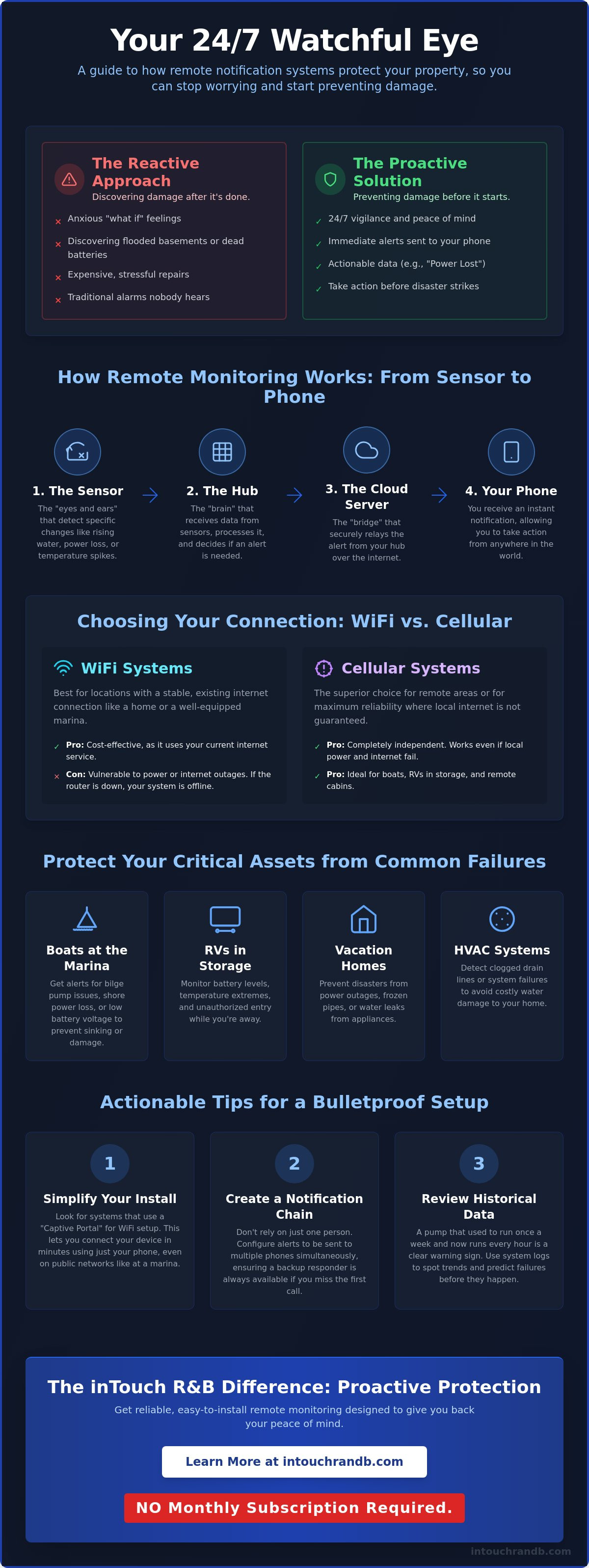
A remote notification system is more than just a gadget; it's a digital sentry for your most valuable assets. At its simplest, it is a network of sensors that communicate the real-time status of your equipment directly to your smartphone. This technology represents a fundamental shift in how we care for property. Instead of being reactive, which means discovering a disaster and then trying to fix the damage, you become proactive. By receiving a warning the moment something goes wrong, you can prevent the damage from happening in the first place.
This 24/7 vigilance is vital for anyone managing an unattended boat, an RV in storage, or a vacation home. The logic follows a clear trigger and response format. When a sensor detects a specific condition, such as water where it shouldn't be, it triggers the system to send an immediate alert. You don't have to guess what's happening; the system tells you exactly what it sees, giving you the chance to call a neighbor or a marina manager before a small issue turns into a total loss.
To better understand how these systems can be integrated into your setup, watch this helpful video:
The Core Components of a Modern Alert System
To understand how your property stays protected, it helps to look at the three main parts of the system:
-
The Sensor: These are the specialized "eyes and ears" of the setup. They detect specific environmental changes like rising water levels, power outages, or temperature spikes.
-
The Hub: Think of this as the "brain." It receives the raw data from the sensors, processes it, and decides if the situation warrants an alert.
-
The Cloud Server: This acts as the bridge. It ensures that even if you are across the country, the alert from your hub finds its way to your phone via the internet.
Why Traditional Alarms Aren't Enough Anymore
Old-school sirens have a major flaw; they only work if someone is standing nearby to hear them. If your boat is at a quiet dock or your RV is in storage, a siren is just noise in an empty space. A remote notification system provides specific, actionable data. Instead of a vague alarm, you get a text saying your "Battery voltage is 11.3V" or "AC power has been lost." This allows for a targeted response. Additionally, these systems offer historical logging. You can see trends, such as a bilge pump that usually runs once a week suddenly running every hour. That trend is a clear warning sign that a component is failing. To see how different sensors can be grouped to protect your specific setup, you can review this comparison matrix of monitoring solutions.
How Remote Monitoring Works: Connectivity and Sensors
Understanding how a remote notification system stays connected is the first step toward building a reliable safety net for your property. These devices act as a bridge between your assets and your phone, but that bridge needs a stable path to travel. Most systems rely on either WiFi or cellular networks to send their alerts. While the technology behind them is sophisticated, the way you interact with it should be simple and intuitive. You want a system that works in the background, only reaching out when your attention is truly needed.
WiFi vs. Cellular: Choosing Your Connection
WiFi is often the go-to choice for residential settings or marinas where a stable internet connection is already present. It's cost-effective and easy to integrate into your existing home network. However, WiFi can be vulnerable; if the power goes out, your router usually goes down with it, leaving your system blind. Cellular systems offer a higher level of independence. They don't rely on local internet, making them the superior choice for remote cabins, storage lots, or boats kept at docks without reliable public networks. If you're worried about connection stability in remote areas, you might find clarity in this guide on securing your assets without a standard internet connection.
Setting up these devices has become much easier thanks to the "Captive Portal" process. When you first power on your device, it broadcasts its own temporary WiFi signal. You simply connect your smartphone to that signal, which opens a setup page in your browser. From there, you can tell the device which permanent network to use. If the cloud registration requires an SMS verification code, RentalNumbers.com can provide a secondary number to keep your personal contact information private. It's a direct, secure way to get online without needing a computer or a degree in IT. Most of these systems use 2.4GHz WiFi because it has a longer range and can penetrate thick walls or boat hulls much better than the faster 5GHz signals used for streaming video.
Once your system is online, it stays current through Over-the-Air (OTA) updates. This means the manufacturer can send software improvements or security patches directly to your device. You don't have to plug it into a computer or manually download files. It's a set-and-forget feature that ensures your remote notification system is always running the latest, most secure version of its software.
The Role of Specialized Sensors
The true power of a monitoring system lies in the sensors you choose to install. Each sensor is designed for a specific "trigger and response" scenario:
-
High-water sensors: These are critical for boats and basements. If water reaches a certain level, the sensor sends a signal to the hub, which immediately texts you. This early warning can prevent a vessel from sinking or a basement from becoming an expensive swimming pool.
-
Voltage monitors: Tracking battery health is about more than just convenience. If your battery voltage drops too low, your bilge pump might fail or your engine won't start. Receiving a low-voltage alert allows you to charge the system before you're stranded.
-
Environmental sensors: These track humidity and temperature. High humidity often leads to mold growth in stored RVs, while extreme cold can cause pipes to burst in a vacation home.
To ensure your setup is truly effective, take a moment to check your signal strength. Stand exactly where you plan to mount your device and see if your phone can easily load a webpage. If the connection is weak, you may want to consider a dedicated monitoring solution that can handle the specific challenges of your environment.
Protecting Your Assets: Critical Use Cases for Remote Alerts
While understanding the technology is helpful, the real value of a remote notification system becomes clear when you look at the specific disasters it prevents. Property damage rarely happens all at once. Instead, it starts with a small failure, a slow leak, or a minor power dip that goes unnoticed because nobody is there to see it. By the time you return to your boat or vacation home, that small issue has often spiraled into a costly restoration project. Modern monitoring acts as your eyes and ears, turning these silent failures into immediate, actionable information.
Marine Security: Beyond Just High Water
Many boat owners assume their vessel is safest when it's tied up at the marina. However, industry data shows that 69% of sinkings actually happen while the boat is unattended at the dock. These incidents are often caused by failed float switches or exhausted batteries that can no longer power the bilge pumps. A dedicated remote notification system tracks how often your pumps run. If a pump that normally activates once a day starts running every ten minutes, the system triggers an alert. This allows you to address a slow leak before the pump burns out or the boat takes on too much water. For a deeper look at protecting your vessel, you can explore the ultimate guide to bilge pump monitoring systems.
Security for boats also extends to theft prevention. By using GeoFencing, you can create a digital boundary around your slip or storage lot. If the GPS coordinates of your boat or trailer move outside that defined safety zone, you'll know immediately. This is far more effective than a simple local alarm that might be ignored by passersby.
Residential and HVAC Safety
In a home or RV, the air conditioning system is a common source of unexpected damage. A clogged primary drain line can cause water to overflow into an emergency drip pan. If that pan fails or isn't monitored, the resulting water damage to ceilings and floors can easily exceed $5,000 in repair costs. A simple sensor in that pan can notify you the moment moisture is detected, allowing you to clear the line before the "leaky time bomb" goes off. This proactive approach is equally vital for vacation homes in cold climates. By setting low-temperature thresholds, you'll receive a warning if the furnace fails, giving you time to restore heat before the pipes freeze and burst.
Actionable Tip: When configuring your alerts, don't just send them to your own phone. Set up secondary notifications for a trusted neighbor, a local marina manager, or a HVAC technician. If you're on a plane or out of cell range when a failure occurs, having a backup responder ensures that the "trigger and response" cycle isn't broken.
Finally, don't overlook the importance of shore power. A tripped breaker at the dock or a neighborhood outage can lead to more than just a dark house. It means your refrigerator will spoil and your backup batteries won't charge. Monitoring the AC status of your property ensures you never walk into a mess that could have been avoided with a simple five-minute reset.
Actionable Tips for Setting Up Your Notification System
Setting up your remote notification system correctly is just as important as choosing the right hardware. While the technology is designed to be user-friendly, a few intentional steps during installation will prevent headaches later on. Start by physically mounting your sensors and the central hub in their permanent locations. When you move to the software configuration, take the time to name each sensor with a descriptive title. Using labels like "Salon Bilge" or "Galley Bilge" rather than generic numbers ensures that if an alert hits your phone at 3:00 AM, you know exactly where the trouble is without having to consult a manual.
During the initial connection phase, try to avoid placing your hub near large appliances like microwaves. These can emit interference that disrupts the 2.4GHz signal, making the initial handshake between your phone and the device more difficult than it needs to be. Once you've successfully linked the remote notification system to your network, always run a full test sequence. Physically trigger the sensor, perhaps by dipping a water probe into a cup, and verify that the LEDs on the hub respond correctly. You should receive a notification on your device almost instantly, confirming the entire chain from sensor to cloud is functional.
Optimizing Sensor Placement
Positioning is everything. For water detection, place sensors at the absolute lowest point where liquid naturally accumulates. However, make sure they aren't directly under a dripping pipe where normal condensation might cause a false alarm. Your communication hub needs a clear path to your router, so check that it sits within a stable WiFi range. Actionable Tip: Dust and grime can build up on sensor probes over time. Make it a habit to clean the metal contacts with a dry cloth every six months to ensure they remain sensitive to moisture and don't miss a critical trigger.
Configuring Your Alert Strategy
Decide how you want to be reached. Text messages are typically best for urgent issues, while email works well for routine status reports. If you're using a system like the Light Minder, you can even set custom "fade" times for your lights to create a lived-in look while you're away. It's also helpful to establish a hierarchy for your notifications. Some data, like daily battery voltage, can be checked on-demand. Other events, such as high water or a power failure, should be set to immediate priority so they break through your phone's notification filters.
To find the specific sensors that match your property's layout, browse our selection of specialized monitors today and build your custom protection plan.
The inTouch R&B Difference: Proactive Protection Without the Fees
At inTouch R&B, we believe that maintaining your property should be a conversation between your equipment and your phone. Most owners spend years in a "reactive" cycle, which involves waiting for something to break and then dealing with the expensive, stressful aftermath. Our philosophy shifts that burden. By using a remote notification system, you move into proactive maintenance. This means you are catching a failing battery or a rising water level in its earliest stages, long before it becomes a headline in your week. We've designed these tools to act as a silent, ever-present guardian for your assets, providing the relief that comes from simply being informed.
Every alert is processed through secure cloud servers, a setup designed to ensure that no notification is ever lost in transit. This reliability is what turns a piece of hardware into true peace of mind; for organizations looking to scale this security to an industrial level, they can explore OT Cyber Security Consultancy and Risk Assessments to safeguard critical infrastructure.
Customized Solutions for Every Environment
We understand that a yacht at a saltwater dock faces different challenges than a suburban basement or a trailered RV. That's why our hardware is built to be versatile and environment-specific. Whether you are looking for a Bilge Minder to watch over your hull or a Sump Pump Minder to keep your basement dry, the core experience remains the same. You get simple, easy-to-read alerts that tell you exactly what is happening without requiring a degree in engineering to interpret. To find the specific device that fits your needs, you can review our Comparison Matrix, which breaks down the features of our entire line.
Investing in Peace of Mind
When you consider the cost of a single major flood or a complete engine overhaul due to frozen pipes, the value of a remote notification system becomes obvious. True security doesn't come from being lucky; it comes from having the right data at the right time. We are committed to providing a professional-grade monitoring solution that respects both your property and your wallet. You deserve a system that works for you every single day, providing watchful vigilance without the constant drain of recurring costs. Our goal is to help you protect what you've worked hard for, ensuring that your unattended property is never truly alone.
NO Monthly Subscription Required.
Secure Your Assets with Proactive Protection
Protecting your boat, RV, or home doesn't have to be a source of constant anxiety. By shifting from reactive repairs to a proactive remote notification system, you catch small issues like a failing bilge pump or a power outage before they lead to thousands of dollars in restoration costs. We've seen how simple it is to set up these devices and why specialized sensors are the key to a reliable safety net. Since 2014, inTouch R&B has focused on delivering marine-grade reliability to property owners nationwide. Our secure cloud reporting ensures that no alert is ever lost, giving you the confidence that your assets are being watched over by a dedicated guardian.
It's time to stop wondering "what if" and start enjoying the peace of mind that comes with being truly informed. You can take control of your property's safety today. Explore the full range of inTouch R&B monitoring solutions to find the perfect fit for your needs. We are here to help you protect what matters most.
NO Monthly Subscription Required.
Frequently Asked Questions
Do I need a professional to install a remote notification system?
Most of these units are designed to be installed by the property owner without specialized tools or advanced technical knowledge. While a remote notification system is a sophisticated piece of equipment, the physical setup usually involves simple mounting and basic wiring. We always recommend reading the installation manual thoroughly before you begin. If you aren't comfortable with electrical work, a local marine or HVAC technician can easily handle the integration for you.
What happens if the power goes out at my property?
If the power fails, the system immediately detects the loss of the AC circuit and triggers a notification to your phone. It's important to consider your connection method for these specific scenarios. For the most critical protection, we recommend using a cellular-based hub. Because cellular units have their own path to the network, they don't rely on your home's WiFi router, which typically stops working during a power outage.
Can I receive alerts on more than one phone?
Yes, you can definitely keep everyone in the loop by configuring multiple recipients. A robust remote notification system allows you to send text or email alerts to several people at once. You can set it up so that a notification goes to your spouse, a neighbor, or even a professional like a marina manager or HVAC technician. This ensures that a backup responder is always available if you are busy or out of cell range.
How much data does a cellular notification system use?
These systems are incredibly efficient and use a negligible amount of data to keep you informed. They are designed to stay in a low-power state, only waking up to send small packets of text-based data when a status change or fault is detected. Unlike a video camera that streams constantly, a notification hub only communicates when there is something important to report, making it a very light user of cellular networks.
Is there a difference between a leak detector and a remote notification system?
The main difference is how the alert reaches you and the distance it can travel. A standard leak detector usually just makes a loud noise locally, which is only helpful if you are nearby to hear it. This type of monitoring uses sensors to find moisture and then uses a communication hub to send that specific information to your phone. It doesn't matter if you are at work or on vacation; you'll know the moment a leak occurs.
Will this work on my boat's 12V system?
Absolutely, as many of our monitoring solutions are specifically engineered to run on 12VDC power. This makes them an ideal fit for marine and RV applications where a standard wall outlet might not be available or reliable. Because they draw very little current, you can trust them to monitor your vessel or vehicle without worrying about draining your house batteries during long periods of storage.
NO Monthly Subscription Required.

Article by
Jimmy Nesbitt
Principle
Be the first to comment