

Imagine arriving at your boat or seasonal cabin only to find a flooded bilge or a failed HVAC system because your local router glitched and stopped sending updates. It is a frustrating reality for many owners who realize, often too late, that consumer-grade internet is frequently too fragile for critical asset protection. With the average burglary resulting in a loss of $2,661, according to recent FBI statistics, the stakes for maintaining a constant connection are high. You shouldn't have to worry about missing a vital alert just because the power flickered or a signal dropped. Fortunately, a professional monitoring system without wifi (utilizing dedicated cellular sensors) provides a reliable way to stay informed without relying on a shaky internet connection.
In this guide, you will learn how to secure your property using a "set it and forget it" with NO Monthly Subscriptions approach that prioritizes uptime. We will explore how specialized hardware can detect specific triggers, such as rising water or electrical failures, and immediately send a text alert to your mobile device. You will gain the practical knowledge needed to move away from technical headaches and toward a solution that offers genuine peace of mind. We are going to walk through the benefits of cellular technology and provide actionable tips on how to safeguard your most valuable assets effectively.
Key Takeaways
- Learn why your home / Boat router is often the weakest link in your property protection strategy.
- Discover how a monitoring system without wifi uses cellular technology to send immediate text alerts if your equipment fails.
- Get practical advice on identifying "Critical Failure Points" like your HVAC system or bilge pump.
- Find out how to easily verify signal strength at your location to ensure your sensors are always ready to protect your assets.
- Explore how to set up a reliable, expert-level monitoring solution that provides peace of mind.
Table of Contents
-
Debunking the Monitoring Myth: Why You Don’t Need WiFi (or a Camera)
-
Cellular vs. WiFi: The Reliability Debate for Critical Equipment
-
5 Practical Steps to Set Up a Monitoring System Without WiFi
-
The inTouch R&B Approach: Reliable Alerts and Zero Subscriptions
Debunking the Monitoring Myth: Why You Don’t Need WiFi (or a Camera)
For years, the word "monitoring" has been almost synonymous with scrolling through a video feed on a smartphone. Most people assume that to keep an eye on their property, they must first install a high-speed router and a complex mesh network. This is a common myth that ties your security to the reliability of your local internet provider. While a camera is great for seeing who is at the front door, it isn't always the best tool for protecting your actual assets. A dedicated monitoring system without wifi offers a more robust, "always-on" alternative that keeps you informed even when the local network fails. For those who require even more advanced setups, such as those used in mission-critical environments, you can explore Video Wall Systems to see how professionals manage complex data streams.
Professional industrial operations have relied on similar principles for decades. Large-scale setups often use Supervisory Control and Data Acquisition (SCADA) systems to manage remote equipment over specialized communication channels. By applying this same logic to your boat, cabin, or home, you move away from fragile consumer electronics and toward professional-grade functional monitoring. This shift allows you to focus on the health of your equipment rather than just watching a video of a problem after it has already occurred.
To better understand this concept, watch this helpful video:
The Weakness of WiFi in Critical Situations
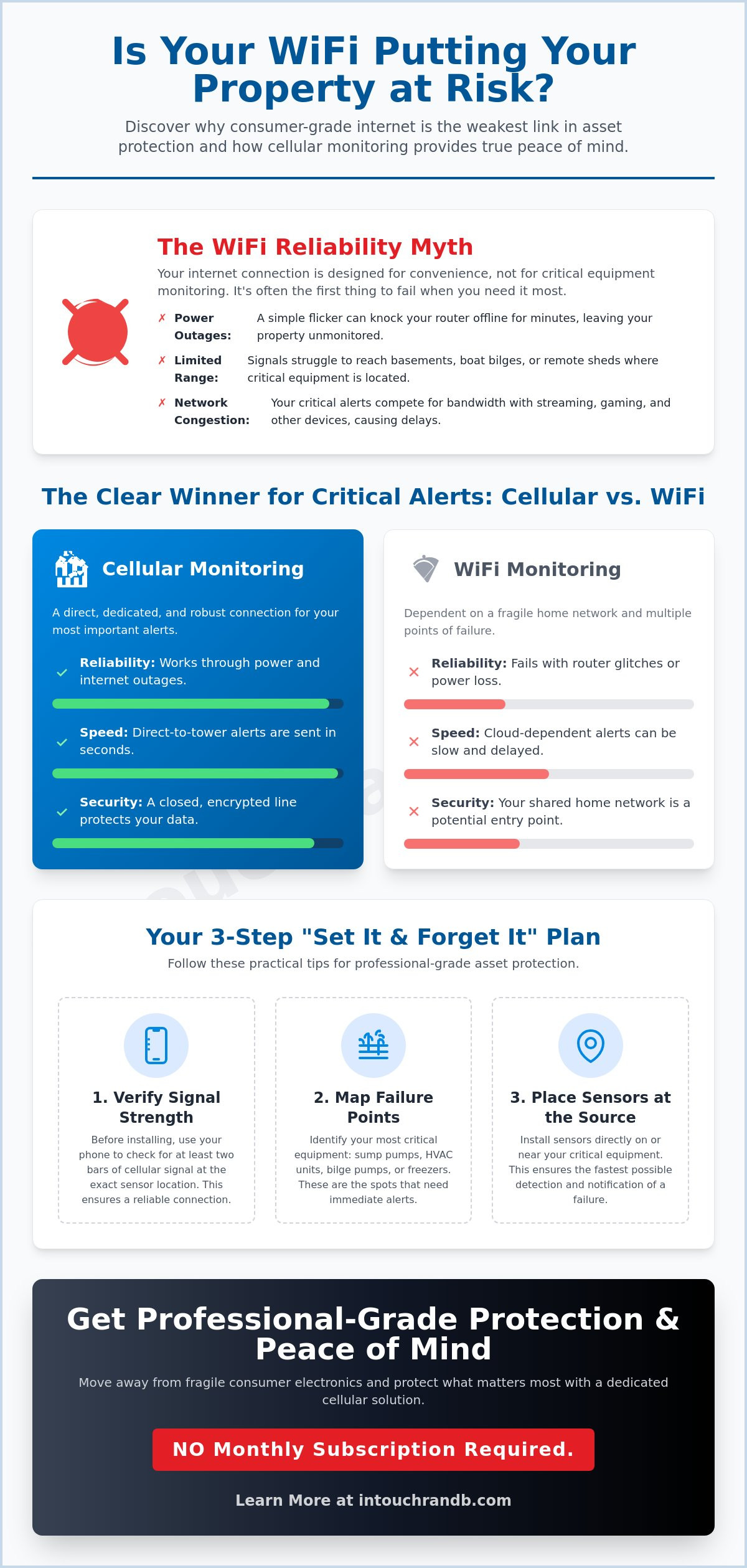
WiFi is built for convenience, but it often lacks mission-critical reliability. If a storm rolls in and the power flickers, your router often takes several minutes to reboot. During that window, a standard smart camera is effectively blind. There is also the "range" problem to consider. A router in the living room rarely provides a stable signal to the bilge of a boat at the end of a dock or to a remote tool shed. Cellular monitoring serves as a direct link between your sensors and the cellular network. Actionable Tip: Before installing any remote sensor, use your smartphone to check for at least two bars of signal at the exact mounting spot to ensure a steady connection.
When "Watching" Isn’t Enough
A camera can show you a flooded floor, but it can't tell you why it happened or prevent it before it starts. For instance, a camera won't alert you if your bilge pump is cycling every three minutes, which is a clear sign of a slow leak. The "Minder" philosophy focuses on immediate, actionable alerts for specific mechanical failures. Instead of watching a video of a disaster, you get a text message the moment a Bilge Minder detects an issue. Actionable Tip: Map out your "Critical Failure Points," such as sump pumps or HVAC units, and place sensors directly at the source for the fastest possible notification.
Cellular vs. WiFi: The Reliability Debate for Critical Equipment
When a pipe bursts or a cooling system fails, the speed of notification determines the extent of the damage. Many modern WiFi systems rely on a "cloud-dependent" architecture, meaning they must send data to a remote server before an alert ever reaches your phone. This extra step introduces latency and potential points of failure. A monitoring system without wifi bypasses these hurdles by sending a signal directly to the nearest cell tower the moment a sensor is triggered (a classic trigger and response sequence). This direct communication ensures that you receive a text alert in seconds, not minutes.
There is a persistent misconception that cellular technology is overly technical or difficult to manage. In reality, it is often more secure and less prone to interference than a local network. A WiFi router is a shared hub where your laptops, smart televisions, and appliances all compete for bandwidth. It is also a potential entry point for digital intruders. A cellular connection functions as a closed, encrypted line that remains unaffected by your home internet speed or router security. It provides a dedicated path for your most critical data, ensuring that your alerts aren't lost in a sea of household web traffic.
Reliability in Remote Locations
Short-range WiFi signals often struggle to penetrate thick concrete walls or the heavy fiberglass hull of a boat. Cellular frequencies are engineered to travel miles rather than feet, allowing them to maintain a connection in environments where WiFi signals simply dissipate. Most professional cellular monitors also utilize a "heartbeat" (a periodic check-in signal sent to the network) to confirm the device is online and functional. If the heartbeat is missed, you are notified immediately, providing a layer of protective vigilance that WiFi systems often lack. Actionable Tip: Download a signal strength app like "OpenSignal" on your phone to verify that your remote cabin or boat slip has at least two bars of coverage before you install your hardware.
Ease of Installation: No Routers Required
The "pairing" process for WiFi devices is a frequent source of frustration, often requiring you to enter complex passwords or adjust router settings. Cellular systems eliminate these technical headaches entirely. Because they do not need a router to function, installation is typically as simple as mounting the device and powering it on. They avoid the need for IP addresses or network configurations, making them a true "set it and forget it" solution. You can compare the specific features of these systems by reviewing this comparison matrix of monitoring solutions. If you want a system that stays on guard without the technical fuss, you might find that a cellular monitoring setup is the most reliable way to protect your assets.
Protecting Boats and Cabins Where WiFi Simply Can’t Reach
Remote locations like marinas and mountain cabins present a unique set of challenges for property owners. In these environments, standard internet service is often either unavailable or notoriously unreliable. A monitoring system without wifi becomes essential because it operates on a completely different infrastructure than the local broadband. Instead of crossing your fingers and hoping the marina's public network stays up, you can rely on a dedicated cellular link. This creates a sense of relief, knowing that you will be the first to know if something goes wrong, even if you are hundreds of miles away. It is the difference between guessing and knowing your asset is safe. If you feel that your Marina is a reliable 24/7 WiFi connection then by all means use ir / connect to it. However if you feeel that it is NOT a reliable 24/7 solution to protect your investment then get a dedicated WiFi connection from your local WiFi provider. i.e. Verizon, AT&T etc .. Then you have control of the Valuable Data going to & from your boat. Also purchase a battery backed Router then can run several hours through an power interruption.
Marine Monitoring: The Bilge Minder Advantage
The bilge is the heart of your boat's safety, yet it is often the most neglected area when you aren't on board. The Bilge Minder provides a critical advantage by tracking how often your pump cycles without needing a dockside router. If a slow leak starts, the system detects the increased activity and sends a real-time notification before the situation becomes an emergency. High-water alarms are vital, but knowing your battery voltage remotely is equally important. If shore power fails and your batteries drain, your pumps won't run when you need them most. Having a direct notification system ensures you can call the dockmaster or head to the slip before a disaster strikes.
Vacation Homes and HVAC Vigilance
For cabin owners, winter brings the constant anxiety of a furnace failure leading to frozen, burst pipes. The HVAC Minder acts as a silent guardian, monitoring the internal temperature of your property around the clock. If the heat cuts out, you get a text immediately. Actionable Tip: Don't set your alert for exactly 32 degrees. Instead, set your temperature alert for 42 degrees (10 degrees above freezing) to give yourself enough time to drive to the property or call a local contractor before the pipes actually freeze. This proactive approach is also useful for rental properties. You can monitor AC usage to ensure guests aren't leaving the windows open with the unit running, which protects your equipment from unnecessary wear and tear. This level of protective vigilance ensures your property remains a sanctuary rather than a source of stress.
5 Practical Steps to Set Up a Monitoring System Without WiFi
Setting up a professional monitoring system without wifi is a straightforward process that prioritizes function over flash. You don't need to be a network engineer to protect your property; you just need to be methodical. By following a clear path, you can transition from a state of worry to one of complete awareness. This approach relies on dedicated hardware that talks directly to cellular towers, ensuring your security isn't tied to a local router.
-
Step 1: Identify your "Critical Failure Points." Focus on the specific areas where a malfunction would cause immediate, expensive damage. This typically includes the basement sump pump, the boat's bilge, or the main furnace room.
-
Step 2: Verify cellular coverage. Take your smartphone to the exact spot where the sensor will be mounted. If you have at least two bars of signal, your device will have the connectivity it needs to send out emergency alerts.
-
Step 3: Choose a dedicated sensor system. Opt for a specialized sensor rather than a general-purpose camera. A sensor is designed to detect a specific trigger (like a water leak or a power drop) and react instantly, whereas a camera is often a passive observer.
-
Step 4: Mount the sensor and test the trigger. Secure the hardware in place and manually activate the mechanism. For example, if you lift a float switch (the mechanical arm that triggers a pump), the system should immediately recognize the movement and initiate an alert.
-
Step 5: Configure your notification list. Enter the phone numbers of the people who need to know when a problem occurs. This might include yourself, a spouse, or a trusted neighbor who can check the property in person.
Testing Your System for Peace of Mind
Once your hardware is installed, you should perform a "trigger and response" test to confirm everything is working correctly. When the sensor is tripped, the system should send a text alert to your phone within seconds. Actionable Tip: Add your monitoring system's phone number to your "Emergency Contacts" or "Favorites" list. This ensures that a critical alert will break through your phone's "Do Not Disturb" settings at night. You should also check that your hardware has a fresh battery backup so it stays operational even during a total power failure.
Expanding Your Coverage
Many owners start with a single Sump Pump Minder to protect a basement but soon realize the value of a broader network. You can scale your protection methodically by adding sensors to multiple zones, such as the kitchen for appliance leaks or the utility room for furnace health. This zonal approach ensures that no matter where a problem starts, you remain the first to know. If you're ready to start building your own network of protection, you can browse the full selection of Minder systems to see which sensors fit your specific needs.
The inTouch R&B Approach: Reliable Alerts and Zero Subscriptions
Choosing a monitoring system without wifi is a major step toward securing your property, but the way that system is managed matters just as much as the technology itself. Many large security corporations trap users in a cycle of "hidden" monthly costs, often charging between $25 and $120 every month just to keep a cellular connection active. We believe in a different philosophy centered on protective vigilance and ownership. When you invest in a Minder system, you own the hardware and you own the data. There is no corporate red tape or recurring bills to worry about, just a direct line of communication between your assets and your phone.
While some enthusiasts attempt to build DIY cellular rigs using off-the-shelf components, these setups often lack the professional-grade sensors required for long-term reliability. A makeshift system might fail at the exact moment a pipe bursts or a bilge pump stops working. The inTouch R&B approach provides a specialized alternative that is ready to work the moment it is powered on. You get real-time notifications sent directly to your phone via SMS, ensuring you are informed of a problem within seconds of a trigger event. This direct notification method bypasses the delays often found in cloud-based apps, giving you the fastest possible response time.
Designed for the Real World
The entire Minder line is engineered for the harsh environments where traditional electronics often fail. Whether it is the damp, humid conditions of a basement or the salt-air environment of a boat bilge, these devices are built to be rugged and dependable. We act as your friendly guide to property safety, ensuring that the technology stays out of the way until it is needed. For those who want a deep dive into the technical specifications and sensing capabilities of each model, you can review our Comparison PDF . Actionable Tip: Inspect your sensor mounting brackets once a year to ensure they haven't been bumped or shifted, maintaining the precise alignment needed for accurate detection.
Your Ever-Present Guardian
The goal of a professional monitoring system without wifi is to provide you with the relief of being informed without requiring you to be a technical expert. You can head into a new boating season or leave your vacation home for the winter with the confidence that a watchful guardian is on duty. By focusing on specific mechanical failures and environmental triggers, you avoid the noise of irrelevant alerts and get only the information that truly matters. It is time to take the first step toward a worry-free ownership experience where you are always in control of your property's safety. Actionable Tip: Keep a simple log of your system tests to ensure your battery backups are fresh and your notification list is always up to date.
Secure Your Property with Confidence
You've seen how a monitoring system without wifi provides a level of reliability that standard internet routers simply can't match. By moving away from fragile networks and focusing on specialized sensors instead of just cameras, you ensure your assets are protected against the most common failure points. Since 2014, inTouch R&B has been dedicated to providing this sense of security through hardware built specifically for marine and residential environments. Our systems deliver direct SMS notifications to your phone, giving you instant awareness the moment a sensor is triggered.
Taking control of your property's safety doesn't have to be a technical headache. You can enjoy the peace of mind that comes with knowing your boat or cabin is monitored by an ever-present guardian. It's time to step into a worry-free season by choosing a solution that puts you back in charge of your data and your hardware. Browse the Full Line of inTouch R&B Minders to find the perfect fit for your needs. You deserve the relief of being informed without the burden of recurring fees.
NO Monthly Subscription Required.
Frequently Asked Questions
Do these monitoring systems work in areas with poor cell service?
If your location has at least one or two bars of signal on a standard phone, the system will likely function perfectly. These devices use low-bandwidth cellular frequencies that are much better at penetrating structures than high-speed data. You don't need a 5G connection to send a simple text alert. Tip: Walk to the exact spot where you plan to mount the sensor and check your phone's signal strength before you begin installation.
How do I receive alerts if my phone is off or I am in a meeting?
Alerts are sent as standard SMS text messages and / or eMail which are held in your carrier's queue if your phone is temporarily unreachable. The moment you turn your phone back on or regain service, the message delivers immediately. Tip: You can set your phone's "Emergency Bypass" or "Critical Alerts" feature for the system's number. This ensures a notification will still make a sound even if your phone is set to silent or "Do Not Disturb" mode.
Can I monitor multiple properties from a single smartphone?
Yes, you can easily track as many different locations as you need from one device. Each sensor system acts as its own unique sender, allowing you to stay informed about your boat, your home, and your cabin simultaneously. Tip: Save each device's phone number as a unique contact in your smartphone. Use clear names like "Lake Cabin Sump" or "Main Street HVAC" so you can identify exactly where the issue is the second your phone pings.
What happens to the monitoring system if the main power goes out?
A professional monitoring system without wifi typically includes an internal battery backup to keep the sensors active during an outage. While a WiFi-based system would go dark as soon as the router loses power, these cellular units stay online to alert you that the power has failed. This trigger and response sequence gives you plenty of time to react before the temperature drops or the bilge fills up. It is a vital layer of protective vigilance. Also purchase a battery backed Router then can run several hours through an power interruption. Some of our Monitoring systems as like AC Minder has a built in battery for many days of alerts if your power (120 VAC) losses power.
Are these systems difficult to install for someone who isn’t tech-savvy?
The installation process is designed to be simple and doesn't require any networking knowledge. Because there are no IP addresses to assign or complicated routers to configure, you simply mount the hardware and power it on. It is a "plug-and-play" solution that avoids the technical headaches common with traditional smart home devices. You can have your property protected in just a few minutes without needing to call a professional installer or a tech-support line. Refer tp many of our Videos on Youtube for easy installation & setup.
Do I need to buy a separate SIM card for my monitoring device?
No, the necessary cellular hardware is already integrated into the device when it arrives. You don't have to visit a mobile store or manage a complex data plan from a third-party carrier. This streamlined approach ensures that the system is ready to protect your assets right out of the box. By avoiding the need for external SIM cards, the brand keeps the setup process clean and ensures the hardware is optimized for the specific cellular frequencies it uses.
Can a cellular monitoring system be hacked like a WiFi camera?
Cellular connections are significantly more secure than standard home networks because they use a closed communication path. A monitoring system without wifi doesn't sit on your local network, meaning it isn't vulnerable to the same entry points as a hackable WiFi camera or router. There is no public IP address for an intruder to find. This architectural difference provides pragmatic reassurance that your data and your property's status remain private and protected from digital interference.
For those who wish to extend this level of security to their entire business or home network, you can learn more about M.I.S. Support, Inc., a provider of proactive managed IT and compliance solutions designed to prevent digital breaches.
Is there a limit to how many people can receive the alerts?
You can configure the system to send alerts to multiple phone numbers at the same time. This allows you, a spouse, and a trusted neighbor or property manager to all stay informed of a critical event. Tip: Always include at least one person on the notification list who lives near the property. Having a local contact ensures that someone can physically check on the asset immediately if you are too far away to respond in person.
NO Monthly Subscription Required.

Article by
Jimmy Nesbitt
Principle
Be the first to comment