

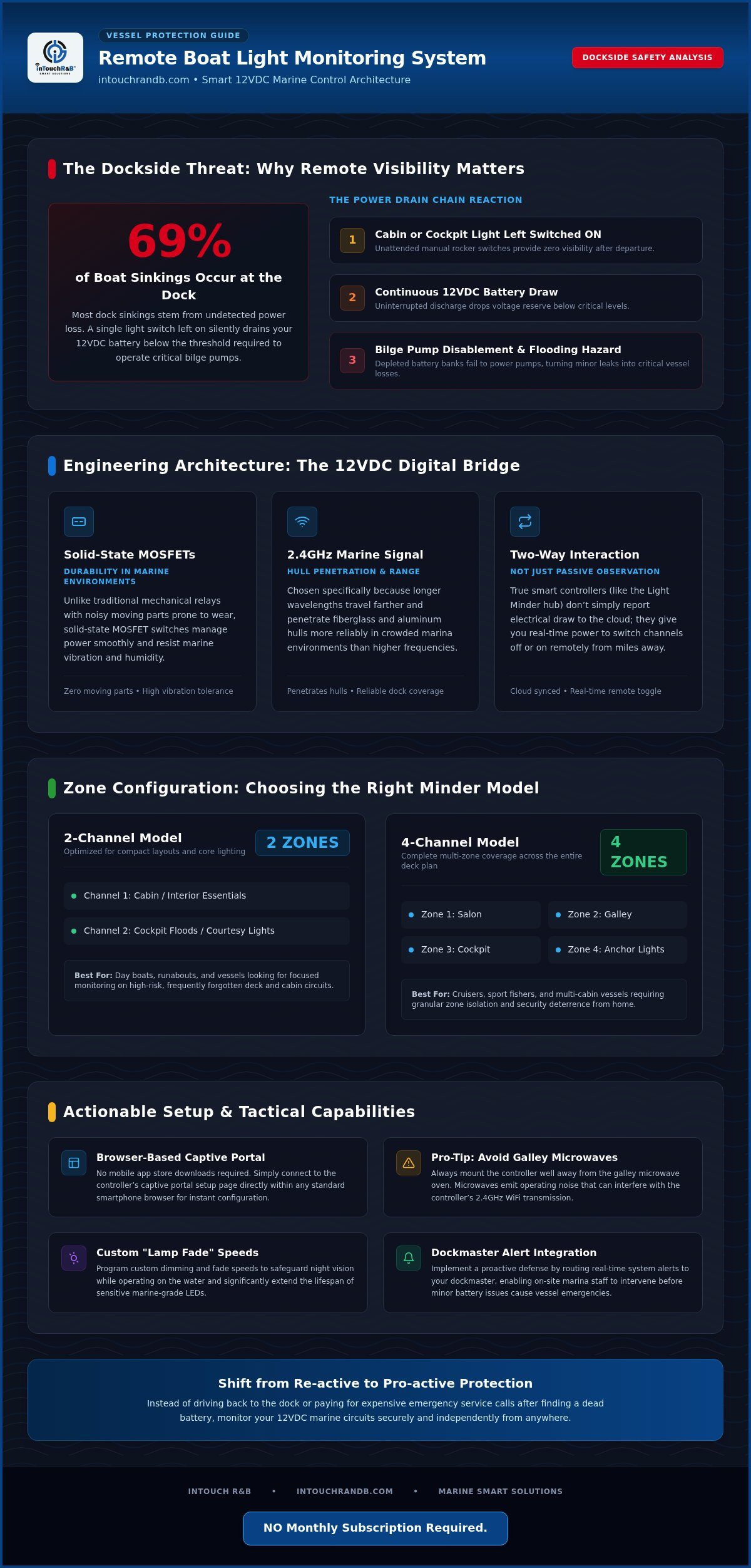
You've just settled in at home after a long weekend on the water when a nagging thought hits you: did you actually flip the cockpit light switch before locking up the cabin? It's a common source of anxiety for boaters because a single light left on can quickly drain a battery bank, potentially disabling critical safety gear like bilge pumps. Since 69% of boat sinkings happen right at the dock, often due to undetected power loss, installing a remote boat light monitoring system is more than a luxury; it's a vital layer of protection for your vessel. We agree that you shouldn't have to choose between peace of mind and expensive, recurring service fees.
This guide will show you how to gain total control over your 12vdc lighting from anywhere using your smartphone. We'll explore how to use browser-based tools to check your status in real time and even set custom dimming speeds to protect your night vision. You'll learn how to keep your boat secure in dark marinas and ensure your batteries stay healthy, all through a simple one-time hardware purchase. For the best results, remember to mount your monitoring controller away from the galley microwave to prevent 2.4GHz signal interference. NO Monthly Subscription Required.
Key Takeaways
- Learn how a remote boat light monitoring system acts as a digital bridge, allowing you to manage your 12VDC lights and protect your battery bank from anywhere.
- Discover how to access your controller’s settings through a browser-based captive portal (a simple setup page that opens in your browser), eliminating the need for app store downloads.
- Master the setup of custom "Lamp Fade" speeds to protect your night vision and extend the life of your marine-grade LEDs.
- Identify whether a 2-channel or 4-channel model best fits your vessel’s layout to ensure every critical light is monitored and controlled.
- Implement a pro-active security strategy by routing real-time alerts to your dockmaster to prevent minor battery drains from becoming costly sinkings. NO Monthly Subscription Required.
What is a Remote Boat Light Monitoring System?
Most boaters are used to the traditional rocker switch on the helm or a toggle in the cabin. While these manual controls work when you're onboard, they offer zero visibility once you step onto the dock. A remote boat light monitoring system changes the game by acting as an intelligent bridge between your vessel's 12VDC electrical system and your smartphone. Instead of just a physical break in a wire, this system uses a smart controller to monitor the flow of electricity and give you real-time status updates through a digital interface.
The system relies on 2.4GHz WiFi to maintain a stable connection even in crowded marinas. This specific frequency is chosen because it travels further and penetrates fiberglass or aluminum hulls more effectively than higher-frequency alternatives. By acting as a watchful guardian, the controller ensures that your battery bank isn't being silently drained by a stray light, keeping your power reserves ready for critical tasks like engine starts or emergency signaling. To better understand this concept, watch this helpful video:
The Problem with Unattended Lighting
Leaving a single cabin light on might seem like a minor oversight, but it can trigger a dangerous chain reaction. In a typical 12VDC system, a constant drain can drop battery voltage below the threshold required to trigger your bilge pumps. Since many recreational boat sinkings happen at the dock due to power failure, monitoring your lights is a pro-active way to prevent a disaster. There's also a security element to consider. A dark boat in a quiet marina can be an invitation for trouble, while being able to remotely activate your marine navigation lights or cockpit floods can deter unwanted visitors. Shifting from a re-active mindset (fixing a dead battery) to a pro-active one (turning off the light from home) saves you time and expensive service calls.
Core Components of a Modern System
At the heart of the setup is the 12VDC controller, such as the Light Minder. This hub doesn't just observe; it interacts with your wiring. Unlike simple sensors that only tell you if a light is on, a true controller allows for two-way communication so you can actually toggle the power. High-quality systems utilize mosfet technology. Mosfets are solid-state electrical switches that handle power smoothly without the noisy moving parts found in traditional relays. This makes the hardware much more reliable in the vibration-heavy and humid environment of a boat. Whether you choose a 2-channel or 4-channel model, these components work together to provide a seamless, app-free experience through a browser-based setup. NO Monthly Subscription Required.
How Remote Lighting Technology Works on a Boat
At its core, a remote boat light monitoring system functions as a digital traffic controller for your vessel's 12VDC power. Instead of electricity flowing directly from a battery to a bulb through a simple mechanical switch, the power first passes through a smart controller. This hardware uses solid-state switches called mosfets to manage the current. Because these components don't have moving parts, they're much more durable in the salt-air environment of a marina than traditional relays. The controller monitors the electrical draw on each channel, allowing it to report exactly which lights are active to a secure cloud server.
The system is typically divided into channels, which represent different zones on your boat. For example, a 4-channel unit allows you to separate and name specific areas like the Salon, Galley, Cockpit, and Anchor lights. You can then manage these zones individually through a browser-based interface. If you're unsure which zone configuration works for your deck plan, checking the comparison matrix of all inTouch R&B Minders can help you decide which model fits your needs. This setup provides a bridge between your boat's wiring and your smartphone, giving you the power to toggle zones from miles away while protecting your vessel's electrical health.
WiFi Standards and Marine Environments
Reliable communication on the water depends on using 2.4GHz WiFi. While 5GHz networks are faster for streaming video, they have a very short range and struggle to pass through thick fiberglass or aluminum hulls. The 2.4GHz frequency is the marine standard because it offers the penetration needed to reach a dock pedestal or marina router. To keep your signal stable, it's a good idea to mount your controller away from the galley microwave. Microwaves operate on the same frequency and can cause temporary interference when you're heating up a meal. Maintaining a clear line of sight to your router whenever possible will ensure your status updates remain real-time and accurate.
Status Indicators and Feedback Loops
You can verify your system's health just by looking at the built-in LED indicators. When you first power up the unit, the green LEDs will cycle through a startup sequence, lighting up individually for half-second intervals (1 through 4) before all flashing together. This confirms the internal processor is running correctly. Once active, the blue LED provides feedback on your connection status. A quick double-blink means the unit is successfully linked to your local router, while a single long blink indicates it's running smoothly and communicating with the server. Staying compliant with U.S. Coast Guard Navigation Rules is much easier when you can instantly confirm your anchor or navigation lights are actually drawing power. NO Monthly Subscription Required.
Choosing the Right Monitoring System for Your Vessel
Selecting the ideal remote boat light monitoring system involves more than just picking a box off a shelf; it requires a clear understanding of your vessel's layout and your long-term goals. You should start by evaluating the number of lighting zones you need to manage. A 2-channel unit is often sufficient for basic security, such as controlling your anchor and cockpit lights. However, if you want the flexibility to toggle the Salon, Galley, and multiple exterior floods independently, a 4-channel model is the smarter investment. Beyond the channel count, prioritize hardware durability. Look for units that feature surface-mounted LEDs and robust internal components designed to survive the constant vibration and salt-heavy air of a marina environment.
While high-end glass bridge setups often integrate with the NMEA 2000 marine networking standard, many boaters find that a standalone controller provides exactly what they need without the complexity of a full network overhaul. Integration should also extend to safety. For example, pairing your lights with a Bilge Minder ensures that if a high-water alert is triggered, you have the lighting visibility needed to assess the situation via a dockside camera or to assist a responding marina manager. This pro-active approach turns your lighting into a functional part of your vessel's safety suite.
Subscription Costs vs. Upfront Value
A common "hidden trap" in the marine industry is the monthly monitoring fee. Many companies lure you in with a lower hardware price but then require a recurring subscription just to access your own data or toggle a switch. We believe that once you own the hardware, you should own the service. Opting for a system that uses a local browser-based interface is a more secure and economical choice. It's more reliable because it doesn't rely on a third-party app store, and it keeps your vessel's data private. You can compare the specific features and long-term savings of these different models in our Comparison Matrix.
Scalability: Adding HVAC and Bilge Monitoring
A pro-active vessel owner thinks about the entire boat as an ecosystem. You might start with lighting, but your monitoring hub should be able to grow as your needs change. Adding an HVAC Minder allows you to monitor cabin temperature and humidity, which is vital for preventing mold growth while the boat is unattended. Having a unified alert system means you get one consistent notification style for every piece of critical equipment on board, from your battery bank to your bilge pumps.
Here is a practical tip for new users: start by automating your most-used lights, like the salon or boarding lights, to get a feel for the browser interface and notification settings. Once you've mastered the "Lamp Fade" adjustments and channel naming, you'll be much more prepared to install and configure critical sensors for your bilge and AC power systems. NO Monthly Subscription Required.
Step-by-Step: Setting Up Your Remote Light Monitoring
Setting up your remote boat light monitoring system is a straightforward process that doesn't require an advanced degree in electrical engineering. First, connect the unit to your boat's 12VDC power supply. As soon as power is applied, watch the green indicator lights. You should see a specific startup sequence where LEDs 1 through 4 light up individually for half-second intervals, followed by a collective flash of all lights. This visual handshake confirms that the internal processor has successfully booted and the hardware is ready for configuration.
Once the hardware is live, it creates its own temporary WiFi network. On your smartphone or tablet, join this network and open your web browser. Type the default IP address 192.168.4.1 into the address bar to access the captive portal. This portal is a local setup page that opens automatically to let you talk to the device without needing an active internet connection. From here, you'll enter your boat's permanent 2.4GHz WiFi SSID and password. This allows the controller to join your vessel's network so it can send you updates even when you're miles away.
After the network link is established, you can begin personalizing the system. Give your boat a recognizable name and label each of the lamp channels, such as "Main Deck Flood" or "Cabin Accent," so you know exactly what you're toggling later. This organization is the first step in moving from a re-active to a pro-active vessel management style.
Customizing the User Experience
One of the most refined features of the Light Minder is the ability to set "Lamp Fade" speeds measured in milliseconds. Instead of an abrupt on-off transition, you can program a soft 2000ms fade that feels luxurious and protects your eyes from sudden glare at night. You should also assign locations to your channels, differentiating between "Main Deck" and "Cabin" lights for better organization. Don't forget to set your specific Time Zone (for example, use -5 for Eastern Standard Time) to ensure that your alert logs reflect the correct local time of any activity. These small adjustments transform a piece of hardware into a personalized security guardian.
Testing and Verification
Verification is the final step in your protective plan. Look at the blue LED on the controller; two quick blinks indicate a successful link to your router, while a single long blink means it's fully operational and connected to the server. Perform a test sequence by toggling each channel through the portal to ensure the physical lights respond as expected. You can verify your current firmware version by checking the information display at the bottom of the browser-based configuration screen. If you're ready to secure your vessel with professional-grade hardware, you can purchase your Light Minder system here to start monitoring your boat today. NO Monthly Subscription Required.
The inTouch R&B Advantage: Proactive Vessel Protection
Choosing a remote boat light monitoring system is an investment in your boat's longevity. It's the difference between finding out your batteries are dead on a Saturday morning and getting a notification on Tuesday that a cabin light was left on. By integrating the Light Minder into your broader property damage prevention strategy, you're building a safety net that works 24/7. This system doesn't just wait for you to check an app; it actively watches your 12vdc circuits and uses mosfet-driven hardware to ensure every command is executed reliably without the risk of mechanical relay failure.
One of the most valuable features for owners who keep their boats in commercial slips is the secondary alert capability. You can configure the system to send real-time status updates not just to your phone, but also to your marina manager or a trusted dock neighbor. If a power failure occurs or a light stays on during a storm, someone on-site can respond immediately. This layer of protection is part of our commitment to a pro-active philosophy, where we help you stop small issues before they turn into expensive insurance claims or a vessel that won't start when you need it most.
Protecting Your Investment
Unchecked lighting doesn't just waste electricity; it leads to battery deep-cycling. When a battery is drained too low, its overall lifespan is shortened, leading to premature and costly replacements. By maintaining remote control of your lighting zones, you ensure your battery bank stays at an optimal voltage to power critical safety gear like bilge pumps. For boaters looking for even more security, the Light Minder can be paired with our asset tracking solutions to provide a complete picture of your vessel's location and status. Our secure cloud servers act as a "no alert lost" backup, ensuring that even if your phone is off for a few hours, the data is waiting for you the moment you reconnect.
Conclusion: Ownership Without the Overhead
Moving from reactive worry to proactive security is a significant step for any boat owner. The Light Minder offers a professional-grade solution that's easy to install and even easier to use through its app-free browser interface. You've worked hard for your vessel, and you deserve the peace of mind that comes from knowing it's safe, lit, and powered up at the dock. This guide has shown you how simple it is to take control of your vessel's environment today without the burden of recurring costs. NO Monthly Subscription Required.
Take Command of Your Vessel's Security Today
Embracing a proactive approach to boat management doesn't have to be complicated or expensive. By installing a remote boat light monitoring system, you eliminate the constant worry of dead batteries or uninvited guests in a dark marina. You've seen how a simple 12VDC installation can bridge the gap between your boat's wiring and your smartphone, providing you with real-time visibility and control from anywhere in the world.
A practical tip for long-term success is to periodically check your blue LED status to ensure your 2.4GHz WiFi connection remains strong throughout the boating season. This small habit ensures your 24/7 proactive alerts are always ready to reach you or your dockmaster if something changes. You don't need to be a technical expert to enjoy these benefits; the browser-based setup is designed to be as straightforward as possible.
Ready to upgrade your vessel's protection? You can Secure Your Boat with the Light Minder Controller and start enjoying the peace of mind that comes from total vessel awareness. Protecting your investment has never been more accessible. NO Monthly Subscription Required.
Frequently Asked Questions
How do I access the configuration page if it doesn’t pop up automatically?
You can manually access the setup portal by typing 192.168.4.1 into your web browser's address bar. This works as long as your smartphone or tablet is connected to the Light Minder's internal WiFi signal. This captive portal is a local web page that doesn't require an active internet connection to function. It allows you to configure your remote boat light monitoring system settings, including your boat name and WiFi credentials, directly from any mobile device.
Can I use a remote boat light monitoring system on a 24V system?
The Light Minder is engineered specifically for 12vdc power environments common in recreational boats and RVs. If your vessel operates on a 24V system, you'll need to install a high-quality DC-to-DC step-down converter to provide a steady 12V supply to the controller. Connecting the unit directly to a 24V power source will result in permanent damage to the internal mosfets and LEDs. Always verify your voltage with a multimeter before completing the installation.
What does it mean if the Blue LED on my Light Minder is blinking?
The Blue LED serves as a critical indicator of your system's connectivity and operational status. If you observe two short blinks, it confirms that the controller is successfully linked to your local WiFi router. A single long blink indicates that the device is functioning correctly and communicating with the secure cloud servers. If the light isn't blinking at all, it's a signal to check your power connections or verify that your 2.4GHz WiFi signal is active.
Do I need to download an app from the App Store to control my lights?
You don't have to download any specialized apps to manage your vessel's lighting. The system utilizes a 100% browser-based interface, which means you can access your remote boat light monitoring system using the standard web browser already on your phone. This approach eliminates the need for frequent app store updates and ensures compatibility across all devices. It's a simpler, more reliable way to maintain control without cluttering your phone with extra software or accounts.
Can I name individual lights, like "Anchor Light" or "Galley"?
Yes, the configuration screen provides dedicated fields for you to assign custom names to each of the lamp channels. You can label them as "Anchor Light," "Salon," or "Cockpit Floods" to match your boat's specific layout. This makes remote operation much more intuitive because you won't have to guess which channel controls which zone. You can also set individual "Lamp Fade" speeds for these named channels to create the perfect lighting transition for each area.
What happens if my boat loses WiFi connection?
If your vessel loses its WiFi connection, the controller will continue to operate your lights locally, but it won't be able to send real-time alerts to your smartphone. The hardware is designed to automatically attempt a reconnection as soon as the signal is restored. To ensure the most reliable performance, we recommend mounting your controller in a location that has a clear path to your router and is away from large metal objects that might block the signal.
Is there a monthly fee to receive text or email alerts?
There are no recurring monthly fees or hidden costs for receiving alerts from your monitoring system. Once you've purchased the hardware, the ability to receive text and email notifications is included as a standard feature of the service. This allows you to monitor your boat's battery health and lighting status 24/7 without the burden of a subscription. It's a one-time investment that provides long-term peace of mind and protection for your valuable marine assets.
Can my marina manager receive alerts if I am unavailable?
You can absolutely set up the system to send alerts to multiple recipients simultaneously. By adding your marina manager or a trusted service technician as a secondary contact, you ensure that someone on-site is notified the moment a problem is detected. This is a key part of a proactive maintenance strategy; if a power failure occurs while you're away, a quick response can prevent your batteries from draining. NO Monthly Subscription Required.

Article by
Jimmy Nesbitt
Principle
Be the first to comment