

Did you know that 69% of boat sinkings actually happen while the vessel is sitting right at the dock? It is a sobering statistic from BoatU.S. that highlights a common fear for every boat owner. You leave your slip on Sunday evening, but by Tuesday, you are already wondering if the shore power stayed connected or if a mystery drain is slowly killing your house bank. We all know that hollow feeling when we worry the bilge pump might lose power before the next weekend arrival.
Learning how to monitor boat battery health remotely is the most effective way to replace that anxiety with a sense of security. In this 2026 guide, we will show you how to set up real-time voltage alerts that go straight to your phone. We will break down the latest tools, from basic voltage sensors to advanced shunts (specialized components that measure the actual energy flowing in and out of your batteries), so you can prevent food spoilage and ensure your engine turns over every single time. By mastering these remote techniques, you can act as a watchful guardian for your vessel even when you are miles away from the marina.
Key Takeaways
- Understand why a healthy battery is your primary defense against the 69% of boat sinkings that occur while vessels are docked and unattended.
- Learn how to monitor boat battery health from anywhere using WiFi-connected sensors that send real-time alerts directly to your smartphone.
- Identify the difference between battery voltage, which acts as the electrical "pressure" in your system, and amperage, which is the "flow" of power being used.
- Follow a simple five-step installation guide to set up a remote monitoring hub that provides a constant "heartbeat" for your vessel’s electrical bank.
- Ensure your boat is always ready for the next weekend adventure with a reliable monitoring solution that has NO Monthly Subscription Required.
Why Boat Battery Monitoring is Your Best Defense Against Sinking
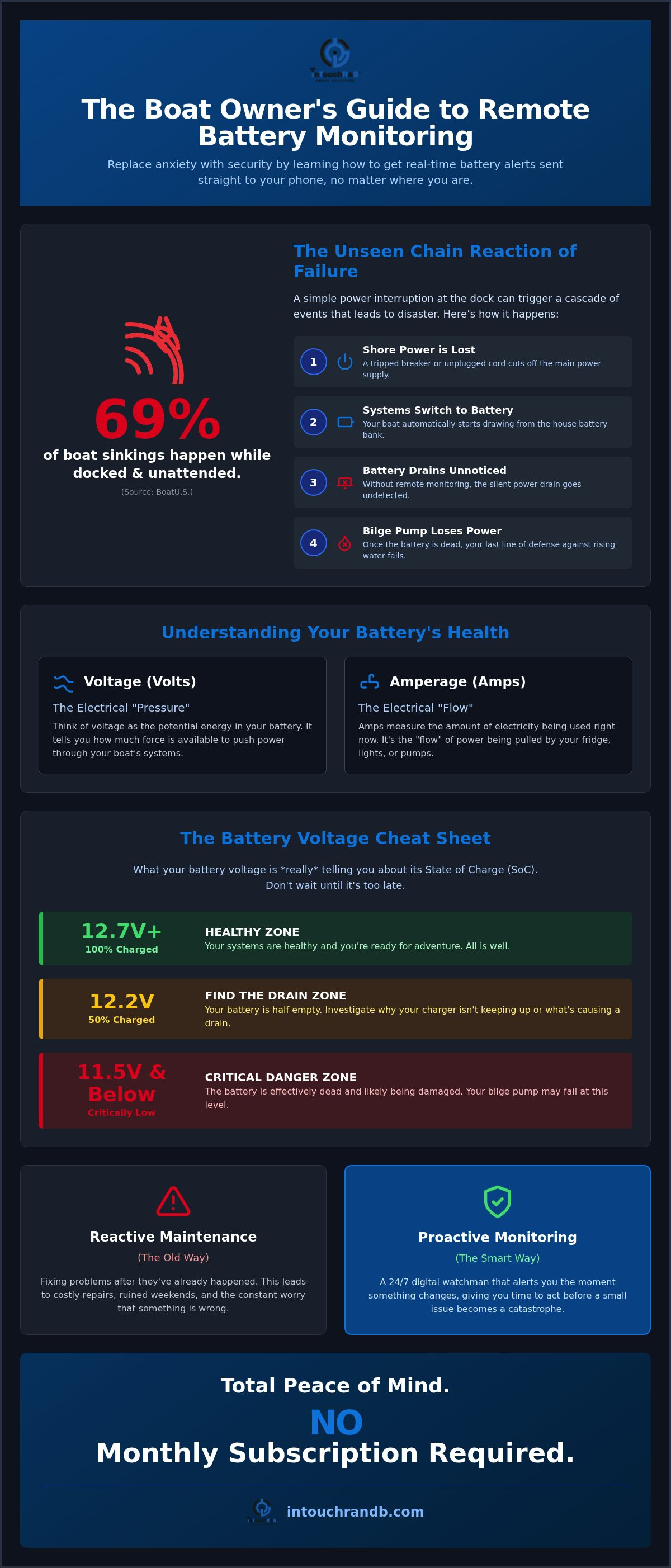
Most boaters assume their vessel is safest when it's tied securely to the dock, but the numbers tell a different story. According to data from BoatU.S., 69% of boat sinkings happen while the vessel is docked and unattended. This usually starts with a "chain reaction of failure." It begins when a shore power cord gets bumped or a breaker trips. Without AC power, your onboard systems automatically switch to your deep-cycle battery bank. If you don't have a way to see that drain happening, the batteries eventually go flat. Once the voltage drops too low, your bilge pump, which is your last line of defense against rising water, simply stops working. Even a high-water alarm won't help you if there isn't enough power left to sound the siren or send a signal.
The Hidden Risks of the Unattended Boat
Beyond the nightmare of a sunken hull, a dead battery triggers other expensive problems that can ruin your season. When the power fails, your HVAC system shuts down, leading to rapid mold growth in humid climates. Your refrigerator stops, resulting in spoiled food and a lingering smell that's nearly impossible to remove from the upholstery. While a total loss insurance claim is a headache nobody wants, these "smaller" issues can still cost thousands of dollars in professional cleaning and repairs. Understanding how to monitor boat battery levels from your living room is much more cost-effective than dealing with a cabin full of mildew. Checking the boat once a week isn't enough; a battery can drain to a critical level in just 48 hours if a light or pump is stuck on.
Proactive vs. Reactive Maintenance
Reactive maintenance means you're only fixing things after they've already broken. Proactive maintenance is different. It's about having a 24/7 digital watchman that alerts you the moment something changes. When you know how to monitor boat battery health through real-time alerts, you get a text the second your shore power disconnects. This gives you time to call the marina manager or drive down to the dock before the bilge pump loses power. There's a deep sense of relief in knowing that your vessel is safe and your batteries are charged. Using a tool like the Bilge Minder allows you to stay informed about environmental changes immediately, ensuring your boat is ready to go whenever you are.
Understanding the Basics: Volts, Amps, and Your Battery's Health
To keep your vessel safe, you don't need an electrical engineering degree, but you do need to understand two basic numbers: volts and amps. Think of your battery bank like a water tank. Voltage is the "pressure" in that tank. It tells you how much potential energy is available to push power through your wires. Amperage, on the other hand, is the "flow." It represents the amount of electricity your devices, like your fridge or lights, are pulling out of the tank right now. When you understand these two factors, knowing how to monitor boat battery health becomes much more intuitive.
It is also vital to distinguish between your starting batteries and your deep-cycle house banks. A starting battery is designed for a quick, powerful burst to crank the engine, while your house bank is built for the long haul, powering your bilge pumps and electronics over several days. If you drain a starting battery too low, it may never recover its original strength. This is why maintaining a steady state of charge (SoC) is the secret to a long battery life and a reliable weekend getaway.
The Battery Voltage Cheat Sheet
Most boaters see a number like 12.2V on a screen and assume everything is fine because it's "twelve volts." In reality, that battery is half empty. Use this simple guide to understand what your multimeter or remote sensor is telling you:
- 12.7V and up: Your battery is 100% charged. You are ready for adventure and your systems are healthy.
- 12.2V: You are at a 50% state of charge. This is the "find the drain" zone. You should investigate why your charger isn't keeping up.
- 11.5V and below: This is the critical zone. Your battery is essentially dead, and its internal chemistry is likely being damaged. At this level, your bilge pump may not have enough "pressure" to clear water from the hull.
Common Causes of Battery Drain
Batteries rarely die for no reason; they are usually killed by "phantom loads." These are small, silent draws from items like stereo memories, clocks, or carbon monoxide detectors that slowly sip power 24/7. Another common culprit is a stuck bilge pump float switch. If a piece of debris wedges the switch up, the pump will run continuously until the battery is exhausted. However, the most frequent "unforced error" is a simple shore power disconnect. A neighbor might accidentally unplug your cord to use the pedestal, or a dock-side breaker might trip during a storm. If you are comparing different setups for your slip, checking a comparison of monitoring tools can help you decide which sensors will catch these drains before they become disasters. Learning how to monitor boat battery levels remotely ensures you see these drops the moment they happen, not three days too late.
Remote Monitoring vs. Traditional Onboard Gauges
Traditional onboard gauges are designed for the person at the helm. They provide a quick snapshot of system health while you are underway, but they become effectively invisible the moment you step off the swim platform. If a bilge pump starts cycling every ten minutes due to a weeping packing gland, a dashboard-mounted voltmeter won't do anything to stop the eventual battery drain while you are at home. This is where the "Internet of Things" (IoT) has fundamentally changed boat safety. IoT simply means your boat's sensors can now communicate directly with the internet, sending data to a central hub that you can access from anywhere in the world.
One of the biggest advantages of modern remote systems is the ability to send multi-recipient alerts. If a critical low-voltage event occurs, the system can text both you and your marina manager simultaneously. This creates a redundant safety net; if you are in a meeting or on a flight, someone on-site can still respond to the emergency. A "dumb" alarm that only triggers a flashing light or a siren on the dock relies entirely on a passerby noticing and caring enough to call you. In a quiet marina on a Tuesday night, that siren might wail until the batteries finally give out without anyone ever hearing it.
The Power of Remote Notifications
When you are deciding how to monitor boat battery health, look for systems that offer both text and email alerts. This redundancy ensures you don't miss a notification if your cell signal is weak but you have access to WiFi. You can check your vessel’s "heartbeat" directly from your smartphone or tablet at any time of day, giving you instant reassurance that your systems are stable. To find the right fit for your specific hull and battery setup, you can review the inTouch R&B Comparison Matrix to see how different sensors handle various environments.
Shore Power Monitoring
Understanding how to monitor boat battery voltage is only half of the safety equation. You also need to know if your charger is actually receiving power from the dock. By monitoring the AC circuit, you can detect a power cable removal or a tripped dock breaker before the batteries even begin to drain. If the AC power fails, your monitoring system should notify you immediately, allowing you to fix the source of the problem before it affects your DC bank. For more details on protecting your vessel from these common electrical issues, check out this Shore Power Failure Alert Guide. Keeping an eye on both AC and DC systems provides a complete, 360-degree picture of your boat's safety.
How to Set Up a Boat Battery Monitoring System in 5 Steps
Setting up a remote monitoring system is a practical way to ensure your vessel remains safe while you are away. Once you have selected your hardware, the actual installation process is surprisingly simple and doesn't require specialized electrical skills. Here is a five-step guide to getting your digital watchman up and running.
- Connect the Hub: Your system needs a way to talk to the internet. Choose a central communication hub that connects to your marina's WiFi. Most hubs are designed to sit inside the cabin or near the helm where the signal is strongest.
- Attach the Sensor: Install a dedicated battery voltage sensor directly to your primary house bank terminals. This ensures you are getting the most accurate reading from the bank that powers your critical safety gear.
- Set Thresholds: Configure your alert settings. A common best practice is to set a trigger for when voltage hits 11.8V, which gives you enough time to react before the battery is fully depleted.
- Add Recipients: Don't be the only one on the alert list. Add a trusted "boat buddy" or the marina office as secondary recipients so someone nearby can check the boat if you are unavailable.
- Test Everything: The most important step is the "live test." Disconnect your shore power cord and watch your phone to ensure the low-voltage alert arrives as expected.
Selecting the Right Hardware
When you are deciding how to monitor boat battery levels, consider your hull material. Wireless sensors are convenient but might struggle to send signals through heavy steel or thick aluminum. For many fiberglass boats, an all-in-one system like the Bilge Minder provides a robust solution that monitors both the bilge and the battery bank from a single device. Ensure your hub is positioned where it can maintain a stable 2.4GHz WiFi connection, as this frequency travels better through obstacles than 5GHz signals.
Configuration Tips for Success
Modern systems often use a browser-based captive portal for setup, which means you don't need to hunt through an app store or worry about software updates. You simply connect your phone to the device's temporary network and fill in your settings. Take a moment to name your sensors clearly, such as "Port Battery Bank" or "House Bank 1," so you know exactly which part of the boat needs attention when an alert arrives. You can also choose how often you want updates. While fault-only alerts keep your inbox clean, receiving a daily "heartbeat" report can provide extra peace of mind that the system is still online. If you want to move from reactive repairs to proactive care, you can secure your vessel with remote monitoring to catch electrical drains before they lead to a dead engine.
Choosing a Solution with No Monthly Subscriptions
Many "smart" boat solutions on the market today come with a hidden financial catch. You might find a sensor for a low upfront price, but you soon realize it requires a mandatory monthly contract to actually send alerts to your phone. Over just a few years, those small monthly fees can easily add up to over a thousand dollars. By utilizing the WiFi already available at your marina, you can bypass these recurring costs entirely. This approach allows you to own your equipment and your data, providing a sense of security that isn't tied to a service plan.
When you are researching how to monitor boat battery health, it's helpful to look at the bigger picture of vessel safety. A battery sensor is a vital component, but it works best as part of a comprehensive safety net. You can expand your system to include a Bilge Minder for water detection, or sensors for motion and high-water levels. This creates a complete "heartbeat" for your boat, ensuring that every critical system is under a watchful eye while you are away from the dock.
The Value You Cannot Ignore
There is a pragmatic reason to prefer simple text and email alerts over flashy, complex apps. Apps often require frequent updates and a high-speed data connection to function properly, which can be a problem in remote coastal areas. A text message, however, is lightweight and reliable; it will reach your phone even when your signal is weak. For a deeper look at how these systems protect your assets, you can read The 2026 Guide to Remote Property Condition Monitoring. Choosing a one-time hardware purchase means you are investing in the long-term health of your boat without the burden of ongoing service fees.
Taking the Next Step for Vessel Security
If you want to start being more proactive, your first step should be a quick audit of your current setup. Take a look at your battery bank today and check for the manufacture date; most lead-acid batteries begin to lose significant capacity after three to five years. If your bank is reaching that age, a remote monitor is even more critical because older batteries are prone to sudden failure. You can often find a battery sensor bundled with other essential tools in an introductory offer, making it easy to secure your entire vessel at once. To find the right combination of sensors for your slip, visit inTouch R&B to see how easy it is to stay informed. Every vessel deserves a guardian that is always on duty with NO Monthly Subscription Required.
Take Command of Your Boat's Safety and Security
Protecting your investment starts with understanding that a healthy battery bank is your primary line of defense against the unexpected. We have explored how monitoring voltage serves as an early warning system, allowing you to catch shore power failures or phantom drains before they disable your bilge pumps. By mastering how to monitor boat battery health through remote WiFi sensors, you can finally stop worrying about what's happening at the dock while you are at home or work. It's about replacing that nagging anxiety with the relief of being informed.
Since 2014, thousands of boat owners have trusted our systems to provide a watchful eye in the harsh marine environment. With the ability to send text and email alerts to multiple contacts simultaneously, you and your marina manager can stay informed the moment a problem arises. It is time to move from reactive repairs to proactive peace of mind. You can protect your boat with a subscription-free monitoring system at inTouch R&B and ensure your vessel is always ready for your next adventure. Enjoy the confidence that comes with knowing your boat is safe and sound. NO Monthly Subscription Required.
Frequently Asked Questions
Can I monitor my boat battery without a WiFi connection at the dock?
If you are looking at how to monitor boat battery health without a local signal, you will need a cellular-based gateway or a dedicated mobile hotspot. Most cost-effective remote monitors use the marina's WiFi to send data. If your slip lacks a signal, you might consider a cellular router to provide that bridge. This ensures you still receive alerts even if the local network goes down.
What is the ideal voltage for a marine battery when not in use?
A fully charged 12V marine battery should sit at 12.7V or slightly higher when it is at rest. If your monitor shows 12.2V, you are already down to 50% capacity. It is best to keep your batteries on a smart charger to maintain that "full" status, as letting them sit at lower voltages can cause permanent internal damage.
Will a battery monitor drain my battery while it's monitoring it?
Modern monitors have an incredibly low power draw that is virtually unnoticeable. They are designed to sip tiny amounts of electricity, often less than what a small digital clock uses. You don't have to worry about the monitoring system itself causing a dead battery; its job is to warn you about the much larger drains from pumps or lights.
Do I need a separate monitor for my starting battery and my house bank?
While you can start with just one, monitoring both banks is the safest approach. Your house bank powers the safety gear like bilge pumps, while the starting battery is what gets you home. Using a system that supports multiple sensors allows you to keep an eye on every "tank" of power from a single dashboard.
How do I get alerts on my phone if my boat loses shore power?
The most reliable method is to use a dedicated AC sensor that plugs into any standard cabin outlet. If the shore power trips or a cord is unplugged, the sensor detects the loss of incoming voltage instantly. It then triggers a notification to your phone, giving you plenty of time to respond before your house batteries begin to drain.
Is it difficult to install a remote battery sensor myself?
Most boaters find the installation process very straightforward and manageable. You generally only need to connect a few wires to your battery terminals and sync the device to your WiFi. Learning how to monitor boat battery levels shouldn't be a technical chore; we design these tools to be accessible for every owner, regardless of their electrical experience.
What happens to the monitoring system if the boat's main power is turned off?
A properly installed monitor is wired directly to the battery, so it bypasses the main battery selector switch. This setup ensures that the system remains active even when you have "turned off" the boat for the week. It allows the sensor to continue sending alerts about your bilge pump or voltage levels while the vessel is unattended.
NO Monthly Subscription Required.

Article by
Jimmy Nesbitt
Principle
Be the first to comment