

Did you know that a simple equipment malfunction could lead to a civil penalty of up to $5,000 under 2026 navigation rules? It's a staggering figure, but the real cost of a dark anchor light is often measured in safety rather than dollars. Whether you're worried about a vessel collision in a crowded harbor or a dead battery caused by a short circuit, the anxiety of not knowing your boat's status is something every owner understands. You want to know your vessel is visible and compliant, even when you're miles away from the dock.
We agree that keeping your boat safe shouldn't feel like a full-time job or a drain on your bank account. In this guide, you'll learn how to implement a boat lighting failure alert system that provides 24/7 peace of mind. We'll show you how to receive immediate text or email notifications the moment a light fails, ensuring you stay ahead of fines and accidents. We're going to break down the latest 2026 regulations, explain how MOSFET technology, which is essentially a high-tech electronic switch, keeps your systems reliable, and introduce a simple hardware solution that protects your investment without any ongoing costs.
Key Takeaways
- Understand how to avoid 2026 fines of up to $5,000 by ensuring your vessel stays visible to others even when you aren't at the dock.
- Discover how a real-time boat lighting failure alert provides immediate notifications via text or email so you can fix equipment issues before they become safety hazards.
- Learn the difference between reactive manual checks and proactive automated monitoring to protect your battery and electrical systems from unexpected malfunctions.
- Get clear steps for installing a 12VDC monitoring device using your boat's 2.4GHz WiFi for reliable, remote oversight of your navigation lights.
- Explore how to build a comprehensive vessel security suite by combining lighting alerts with other essential monitors like the Bilge Minder.
The Critical Risks of Boat Lighting Failure While Docked
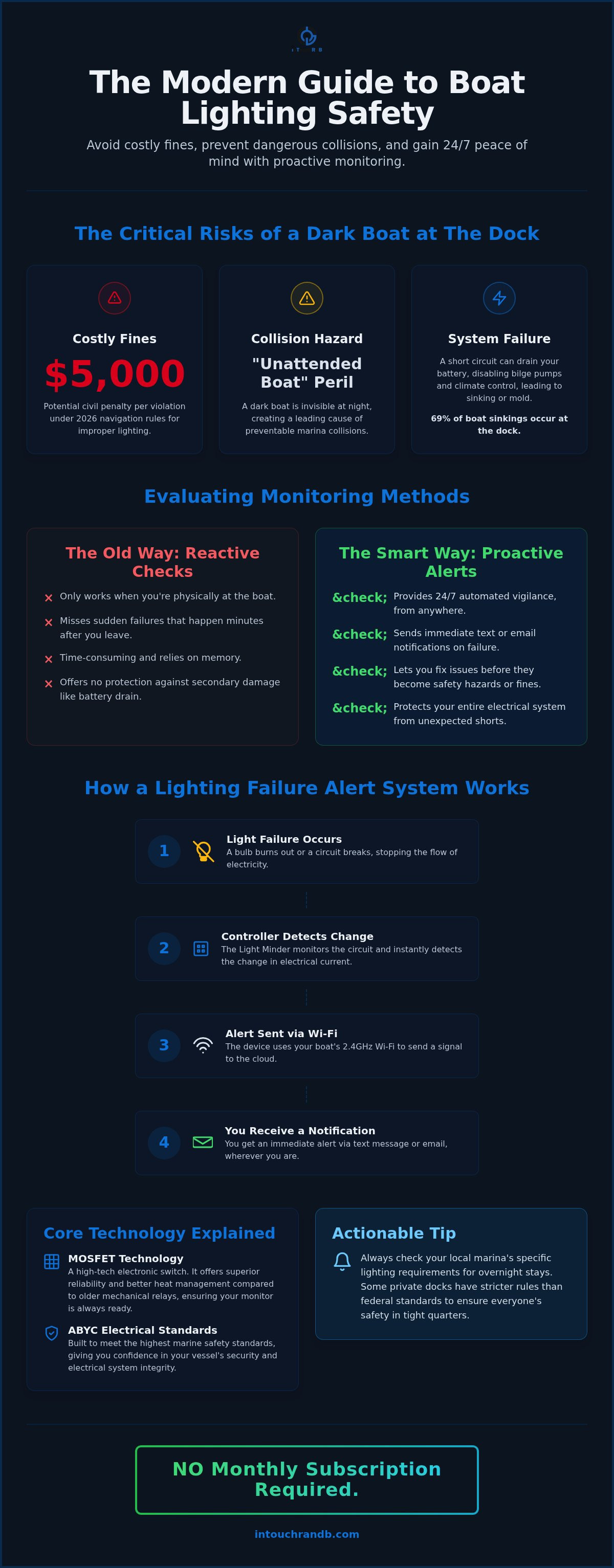
A boat sitting in the dark at a marina isn't just a nuisance; it's a significant safety liability. When your anchor or docking lights fail while you're away, your vessel effectively disappears to other boaters navigating the area at night. This "unattended boat" peril is a leading cause of preventable marina collisions. Without a reliable boat lighting failure alert, you might not realize your vessel has become a hazard until you receive an expensive phone call about a collision. Implementing a boat lighting failure alert ensures you're the first to know when a circuit goes down, allowing you to act before an accident occurs.
The legal stakes for maintaining proper illumination are high. Following international conventions for navigation lights isn't just a suggestion; it's a requirement for safe passage. The U.S. Coast Guard enforces strict rules for visibility to prevent accidents in restricted light. If your vessel is found in violation of these navigation rules, you could face civil penalties of up to $5,000 per violation. It's a steep price to pay for a simple equipment failure that could have been detected remotely with the right monitoring system.
Navigation and Anchor Light Regulations
All vessels are required to display specific lights from sunset to sunrise and during times of low visibility, such as heavy rain or fog. These lights serve as a universal language for boaters, communicating the vessel's size, position, and status. Visibility is your first line of defense against accidents. If another captain can't see you, they can't avoid you. Vessel visibility is defined as a core component of docking safety where active illumination ensures your boat is recognizable to other captains, preventing it from becoming an invisible hazard in the dark.
Actionable Tip: Check your local marina's specific lighting requirements for overnight stays. Some private docks have stricter rules than federal standards to ensure everyone's safety in tight quarters.
Secondary Damage: Beyond the Dark Deck
A lighting malfunction often signals a deeper issue within your boat's electrical system. A failed circuit can cause a rapid battery drain, which is especially dangerous because it can lead to the failure of your Bilge Minder or other critical pumps. According to BoatU.S., 69% of boat sinkings happen while the vessel is docked. If your batteries die because of a lighting short, your pumps won't run when you need them most. Additionally, losing power to your climate control systems can lead to mold growth in unattended cabins, turning a small electrical glitch into a massive cleanup project. Proactive monitoring helps you catch these issues before they spiral into a total power loss.
How a Boat Lighting Failure Alert System Works
Remote monitoring isn't just for home security; it's a vital part of modern vessel care. A boat lighting failure alert system acts as a digital sentry, constantly checking the electrical current flowing to your navigation and anchor lights. While manual checks only tell you the state of your bulbs at the moment you're standing on the deck, these automated systems provide 24/7 vigilance. If a bulb burns out or a circuit breaks while you're at home, the system detects the change in electrical resistance and immediately bridges the gap between your boat and your smartphone. The system acts fast. It ensures you aren't left in the dark about your boat's status.
The heart of this process is the communication hub. This hardware connects directly to your 12VDC power source and your lighting circuits. It translates electrical signals into data that moves through the cloud to reach you via text or email. This transition from reactive to proactive maintenance means you're no longer guessing if your boat is visible in the harbor. This is why a boat lighting failure alert is a critical upgrade for any boat owner who leaves their vessel unattended for long periods.
Inside the Light Minder Controller
The LITEM-WIR1-CON-101 is a specialized 2 or 4-channel device designed specifically for the marine environment. It uses MOSFET technology, which are essentially advanced electronic switches that offer better reliability and heat management than traditional mechanical relays. These components allow for precise monitoring of your lighting circuits. The device also features surface-mounted LEDs (Green and Blue) to give you an at-a-glance status of the hardware itself. Adhering to ABYC Electrical Standards, this controller ensures your wiring and circuit protection meet the highest safety benchmarks.
One unique feature is the "Lamp Fade" configuration. This allows you to customize how your lights respond to triggers, such as fading them in or out rather than an instant, harsh switch. This level of control is easily managed through a captive portal, which is a private setup page accessed via the device's default IP address (192.168.4.1). The hub handles the work, giving you professional-grade control over your vessel's lighting.
WiFi and Connectivity Requirements
For the alert system to function, it requires a stable 2.4GHz WiFi connection. This specific frequency is the industry standard for marine monitoring because it offers a longer range and better ability to pass through fiberglass hulls and cabin walls compared to 5GHz signals. WiFi is mandatory. You'll need to ensure the controller is mounted in a location that maintains a strong link to your marina's network or your onboard router. To get the best performance, it's a good idea to plan your installation carefully. You can explore how the Light Minder fits your needs by checking our vessel monitoring comparison matrix.
Technical Tip: Avoid placing your monitoring hardware near microwaves or other heavy electrical equipment. These devices can create signal interference that might delay or block your alerts.
Evaluating Monitoring Methods: Manual vs. Automated Alerts
Relying on manual checks for your vessel's lighting is like checking your smoke alarm only when you're already in the kitchen. It tells you everything is fine at that specific moment, but it offers zero protection for the other six days of the week when you aren't at the marina. Most boaters wait until their weekend visit to flip the switches, but a bulb can burn out or a circuit can fail the moment you drive away. This gap in visibility is where accidents and expensive citations happen. By switching to an automated boat lighting failure alert, you replace guesswork with constant, digital oversight that works even when you're miles away.
When evaluating hardware, you'll often choose between simple wired sensors and wireless cloud integration. While a basic wired sensor might tell you if power is present at the helm, it doesn't provide the remote connectivity needed for true peace of mind. A cloud-integrated boat lighting failure alert bridges that gap. It uses your boat's 12VDC power (the standard electrical system for most vessels) to keep the communication hub active. This ensures that the information effectively reaches your phone, regardless of where you've parked your car for the day.
Proactive vs. Reactive Maintenance
Reactive maintenance is the traditional, and often stressful, way of boating. You show up to the dock and find a dead battery or, worse, a $5,000 citation tucked into your windshield from the Coast Guard. Proactive maintenance changes that dynamic entirely. When you install a system that monitors your lighting circuits 24/7, you get a text alert the second a failure occurs. You can even set up multi-recipient alerts. This means both you and your marina manager can be notified simultaneously, allowing someone on-site to swap a bulb or check a breaker before the sun goes down and the risk of a collision increases.
The Cost of Subscriptions vs. Ownership
Many remote monitoring services on the market today trap you in a cycle of monthly fees. Over a few years, those small monthly charges can easily exceed the cost of the hardware itself. We believe in a different approach. A one-time investment in hardware like the Light Minder gives you professional-grade protection without the burden of a recurring bill. It's a pragmatic choice for owners who want reliable security without the frustration of ongoing costs. This model ensures that your safety budget goes toward quality equipment rather than endless service fees.
The "No Alert is Lost" philosophy is central to a reliable system. If your boat loses its light, the controller sends a signal to a secure cloud server. This server is responsible for making sure that notification actually lands in your inbox or on your phone. Even if your phone is temporarily out of service, the record of the event is stored and retried. This ensures that you're never left wondering if the system is actually watching your boat. It's about providing a safety net that is as persistent as the environment your boat lives in.
Actionable Tip: Use a comparison matrix to evaluate different monitoring needs. It helps you see which systems cover lighting, bilge levels, or shore power so you can build a complete security suite for your vessel.
Steps to Install and Configure Your Lighting Monitor
Setting up your boat lighting failure alert is a straightforward process that doesn't require a degree in electrical engineering. Before you begin, gather your tools and ensure you have the installation guide handy. You'll need access to your vessel's 12VDC power source and a stable 2.4GHz WiFi connection. It's a good idea to perform a quick "bench test" near your router before permanently mounting the hardware. This ensures the signal strength is sufficient before you commit to a specific location in the engine room or behind the helm.
Actionable Tip: Use a permanent marker to label each wire as you connect it to the 2 or 4-channel terminals. This simple step makes future maintenance much easier if you ever need to troubleshoot a specific lighting circuit.
Initial Setup via the Captive Portal
Once your controller is powered up, it creates its own temporary WiFi network. You don't need an existing internet connection to start the configuration. Simply open a web browser on your phone or laptop and enter the default IP address: 192.168.4.1. This opens the Captive Portal, which is a secure, private setup page where you'll enter your marina's WiFi SSID and password. You'll also provide a boat name and make so your alerts are easily identifiable when they hit your inbox.
This is also where you can personalize your monitoring. You can name each of the 2 or 4 channels to match your specific setup, such as "Salon Lights" or "Galley Lights." This level of detail ensures that when you receive a boat lighting failure alert, you know exactly which circuit needs attention. This proactive approach saves time and prevents you from hunting through wiring diagrams in the dark. You can find the right hardware for your vessel by visiting inTouch R&B to secure your boat today.
Testing and Verifying Operation
After saving your settings, the device will reboot and attempt to connect to your network. Watch the status indicators on the front panel. During the initial startup, LEDs 1 through 4 will flash at half-second intervals, confirming the system is running its internal checks. The Blue LED is your primary indicator of connectivity. Two short blinks mean the device is successfully communicating with the cloud, while one long blink indicates it's still searching for a signal.
If the Green LED is steady, your power is stable and the MOSFETs (electronic switches) are ready to monitor your circuits. One of the best parts of this system is that it stays current without any manual effort. The hardware is designed to receive over-the-air firmware updates automatically. This ensures your boat lighting failure alert system always has the latest security patches and features without you ever having to plug in a cable or download a file manually.
Why the Light Minder is the Best Choice for Vessel Security
The Light Minder stands out because it isn't a modified home security gadget; it's a dedicated marine tool. Most generic sensors fail in the salty, humid environment of a marina. This controller is engineered to handle those harsh conditions while providing a reliable boat lighting failure alert that you can trust. By choosing a system designed specifically for the water, you ensure that the MOSFETs and internal circuitry remain functional for years. This reliability is the foundation of true vessel security, giving you a watchful guardian that never sleeps.
One of the greatest advantages is the ability to integrate your lighting alerts with the Bilge Minder. While a dark deck is a safety hazard, a rising water level in the bilge is an immediate threat to your boat's survival. When you combine these monitors, you create a comprehensive safety net for your vessel. The system also allows for deep customization. You can adjust lamp names, set specific fade speeds for your LEDs, and configure time zone settings so your alerts always make sense regardless of where you are when you receive them.
Total Vessel Monitoring Integration
This hardware is a key piece of the inTouch R&B ecosystem. This ecosystem allows you to monitor various aspects of your boat through a single, unified interface. Beyond just lighting, the system tracks battery voltage. This is critical because a lighting circuit failure can often be the first sign of a broader battery drain issue. Knowing your voltage levels alongside your boat lighting failure alert status gives you a complete picture of your vessel's electrical health at all times.
Owners consistently choose this system because it respects their budget and their autonomy. Many competitors lock their best features behind a paywall, but we provide professional-grade monitoring with a simple one-time hardware purchase. You get 24/7 protection and the ability to send multi-recipient notifications to family or dock masters without any recurring costs. It's a pragmatic solution for the modern boater who values both safety and financial transparency.
Getting Started with inTouch R&B
Setting up your system for success starts with the details. When you first access the captive portal to configure your device, take a moment to be specific with your data entry. The system is only as good as the information you provide it.
Actionable Tip: Record your exact Boat Name and Make in the configuration settings. This ensures that if you manage multiple vessels, or if an alert is sent to a marina manager, the reporting is accurate and immediate action can be taken on the right boat without confusion.
If you ever run into a snag during installation, our support team is available to help you through the process. You can also access a library of instructional videos on YouTube that walk you through every step of the wiring and configuration. The goal of this technology is to shift your mindset. You can move away from the "hope it's okay" feeling every time a storm rolls in. Instead, you can live with the "I know it's safe" confidence that comes from active, real-time monitoring of your most valuable assets.
Secure Your Vessel's Visibility and Compliance
Managing a boat involves enough guesswork; your safety equipment shouldn't add to it. By choosing a proactive boat lighting failure alert system, you're taking a vital step toward preventing collisions and avoiding those steep 2026 fines. We've explored how simple 12VDC hardware can bridge the gap between your vessel and your smartphone, providing the 24/7 protection and control you need. Since our founding in 2014, we've focused on helping owners move from hoping their lights are on to knowing their vessel is safe.
Setting up multi-recipient alerts means your dock manager or a trusted friend can step in if you're out of reach. It's about building a reliable safety net that works for your specific needs. You can protect your vessel today with the Light Minder Controller and enjoy the peace of mind that comes with professional monitoring. Take charge of your boat's security and stay visible on the water. NO Monthly Subscription Required.
Frequently Asked Questions
What happens if my boat loses WiFi connection?
If your vessel loses its WiFi link, the Light Minder is programmed to automatically attempt a reconnection once the signal returns. It's critical to ensure your hub is mounted within a stable 2.4GHz range, as this frequency provides the best penetration through fiberglass and cabin structures. While the device is offline, it can't send a boat lighting failure alert, so maintaining a strong connection to your marina's network or onboard router is essential for constant protection.
Can I monitor multiple lighting zones?
Yes, you can monitor different areas of your vessel by choosing between the 2-channel and 4-channel versions of the controller. This flexibility allows you to assign specific circuits, such as your anchor lights and navigation lights, to individual channels for precise reporting. You can even name these zones in the captive portal, ensuring that every boat lighting failure alert identifies exactly where the issue is located on the main deck or galley.
Do I need to pay a monthly fee for text alerts?
You don't have to pay any recurring fees for text or email alerts with our systems. We believe that once you purchase the hardware, you should own the service too. This model provides a value you can't ignore, offering 24/7 protection and control without the burden of a bill every month. It's a pragmatic choice for owners who want professional-grade security for their boat or RV without ongoing financial commitments.
Is the Light Minder compatible with all boat types?
The Light Minder is compatible with any vessel that operates on a standard 12VDC power system and has access to a WiFi network. Whether you own a center console, a luxury yacht, or a trailered boat, the installation process remains the same. You'll just need to ensure the communication hub is protected from the elements and remains within range of your 2.4GHz signal to report equipment failures to our secure cloud servers.
What do the different LED colors on the controller mean?
The LED indicators provide an at-a-glance status of your system's health. Green LEDs, located below the MOSFETs, are primarily used during the initial startup and test sequences to confirm the hardware is functioning correctly. The Blue LED indicates your operational status after configuration. Two short blinks mean the device is successfully connected to your WiFi router, while one long blink tells you the device is powered and functioning but still searching for a signal.
Can my marina manager receive alerts too?
Yes, you can easily configure the system to notify a secondary contact like a marina manager or a service technician. Our multi-recipient alert feature ensures that the people who can actually fix the problem are informed the moment a circuit fails. This proactive approach is much more effective than waiting for a weekend visit to discover a malfunction. It allows for immediate action, which is vital for preventing collisions and maintaining regulatory compliance.

Article by
Jimmy Nesbitt
Principle
Be the first to comment