

Last October, David sat in his living room watching the weather channel while his RV sat in a storage lot three towns away. He found himself wondering if the interior lights were still functioning or if a tripped breaker had cut the power, potentially leaving his refrigerator to thaw. That nagging anxiety over an unattended property is a feeling most boat and RV owners know too well. It is often made worse by the frustration of "smart" devices that require a monthly fee just to send a basic status update.
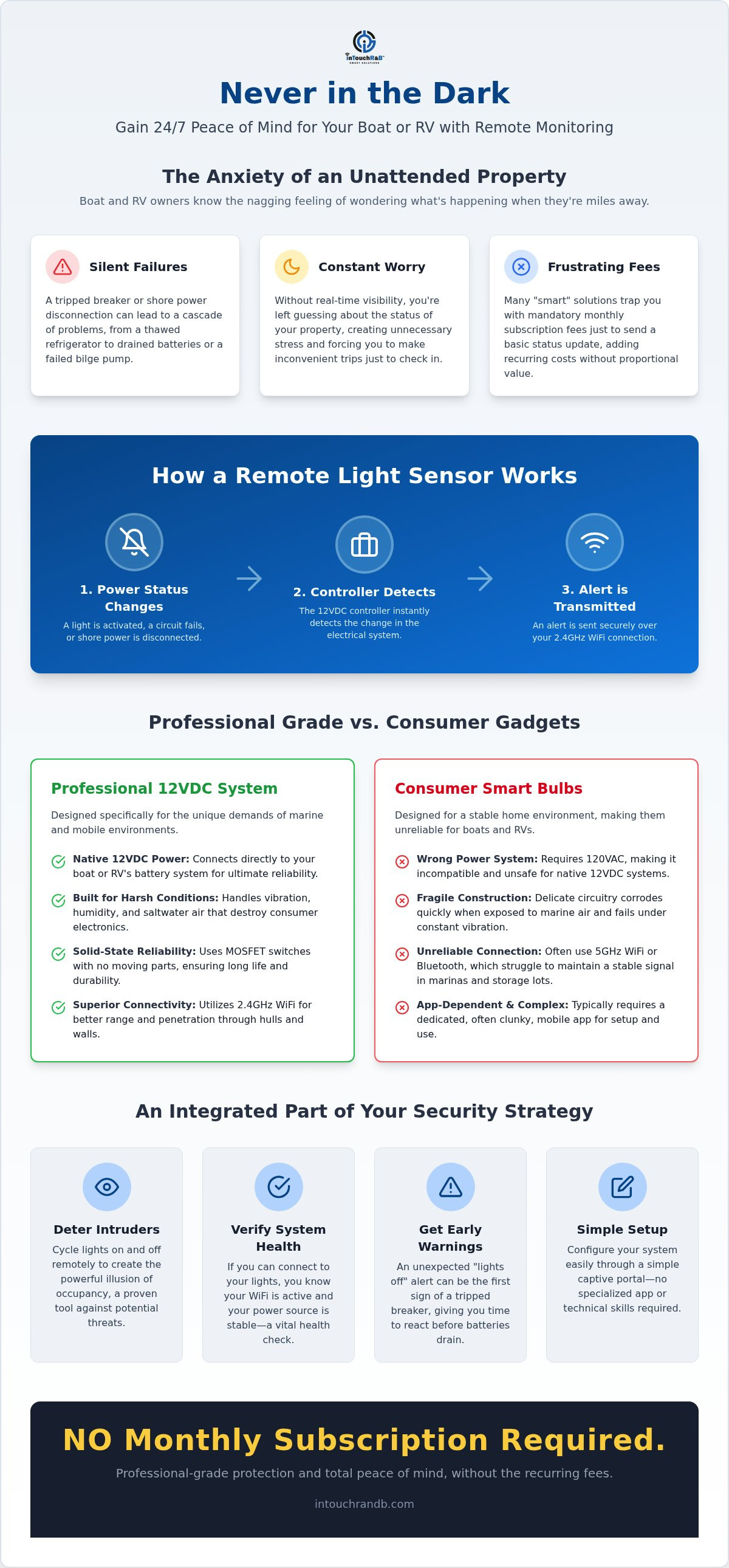
We believe you should have 24/7 visibility into your assets without being burdened by recurring costs. This guide explains how a modern remote light sensor provides real-time data on your property's status. When a light is activated or a circuit fails, the controller detects the change and transmits an alert to your device, allowing you to respond before a small problem turns into a costly repair. We will clear up the confusion between 12VDC systems, which are the battery standards for boats and campers, and the 120VAC systems found in traditional homes. You will discover how to implement a solution that is easy to install and provides total peace of mind. NO Monthly Subscription Required.
Key Takeaways
- Discover how a remote light sensor provides a 24/7 window into your boat or RV status, alerting you to power changes before they become problems.
- Learn to configure your Light Minder through a simple captive portal, allowing for custom naming and setup without needing a specialized app.
- Understand why dedicated 12VDC hardware is more reliable than battery-powered consumer gadgets for long-term monitoring in marine and mobile environments.
- See how lighting sensors fit into a broader security ecosystem to stop the "chain reaction of failure" that can lead to dead batteries or sinking.
- Enjoy professional-grade protection that is easy to install, works reliably on 2.4GHz WiFi, and has NO Monthly Subscription Required.
What is a Remote Light Sensor and Why Does Your Property Need One?
A remote light sensor is more than just a fancy way to turn on a lamp from your phone. It is a specialized system that bridges the gap between your physical property and your digital awareness, allowing you to monitor and control lighting status via the internet. While many people are familiar with motion-activated lights that turn on when someone walks by, a monitored light system provides a continuous stream of data. It tells you if the light is on, if it is off, or if the system has lost power entirely. It is a window into your property's health.
For owners of boats, RVs, and second homes, the "unattended property" peril is a constant source of stress. You aren't just worried about burglars; you're worried about the silent failures that happen when no one is watching. A remote light sensor acts as a 24/7 guardian, providing a proactive way to check in on your assets without driving for hours or calling a neighbor to just take a look. It offers the relief of being informed, ensuring that you are never left in the dark about the status of your most valuable investments.
The Security Benefits of Remote Lighting Control
The most immediate advantage is deterrence. By cycling lights on and off from a distance, you create the illusion of occupancy, which is a powerful tool against intruders. However, the deeper value lies in verification. If you can reach your controller through the web, you know your 2.4GHz WiFi is active and your power source is stable. It serves as a secondary alert system. If the lights go dark unexpectedly, it might be the first sign of a tripped breaker or a shore power disconnection. This allows you to respond to a power loss before your batteries drain or your bilge pump fails. You can even use light as a visual signal for other environmental changes, turning a simple bulb into a component of an integrated security strategy.
Why Traditional Smart Bulbs Fail in Marine Environments
Standard smart bulbs are designed for the 120VAC environment of a suburban living room, not the 12VDC (direct current) systems found in boats and RVs. Most consumer-grade bulbs also struggle with the unique connectivity challenges of a marina, where metal hulls and distance from the access point can drop signals. Saltwater air is another enemy. It corrodes the delicate circuitry of standard home electronics quickly. A dedicated 12VDC controller like the Light Minder is built to handle these specific electrical and environmental demands. It offers the stability needed for long-term monitoring without the flimsiness of retail gadgets. Choosing hardware designed for the environment ensures your system just works when you need it most. NO Monthly Subscription Required.
How the Light Minder Technology Works: A Technical Breakdown
At the heart of a reliable remote light sensor system is the 12VDC controller. Think of this device as the brain of your lighting setup. Unlike standard home automation that relies on 120V wall outlets, this controller is designed to run directly off your boat or RV battery system. When you initiate a command or the system detects a change, the controller processes that signal and manages the power distribution to your lights. It is built to be a watchful guardian that stays awake even when you are miles away.
To keep you informed, the system utilizes 2.4GHz WiFi connectivity. We chose this specific frequency because it offers a better range and can penetrate fiberglass hulls or RV siding more effectively than high-speed 5GHz signals. Once connected, the device maintains a constant heartbeat with your network. If the connection drops or the power fails, you will know immediately because the "handshake" between the device and the internet is broken. This trigger and response mechanism ensures that you aren't just guessing about the status of your property.
The Role of MOSFETs and Surface-Mounted LEDs
MOSFETs are electronic switches that handle power efficiently without moving parts. Because there are no mechanical relays to click or wear out, the system remains reliable for years in high-vibration environments like a moving trailer or a bobbing boat. To help you understand what is happening inside the box, we included surface-mounted LEDs. A Green LED indicates a successful startup and self-test, while a Blue LED confirms the system is active and communicating with your network. These visual cues are essential for quick troubleshooting during installation. If you want to see how these components fit into a complete security plan, you can explore the full range of monitoring solutions we offer. We also provide over-the-air firmware updates to ensure your hardware stays current with the latest security standards.
Browser-Based Configuration vs. Clunky Apps
Setting up your remote light sensor shouldn't require a degree in computer science or yet another app cluttering your phone. We use a "Captive Portal" for setup. When you first power the device, it creates its own temporary WiFi network. You simply connect your phone to it and type 192.168.4.1 into your browser. This opens a private settings page where you can enter your home or marina SSID and password. During this initial boot, you must select "YES" to acknowledge the terms and conditions to activate the reporting features. It is a straightforward, logical process that puts you in control without the need for third-party accounts. NO Monthly Subscription Required.
Consumer Motion Lights vs. Professional Monitoring: Making the Right Choice
Choosing between a cheap motion light from a big-box store and a professional remote light sensor system is really a choice between a decoration and a security tool. Many owners reach for solar or battery-powered gadgets because they seem easy to install. However, these units often fail when you need them most. A cloudy week can drain a solar battery, and a standard alkaline battery will eventually leak or die without warning. In contrast, a hardwired 12VDC system draws power directly from your house batteries, ensuring the system stays active as long as your property has power.
There is also the "Subscription Trap" to consider. Most home-centric sensors require a monthly fee to access "advanced" features like remote alerts or history logs. Over a few years, that cheap sensor ends up costing hundreds. We believe in a different approach. By investing in professional-grade hardware, you get a system that communicates directly with you without the recurring drain on your wallet.
Actionable Tip: Before you buy any monitoring hardware, always verify the input voltage. Installing a 120VAC sensor on a 12VDC boat circuit will simply fail to power on, but trying to "hack" a consumer device into a marine system can lead to fried circuits or even fire hazards. Stick to hardware designed for the voltage of your specific environment.
Evaluating the Total Cost of Ownership
The true value of a monitoring system isn't just the price on the box. It is the money you save by preventing a disaster. If your remote light sensor alerts you that the power is out, you can save thousands in spoiled food or prevent a "chain reaction of failure" that leads to a sinking. Our secure cloud reporting ensures that no alert is ever lost, giving you a chronological record of your property's status. It is a pro-active maintenance philosophy that stops problems before they start, rather than just reacting to a catastrophe after the fact.
Marine-Grade Durability Standards
"Weather-resistant" is a term marketers use for items that can handle a light rain shower. In a dock environment, your equipment faces salt spray, extreme humidity, and constant vibration. Consumer gear made of cheap plastics will crack and yellow within a single season. Professional systems use high-quality polycarbonate and stainless steel components to withstand these harsh conditions. You can see how our specific hardware stacks up against other options by checking out our Comparison Matrix. Choosing the right materials today means you won't be replacing the entire system next year. NO Monthly Subscription Required.
Actionable Steps: Setting Up Your Remote Light Monitoring System
Getting your remote light sensor system up and running is a logical process that ensures your property remains under a watchful eye. Unlike complex home automation hubs that require constant maintenance, the Light Minder is designed for a straightforward installation that you can complete in an afternoon. Following a few chronological steps will move you from uncertainty to total visibility.
Step 1: Mount the controller. Choose a dry location within your boat or RV cabin that is within range of a stable 2.4GHz WiFi signal. While the housing is durable, keeping it away from direct moisture ensures the internal electronics remain protected for years to come.
Step 2: Establish power. Connect the device to your 12VDC power source. Pay close attention to the initial LED flash sequence. A green flash confirms the internal "brain" has booted correctly and is performing its initial self-test. It is the first sign that your guardian is awake.
Step 3: Connect to the portal. Open the WiFi settings on your smartphone and look for the device's temporary network. Once you've joined it, open your web browser and navigate to 192.168.4.1 to access the configuration page. This is where you'll tell the device how to talk to your local network.
Step 4: Personalize your labels. Within the portal, you can name your specific lighting channels. Instead of "Channel 1," you might use "Salon Lights" or "Main Deck." This ensures that when an alert arrives, you know exactly which part of your property is being reported.
Step 5: Refine the experience. Set your "Lamp Fade" times in milliseconds. For example, a 1000ms fade creates a professional, soft transition when lights are toggled. It's a small detail that provides a luxury feel to your mobile environment.
Troubleshooting Connection and Interference
If you encounter issues during setup, consider your surroundings. Keep your remote light sensor away from microwaves or large metal obstructions that can cause signal interference. If the configuration portal does not automatically appear on your phone, manually type 192.168.4.1 into your browser's URL bar. Pay close attention to the Blue LED: two short blinks mean it is searching for your router, while one long blink indicates the system is fully functional and reporting. To get started with your own setup, order your Light Minder today and take the first step toward proactive property protection.
Customizing Alerts and Time Zones
To ensure your activity logs are accurate, you must set your Time Zone offset. If you are on the East Coast, for example, you would enter -5 for EST. This simple step ensures that when you receive a report in the middle of the night, the timestamp reflects your actual local time. You can also configure secondary recipients for alerts, such as a trusted marina manager or a friend, so someone local is notified if a power failure occurs. Whether you want hourly updates or a single daily summary, the system allows for total control over how you receive your data. NO Monthly Subscription Required.
Beyond Lighting: Integrating Sensors into a Total Security Strategy
While a remote light sensor provides immediate visual confirmation of your property's status, it truly shines when it functions as part of a larger ecosystem of vigilance. We don't view lighting as a standalone feature; instead, we see it as the first line of defense in a comprehensive monitoring plan. When you can see that your lights are functioning, you are actually verifying that your entire electrical backbone is healthy. This integrated approach turns a simple light controller into a vital security hub for your boat, RV, or second home.
Understanding the "Chain Reaction of Failure" is essential for any property owner. It often starts with a simple shore power disconnection or a tripped pedestal breaker. If the power goes out, your battery charger stops. Over the next few days, your batteries slowly drain until they can no longer support critical systems. For boat owners, this eventually means the bilge pumps stop working, which can lead to the vessel sinking. By the time you realize there is a problem, the damage is already done. A remote light sensor interrupts this chain by giving you an early warning the moment the system goes offline.
You can close the loop on property protection by combining your lighting data with specialized tools like the Bilge Minder or the HVAC Minder. These systems work together to provide a complete picture of your asset's environment. From preventing a sinking to detecting theft via GeoFencing, having multiple data points ensures that you are never caught off guard by a sudden change in status.
The Power of Multi-Sensor Monitoring
Monitoring your battery voltage is just as important as monitoring your lights. If your voltage drops while your lights are supposed to be off, you might have a parasitic drain or a failing charger. We go into great detail about these risks in our article on Shore Power Failure Alert myths. It is a must-read for anyone docked in a public marina. Actionable Tip: For the ultimate "dock-safe" setup, install a high-water sensor in your bilge and wire it into your monitoring ecosystem. This ensures that even if you miss a power-loss alert, a rising water level will trigger an immediate emergency notification.
Peace of Mind for the Unattended Property
The true benefit of this technology is the relief of being informed. Instead of lying awake wondering if your RV is freezing or if your boat is still afloat, you can check your status in seconds. Our real-time notifications change the ownership experience from one of constant worry to one of pragmatic reassurance. The simplicity of our browser-based interface means you don't have to manage complex software updates or worry about app compatibility. You get a reliable, professional-grade guardian that watches over your property 24/7. NO Monthly Subscription Required.
Take Command of Your Property's Security
Protecting an unattended boat, RV, or second home doesn't have to be a source of constant stress. By installing a professional remote light sensor, you shift from a reactive state of "hoping for the best" to a proactive state of total awareness. You now understand how 12VDC technology provides a more reliable foundation than consumer-grade gadgets, and how simple browser-based setup puts you in control without clunky apps. This system acts as your eyes and ears; it ensures that a simple power loss doesn't spiral into a major mechanical failure.
Since 2014, marine professionals have trusted our technology to safeguard valuable assets in the harshest environments. Whether you are customizing lamp names for your cabin or setting up alerts for a trusted friend, our systems provide the 24/7 protection you deserve. It's time to enjoy the peace of mind that comes with knowing your property is safe and secure. Secure your property with the Light Minder today. NO Monthly Subscription Required.
Frequently Asked Questions
How do I access the configuration page for my remote light sensor?
If the captive portal doesn't open automatically on your device, you can access it by typing 192.168.4.1 into your browser's address bar. This internal address connects your smartphone or tablet directly to the controller's setup screen. From this menu, you can easily name your lights, adjust settings, and enter your local WiFi credentials without needing any special technical skills.
What does the Blue LED on the controller indicate?
The Blue LED is your primary visual indicator for network and system health. When you see two short blinks, it means the remote light sensor has successfully established a connection with your WiFi router. A single long blink confirms the device is functioning properly and is actively monitoring your property. It's a simple, logical way to verify your system is on duty at a glance.
Can I use these sensors on a 24V system?
The Light Minder is engineered specifically for 12VDC power environments, which are the standard for most recreational boats and RVs. Because the hardware is optimized for 12V, connecting it to a 24V system will likely cause permanent damage to the internal circuitry. It's vital to verify your property's voltage before installation to ensure the system remains reliable and safe.
Do I need to download an app to monitor my lights?
You don't need to download a dedicated app to manage your system. We use a browser-based captive portal for all initial setup and configuration tasks, so you won't have to worry about software updates or app compatibility. Alerts are sent directly to you through simple text or email notifications, making it easy to stay informed about your property's status from anywhere.
What is 'Lamp Fade' and why should I customize it?
Lamp Fade is a customizable setting that controls how quickly your lights transition between on and off, measured in milliseconds. For instance, setting the fade to 5000 MSec creates a gentle five-second transition that provides a high-end feel to your cabin lighting. This feature also helps reduce the sudden electrical surge on your 12VDC system, which can extend the life of your bulbs and wiring.
Will this work if my boat is in a marina with weak WiFi?
The device needs a stable 2.4GHz WiFi signal to transmit data to our secure cloud servers. If your marina's WiFi is weak or drops out frequently, your reports may be delayed or missed. In these situations, we recommend using a dedicated cellular hotspot on your boat or RV to provide a consistent connection for your Minder. NO Monthly Subscription Required.

Article by
Jimmy Nesbitt
Principle
Be the first to comment