

A sump pump can stop working quietly while water rises out of sight. A sump pump failure notification system can alert you to a detected concern, but the warning is most useful when you know what triggered it and what to do next.
Different systems monitor different conditions. Some sound an alarm at the property, while connected systems can send remote notifications. Knowing what each setup can detect, how it sends alerts, and what happens during a power or internet interruption helps you choose a system and plan a response.
This guide explains common alert triggers, compares local alarms with text and email notifications, and outlines steps for responding to a warning. Sump Pump Minder from inTouch R&B is a dedicated option for remote sump pump monitoring.
Key Takeaways
- A sump pump failure notification system reports the conditions it is designed to monitor. Learn what each alert means before relying on it.
- Sensors detect conditions such as water at a specific location, while a controller processes the signal and initiates a warning.
- Local alarms can alert someone nearby. Remote notifications can reach a person away from home, and a combined setup can provide both.
- Choose alert recipients, assign who will respond, and test the notification path according to the product manual.
- Sump Pump Minder is inTouch R&B’s dedicated sump pump monitoring option, with remote notifications available through its monitoring solutions.
Why a sump pump failure notification system matters before water reaches the floor
A basement can go unchecked for hours, especially when nobody is home or the space is mainly used for storage. If the sump pump has a problem during that time, water may collect before anyone notices. A sump pump failure notification system adds a way to learn about a detected concern so someone can respond.
The pump and its alert system have different jobs. A sump pump moves water out of a collection pit; a notification system reports conditions it is designed to detect. An alert doesn’t repair the pump, clear a blockage, or stop water from rising. It gives someone information that can help them act sooner.
A useful alert identifies the trigger, reaches a responsible person, and leads to a clear next step. For example, a high-water warning can prompt someone to check the pit and pump safely, then arrange help if the cause is unclear or the water continues to rise.
What can a sump pump failure notification system tell you?
A water sensor can detect water at its location. Other monitoring equipment may report a concern related to equipment status. These are different kinds of information, and the system’s sensors determine what it can detect. Read the product instructions to understand each alert and check where the sensors are installed.
Why a local alarm and a remote alert serve different needs
A local alarm may use a sound or light to warn someone at the property. It can be useful when someone is nearby, but it may go unnoticed in an empty home. A remote alert can reach an owner or designated contact elsewhere. Neither type guarantees that someone will receive the warning in time or that damage will be prevented.
Consider who is usually near the basement and who can act when the home is empty. A local alarm may suit a household where someone is often present. Remote notifications add reach for owners who travel or manage a property from elsewhere. A combined setup can provide both types of warning, but it still needs a recipient who knows what to do.
Before relying on an alert, learn what triggers it, who receives it, and what response is expected. A rising-water warning calls for a prompt check of the situation. An equipment-status alert is a reason to investigate, not proof of a particular failure. Clear expectations help prevent confusion when time matters.
How a sump pump failure notification system detects trouble and sends alerts
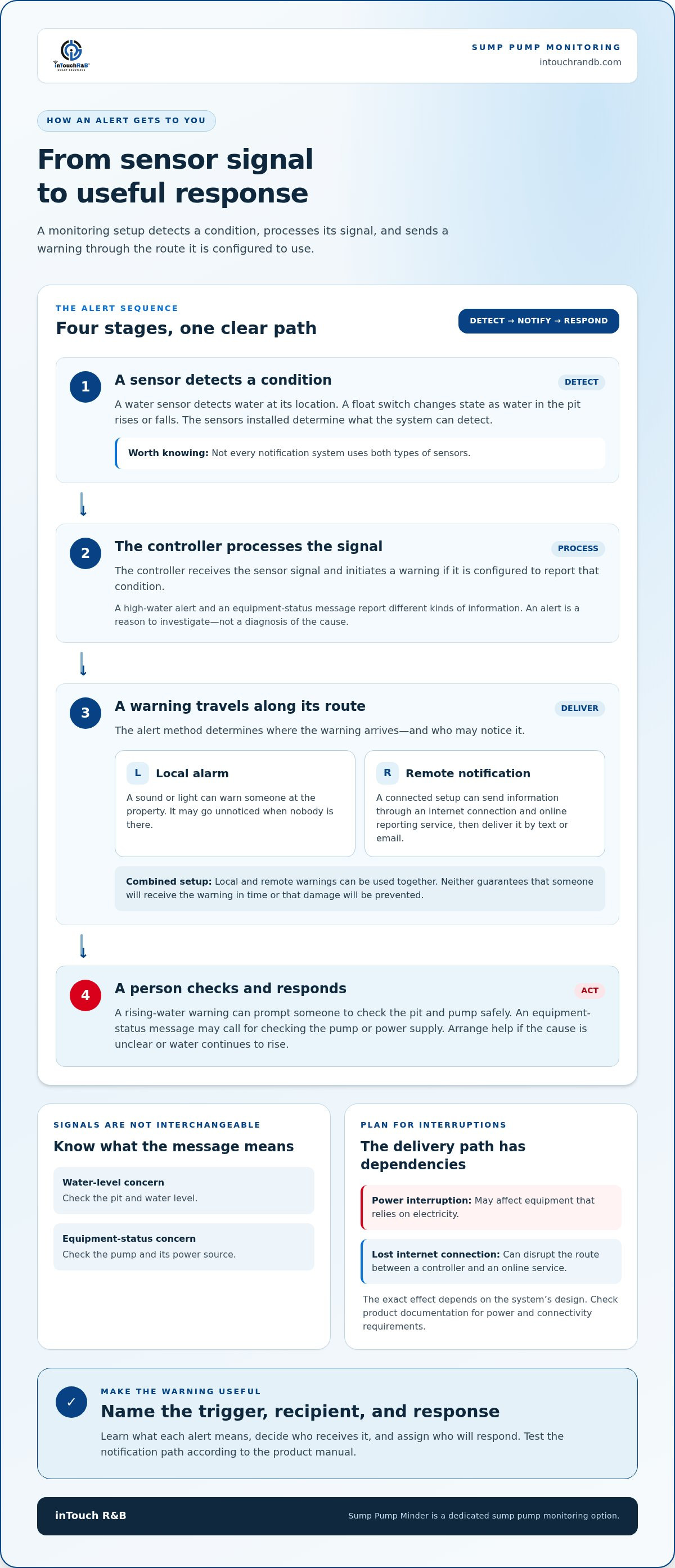
A connected monitoring setup follows a simple sequence: a sensor detects a condition, a controller receives and processes its signal, and the system sends a notification if it is configured to report that condition. The sensor notices a change; the controller turns that information into an alert.
The details depend on the equipment and sensors installed. A water sensor may detect water at a particular location, while a float switch responds to the water level in a pit. A float switch is a mechanism that changes state as the water level rises or falls. Depending on the setup, that change can operate a pump or send a signal to monitoring equipment. Not every notification system uses both types of sensors.
Which sump pump conditions can trigger an alert?
Rising water is one possible warning condition when a suitable sensor is installed and configured. Equipment-status information is different: it relates to the pump or its operation rather than measuring water at a sensor’s location. Pump activity, power status, and water level are separate things to monitor. Check the product instructions to learn which conditions a system reports and what each alert means.
This distinction helps you respond appropriately. A high-water warning points you toward checking the pit and water level. An equipment-status message may call for checking the pump or its power source. Neither message necessarily identifies the cause, so treat it as information to investigate rather than a diagnosis.
How alerts travel from a sensor to a person
In a connected setup, the controller uses an internet connection to send information to an online reporting service, sometimes called the cloud. The service can then help deliver a message to the recipient by text or email. inTouch R&B’s monitoring solutions provide text and email notifications. The specific alerts depend on the monitoring setup and sensors.
Remote communication depends on more than the sensor. A power interruption can affect equipment that relies on electricity, and a lost internet connection can disrupt the route between a controller and an online service. The exact effect depends on the system’s design. Review the product documentation for power and connectivity requirements, and consider pairing remote notifications with a local warning where appropriate.
Make the alert sequence practical by naming the trigger, recipient, and response. If a message reports a water-level concern, the recipient can check the property and see whether the pump is running. If it reports an equipment concern, they can inspect the pump and power supply. Assigning those steps in advance turns a technical notification into a response plan.
Sump Pump Minder is inTouch R&B’s dedicated option for sump pump monitoring. Explore inTouch R&B’s remote monitoring solutions to see how notifications can fit into your home’s plan.
Compare sump pump notification options by trigger, reach, and limitations
Choose an alert method by weighing where the warning arrives against what it tells you. A local alarm can reach someone nearby, while a connected notification can reach someone away from the property. A combined approach offers both types of warning. Compare the trigger, reach, next step, and limitations to find the right fit for your home.
Local alarm, Wi-Fi notification, or both?
A local alarm sounds or displays a warning at the property. Someone nearby can notice it and respond, but it may not help when the home is empty. A Wi-Fi-connected alert can send a message remotely, but it depends on the equipment’s connection and internet access. A combined setup can provide both an onsite warning and a remote message, with each alert path still subject to its own limitations.
What a comparison table should help you decide
Use this overview as a starting point, not a promise of what every model detects. Sensors and system features determine the alert triggers. Check the product instructions to match those triggers to your needs, especially if you want to monitor water level, pump activity, or power status.
| Option | Possible trigger | Where the warning arrives | Useful next step | Limitations to consider |
|---|---|---|---|---|
| Local audible alarm | A condition detected by its installed sensor, such as water at the sensor | At the property, through a sound or light | Someone nearby can check the pit and pump | May go unnoticed if nobody is present; detection depends on the sensor |
| Connected notification | Water or equipment condition supported by the installed system | Remotely, through the system’s available notification method | The recipient can assess the situation or arrange for someone to check | Remote delivery may be affected by power or internet interruptions |
| Combined approach | One or more conditions supported by the installed sensors and equipment | At the property and remotely, if both alert paths are configured | A nearby person or remote contact can respond | Combines alert methods, but doesn’t remove their individual limitations |
Treat backup power and alternate connectivity as separate questions. A backup power source may help equipment stay on during an electrical interruption, but it doesn’t automatically provide an internet connection. An alternate connection may help maintain communications, but it doesn’t power equipment that has lost electricity. Check the system’s documentation and plan for the specific interruption you’re concerned about.
If nobody is usually home, prioritize how a remote message reaches a responsible person and what they can do next. If someone is often nearby, a local alarm may provide a practical warning, with remote alerts adding reach. Sump Pump Minder can be part of your monitoring comparison. For more information, visit inTouch R&B.
Set up a dependable sump pump alert and response routine
An alert is most useful when everyone knows who will receive it and what happens next. Set up a response plan alongside the notifications, so a warning doesn’t leave household members or property contacts guessing. Keep the plan somewhere recipients can find it, and update it when contact details or responsibilities change.
Create a clear recipient and response plan
Choose a primary recipient and a backup person who can access the property. Make sure each person understands which alerts they may receive, how to reach the other contact, and who will arrange follow-up if there’s a pump or water concern.
- Name the recipients. Add a primary contact and a backup who can act if the first person is unavailable.
- Assign the first check. Decide who can inspect the sump area and how they’ll share what they find.
- Agree on follow-up. Identify who will arrange qualified repair if the pump appears faulty or the cause isn’t clear.
- Keep details current. Update phone numbers and email addresses, and tell every recipient about changes to the plan.
Be specific about the handoff. The person who receives an alert can notify the backup if they can’t get to the property. The person checking the area can report whether water is rising and whether the pump appears to be operating. If repair is needed, assign someone to arrange it rather than assuming another person will.
Test alerts without assuming the system is working
Follow the product manual to test the sensor and notification delivery during setup, then repeat checks as recommended. Confirm that recipients can identify a test message and understand what to do. Record the test and investigate missing, repeated, or unexpected alerts instead of assuming the setup is working as intended.
A simple log makes changes easier to spot. Record the test date, the alert condition tested, which recipients received it, and any issue that needs follow-up. If a notification doesn’t arrive, use the manual’s troubleshooting steps and review recipient details and connectivity. Don’t create a risky condition or handle electrical equipment around water just to test an alert.
If a real warning arrives, note its time and wording, then follow the system instructions. Have the assigned person approach the sump area cautiously and check from a safe position. If water is rising, the pump isn’t working, or the cause is uncertain, arrange qualified help rather than attempting repairs beyond their ability. Record what was observed and what action was taken to support follow-up.
Use the same routine for every recipient, including anyone who may respond while you’re away. A named backup, a tested alert path, and a written record make it easier to turn a warning into timely action. To explore a remote monitoring option for your sump pump plan, view inTouch R&B’s monitoring solutions.
How Sump Pump Minder fits into a home notification plan
Sump Pump Minder is inTouch R&B’s dedicated sump pump monitoring option. It can be part of a home notification plan, helping inform someone when the monitoring system detects a concern. Monitoring equipment reports information; a person still needs to understand the alert and decide what to do.
inTouch R&B’s monitoring solutions send text and email notifications. The specific conditions a setup can detect depend on its installed sensors and equipment. Use the product information to understand what an alert reports. Monitoring can support a response, but it doesn’t replace the pump or take care of repairs.
Match the monitoring solution to the concern you want to notice
Start with the concern you want to monitor. Do you want to know if water reaches a sensor, receive information about equipment status, or be notified remotely while you’re away? These are different needs. The installed sensors determine what a system can detect, so match the setup to the warning you want and learn what each notification means.
Write down the question you want an alert to answer. “Is water rising near the sump?” is different from “Is there an equipment concern?” A sensor positioned to detect water in one location may not report a separate pump-status issue. Use the product documentation to understand what each sensor detects and where it should be installed. For a broader comparison, inTouch R&B’s monitoring system comparison can help you consider how monitoring options differ.
Take the next step with a practical alert plan
Decide who will receive notifications before putting a monitoring setup into use. Name a primary recipient and a backup, then agree on who can check the property and who will arrange follow-up if an alert points to a problem. Include recipients in setup and notification tests, and make sure they know where to find the product instructions.
After installation, follow the manual to test the alert path and confirm that recipients recognize the messages. Keep contact information current, record test results, and revisit responsibilities if the people or access arrangements change. A practical plan connects the alert to someone who can act without assuming every message will arrive or that monitoring will prevent damage.
Explore Sump Pump Minder from inTouch R&B as a dedicated option for your sump pump notification plan.
Make your next step a more prepared home
Plan for a pump concern before one arises. Consider how you want your home monitored, who should be kept informed, and how your setup can adapt if household or property arrangements change. A sump pump failure notification system can help you learn about a detected concern, while a response plan connects the warning to action.
Explore Sump Pump Minder as part of your plan for remote sump pump monitoring. Think about how it can fit alongside your existing sump pump and the people you rely on to respond.
Take the next step toward a practical monitoring plan with inTouch R&B. NO Monthly Subscription Required.
Frequently Asked Questions
Can a sump pump failure notification system alert me when I am away from home?
Yes. A connected sump pump failure notification system can send an alert when its monitoring and communication path is available. For example, you might receive a message while at work and ask your designated contact to check the property. Keep contact information current, understand what conditions the system detects, and name a backup person who can respond.
What happens if the Wi-Fi or power goes out?
Remote notifications may be interrupted if the equipment loses power or its internet connection, depending on the system’s design. Backup power and alternate connectivity are separate features, so one doesn’t automatically provide the other. Review the product manual to understand how your setup behaves during an outage. If power or internet loss is a concern, include a local warning and a person who can check the property in your response plan.
Does a sump pump alarm mean the pump has failed?
No. An alarm means the system detected a condition it was set up to report, not necessarily that the pump has failed. A water-level alert, for instance, could mean water reached a sensor; it doesn’t explain why. Check the message and device instructions before deciding what it indicates. If you can safely access the area, look for obvious issues and arrange qualified repair if the pump isn’t operating as expected.
Can a notification system prevent basement flooding by itself?
No. A notification system reports a detected concern; it doesn’t remove water or repair a pump. Its value is helping someone learn that attention may be needed. Prevention also depends on the pump and the actions taken after an alert. Maintain the pump according to its instructions, know who can respond, and arrange help if water is rising or the cause isn’t clear.
Can more than one person receive a sump pump alert?
Yes. inTouch R&B’s monitoring solutions can send notifications to an owner and a secondary contact. A second recipient can help if the owner is traveling or can’t reach the property. Agree on who will check the alert first, who serves as backup, and how they’ll share updates. Keep both people’s contact information current, and make sure each knows how to recognize and respond to a notification.
How often should I test a sump pump notification system?
Test the system during setup and periodically afterward, following the product manual. The manual explains how to test a sensor without creating an unsafe condition or an unwanted pump response. Record the test date, which alert was checked, and whether the intended recipient received it. If a test message is missing or unexpected, investigate before depending on the alert path.
NO Monthly Subscription Required.

Article by
Jimmy Nesbitt
Principle
Be the first to comment