

A furnace problem at one site shouldn’t go unnoticed until someone visits in person. A remote furnace failure alarm monitors conditions such as temperature and sends an alert when a reading meets a configured trigger, helping staff identify which location needs attention.
For multi-site HVAC teams, the value lies in a clear alert process across locations, not simply another notification. A useful setup defines which conditions to monitor, how the system reports them, and who responds when an alert arrives.
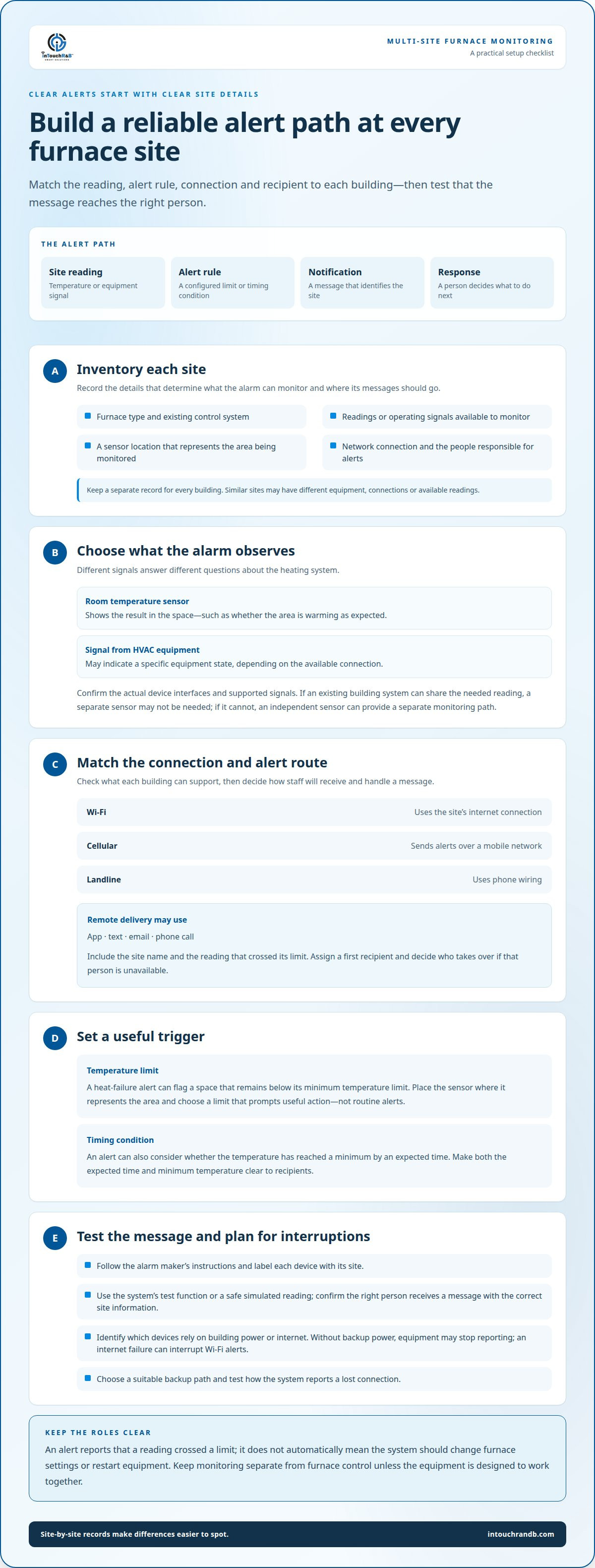
This guide explains how multi-site alarm management works, which conditions teams can monitor, and how alert rules turn readings into notifications. It also covers practical considerations for choosing thresholds and routing alerts to the people responsible for each site.
Key Takeaways
- Choose the furnace readings that will give your team a useful early warning, then decide who should receive each alert.
- Map how monitoring equipment will connect with each site’s HVAC setup before setting up notifications.
- Set limits that reflect the conditions each location needs, and review them when operating needs change.
- Use alerts to help teams spot a problem sooner, prioritize site visits, and respond before a small issue causes greater disruption.
Alarm notifications for readings outside set limits
A monitoring system compares temperature readings with a configured limit and sends a notification when the reading meets the alert condition. Staff can use the message to identify the affected site and decide what response is appropriate.
Heat Failure Triggers
A heat failure notification can be triggered when a sensor reports that a space remains below its minimum temperature limit. If a building should be warming but the reading stays low, the alarm flags the condition for review. Place the sensor where it represents the area you need to monitor, and choose a limit that prompts useful action rather than routine alerts.
Remote Notification Options
Remote notifications may arrive by app, text, email, or phone call, depending on the system. For a team overseeing several buildings, include the site name and the reading that crossed its limit. Decide who receives each alert and who takes over if the first recipient is unavailable.
Wi-Fi systems use the site’s internet connection, cellular systems send alerts over a mobile network, and landline systems use phone wiring. Compare the connections available at each building and consider how alerts will be handled if a network goes down.
Building codes, insurance policies, and warranties set separate requirements and coverage terms. Don’t assume an alarm is universally required or covered. Review the applicable local code and written policy or warranty terms before relying on an alarm for compliance or reimbursement.
Remote alarm costs depend on the equipment, installation work, connection method, and any ongoing service fee. For a multi-site setup, account for the number of locations and the monitoring approach at each one, rather than assuming one site’s setup represents every building.
For installation, follow the alarm maker’s instructions, place the temperature sensor where it can represent the space, and configure the alert limit and recipient list. Test the notification using the system’s test function or a safe simulated reading, then confirm that the correct person receives a message identifying the site.
During a power outage, a sensor or communication device without backup power may stop reporting; an internet failure can interrupt Wi-Fi alerts. Before setup, identify which components rely on building power or internet. Choose a suitable backup path and test how the system reports a lost connection.
An alert condition can account for timing as well as the measured limit. For example, a networked temperature sensor could send an alert if the indoor temperature has not reached a minimum by the expected time. This focuses the notification on whether warming is progressing as expected, not just whether a reading is below a threshold. Make the expected time and minimum temperature clear to recipients so they understand the alert and can decide on follow-up.
Integration with existing HVAC equipment and protocols
An alarm can monitor a furnace without replacing its controls, but the connection method matters. Some systems use a separate temperature sensor; others read a signal from existing HVAC equipment. The right approach depends on the furnace’s available connections, the information your team needs, and whether monitoring should remain separate from heating control.
Start by identifying what the alarm needs to detect. A room sensor can report that a space is not warming as expected, while a connection to a control circuit may indicate a specific equipment state. These signals answer different questions: temperature shows the result in the space, while a furnace signal may indicate what the unit is doing.
Before installation, map each site using a simple equipment inventory:
- Record the furnace type and the control system already in place.
- Note which readings or operating signals are available to monitor.
- Identify where a sensor can measure conditions relevant to the protected area.
- Document the site’s network connection and who should receive its alerts.
Protocols are rules devices use to exchange information. A building system may use a shared communication protocol, while a standalone alarm may rely on its own sensor and connection. Compatibility depends on the actual device interfaces and supported signals, not simply on both systems being described as “smart.” Confirm those details to avoid relying on a connection the equipment cannot provide.
For example, a site may have a building management system that already gathers temperature readings. If the alarm can use an available reading, the team may not need a separate sensor. If the system cannot share that data, an independent sensor may provide a separate monitoring path. Either way, continuous monitoring depends on the sensor staying powered, communicating properly, and reporting the intended condition.
Keep monitoring and furnace control separate unless the equipment is designed to work together. An alert system can notify staff that a reading crossed a limit; that does not mean it should change furnace settings or restart equipment. This distinction helps teams understand whether a message reports an observed condition or an automated control action.
During setup, match each device to its site, label the connection, and test the reading against the displayed value. Then trigger a test alert and confirm that its location and message make sense to the recipient. For a broader view of equipment monitoring, explore the monitoring options for connected equipment.
For multi-site teams, use the same inventory process at every building, but record each site’s equipment and connections separately. Consistent records make it easier to spot differences, plan maintenance, and understand which readings each alarm can provide.
Where a standalone alert is more suitable than a shared HVAC connection, the controller’s listed notification method can be considered alongside the site’s existing equipment and alert-routing needs. A 120V Temperature Alarm Controller is listed with a 105dB sound and light alert. Teams should confirm that the device’s power and notification approach fit the installation, and verify that recipients can recognize the alert and respond using the site’s established procedures.
Customizable alarm limits and thresholds
A useful temperature threshold reflects the needs of a specific space, not a generic setting copied across every building. A storage area, office, and rarely used room may have different operating conditions. Set each limit around the condition that requires attention, and assign a clear response to each alert.
Begin by deciding what the system should detect. A low-temperature limit can flag a space that is colder than its acceptable range; a high limit can identify unexpected warmth. Where the equipment supports it, a time-based condition can distinguish a brief change from a temperature that remains outside the set range.
For each monitored area, record:
- The space or equipment the reading represents.
- The acceptable temperature range for that location.
- The person or team responsible for responding.
- The action to take when a reading crosses a limit.
Use the building’s actual operating needs to guide these choices. A room that is unoccupied overnight, for example, may follow a different schedule from a staffed area. If the monitored temperature is expected to change during normal operations, note that pattern before setting the alert. This helps distinguish an expected condition from one that calls for investigation.
Thresholds also affect how often staff receive notifications. A limit set too close to normal temperature variation may produce repeated alerts that need no action. A limit set too far from the condition that matters may delay notice. Review the expected range, sensor location, and response time the team needs, then adjust the limit to support a practical decision.
For a multi-site operation, keep a separate record for each location rather than applying one setting everywhere. A site with different hours or heating needs may require a different limit. Use consistent labels, such as building and room name, so staff can connect each alert with the correct space. For locations with similar operating conditions, follow the same review process while retaining individual settings.
After setting limits, test each one using the system’s available test method. Confirm that the reading is associated with the right location and that the intended recipient receives the notification. Review settings after changes to room use, equipment, or operating schedules. Documenting what changed and who owns the response helps keep thresholds useful as site conditions evolve.
Preventing downtime and equipment damage
A furnace alarm can flag a falling indoor temperature so staff can investigate before a site stays cold for too long. It may help teams limit disruption, but it cannot repair a furnace or prevent every equipment failure. Sensors report the conditions they measure, not every fault inside the heating system.
One reported failure left a home at 50 DegF after the furnace stopped firing. In a managed building, a similar temperature reading could prompt staff to check the affected space, confirm the furnace has stopped heating, and arrange the appropriate response. The alert provides an earlier signal, while diagnosis and repair remain separate steps.
Temperature monitoring is most useful when the sensor measures the area that matters. A sensor near a draft, doorway, or heat source may show conditions that don’t represent the occupied space. During setup, choose a location that reflects the room’s normal temperature, label it clearly, and confirm its reading matches the conditions staff expect.
A remote alert can help teams prioritize visits across several buildings. A message identifying the site and affected area gives the recipient a clear starting point. Staff can review the reading, contact someone at the location, and decide whether a service visit or another action is needed. A clear escalation plan ensures each alert has an assigned response.
To make each notification useful, define the next action alongside the temperature limit:
- Identify which team receives the first alert for each building.
- Set a backup recipient if the first person cannot respond.
- Record how staff should report the furnace’s condition after investigating.
- Keep the site name and sensor location consistent in alert labels.
A temperature sensor may not detect a furnace fault if the reading at its location has not changed. It may also fail to identify the faulty part, such as a blower motor or flame sensor. Those problems require separate troubleshooting; treat an alarm as an indicator, not a complete equipment diagnosis.
Monitoring also depends on the sensor and its communication path working as intended. If a device loses power or connection, staff may not receive a current reading. Include loss-of-signal checks in the monitoring plan and test that a sample alert reaches its assigned recipient. This helps distinguish a stable temperature from a sensor that has stopped reporting.
After an alert, record the reading, site, and response. Reviewing these details can help teams recognize recurring problems at a location and improve future escalation. The alarm supports timely decisions; maintenance and repair address the underlying furnace problem.
What is a remote furnace failure alarm and how does it work?
A remote furnace failure alarm monitors a condition related to heating, then sends a notification when that condition meets a set trigger. It typically involves a sensor or equipment signal, an alarm device, a communication path, and an assigned responder. The exact setup depends on what the system measures and how the site sends alerts.
For example, a temperature sensor can report that a room remains below its chosen limit. The alarm compares the sensor’s reading with that setting. If the reading crosses the threshold, the system sends an alert through its available connection. A staff member can then identify the location, review the message, and arrange an inspection.
Some systems monitor room temperature; others receive a signal from connected equipment. These methods reveal different information. A low room reading indicates that the space is cold, while an equipment signal may indicate a furnace operating condition. Neither automatically identifies every failed part. A blower motor problem or dirty flame sensor may require separate diagnosis.
A typical alert sequence follows these steps:
- A sensor measures temperature, or equipment provides a status signal.
- The alarm compares that input with the selected trigger.
- If the trigger condition occurs, the system sends a remote notification.
- The assigned person reviews the site and reading, then chooses a response.
For a multi-site team, location labels matter. An alert that says “north office, second-floor room” gives staff a useful starting point. A message that only says “temperature low” leaves them to identify the building and sensor. Consistent site names help route notifications to the people responsible for each location.
Connection type determines how the message travels. Depending on its design and the site, a system may rely on Wi-Fi, cellular service, or a landline. The alarm’s sensor, power source, and communication path all affect whether it can report a condition. Include a connection-loss test during setup so staff know when readings stop arriving.
An alarm reports the condition it can measure; it doesn’t repair the furnace or confirm the cause. Treat a notification as a prompt to investigate, not a complete diagnosis. The system helps teams notice a problem and direct attention to the right place.
To explore remote monitoring options for equipment across your sites, view monitoring solutions.
InTouch R&B
inTouch R&B offers remote monitoring and alert products for critical equipment, including HVAC systems. For teams monitoring HVAC conditions across sites, HVAC Minder is one relevant option. Bilge Minder, Light Minder, and GPS Tracking System address other monitoring needs.
Use this guide to identify which readings matter, how alerts should reach your team, and who will respond. This gives you a practical starting point for a monitoring approach suited to your buildings and operating needs. NO Monthly Subscription Required.
Contact inTouch R&B to discuss your equipment monitoring needs.
Plan your next monitoring step
Choose one site as a starting point for planning your remote furnace failure alarm. Note the readings your team needs, who should receive an alert, and how staff will respond. This practical outline can help shape a monitoring approach around your buildings and operating needs.
inTouch R&B offers Bilge Minder, HVAC Minder, and Light Minder for remote monitoring of critical equipment. If you’re considering how monitoring could support your sites, contact inTouch R&B to discuss your needs. A clear plan is a steady first step toward keeping your team informed. NO Monthly Subscription Required.
Frequently Asked Questions
How does multi-site HVAC alarm management work?
Multi-site HVAC alarm management organizes monitoring and alerts across separate buildings. Associate each location’s readings and recipients with clear site labels so staff can tell which property needs attention. For example, a facilities team can route a warehouse alert to its assigned technician and an office alert to another contact. A shared response log can help track follow-up across sites.
What types of furnace failures can remote alarms detect?
Remote alarms can flag conditions associated with a furnace problem, such as a space staying colder than its configured limit or a monitored equipment signal changing. The indication depends on the sensor or signal being monitored. An alarm can show that something needs attention, but may not identify the failed component or explain the cause. Use the alert to guide inspection and diagnosis.
Can a smart thermostat or temperature sensor alert me if my furnace stops working?
Yes, if the device supports remote notifications and is configured to send them when temperature or heating conditions meet an alert rule. A temperature sensor can report that a room isn’t warming as expected, while a thermostat may show a difference between the set temperature and room reading. Confirm that alerts are enabled, recipient details are current, and a test notification reaches the intended person.
NO Monthly Subscription Required.
Be the first to comment