

The most feature-packed tracker may not be the right fit for your fleet. A gps tracker for construction equipment needs to suit the machine, the job-site conditions, and the way your team responds to alerts. When equipment moves between active sites, it can be difficult to confirm where it is. Comparing trackers gets harder when details about coverage, installation, and notifications are unclear.
Look beyond the dot on a map. Before choosing a system, find out what information it provides, how often it updates, and whether it works where your equipment operates. This guide explains how to assess those details, choose alerts that support day-to-day oversight, and plan a rollout your team can manage.
We’ll cover how to match a tracker to equipment and site conditions, what to confirm about power, connectivity, installation, and alerts, and how to decide who responds to a notification. inTouch R&B offers a GPS Tracking System for mobile assets. Confirm construction-equipment compatibility and product details directly before deciding whether it fits your needs.
Key Takeaways
- A gps tracker for construction equipment can help teams check asset locations, support accountability, and prepare a response if equipment goes missing.
- Tracking devices report location information for authorized users, but update timing and available functions vary by system.
- Compare dedicated devices, equipment-integrated options, and fleet platforms by checking installation, location visibility, alerts, user access, and ongoing upkeep.
- Before rollout, inventory equipment, record normal locations and responsibilities, prioritize assets, verify compatibility, assign access, and test the response process.
- inTouch R&B offers a GPS Tracking System for mobile assets such as boats and RVs. Confirm construction-equipment suitability and product details before selecting it.
Why use a GPS tracker for construction equipment?
A GPS tracker reports an asset’s location, helping a construction business check where equipment is, identify who is responsible for it, and prepare a response if it goes missing. A GPS tracking unit is one way to support asset tracking. The information it provides depends on the specific device and service.
Think of location tracking as one part of equipment oversight, not a complete picture of a machine. A location report alone doesn’t confirm whether an excavator is running well, how many hours it has worked, or whether it needs maintenance. A gps tracker for construction equipment can support location checks and accountability, but it can’t guarantee that theft will be prevented or equipment recovered.
For a general example of a tracker marketed for vehicles, trailers, and construction equipment, watch the video below. It doesn’t replace checking whether a particular device suits your equipment and work sites.
Which construction equipment might an operator want to track?
Start with mobile, high-value, or frequently relocated assets. An excavator moving between sites, a loader shared among crews, or equipment left away from a staffed work area may be worth evaluating. For contractors operating specialized foundation machinery or exploring venta de vibrohincadores en méxico, tracking these critical assets helps protect substantial investments. These are examples of possible priorities, not confirmation that a particular tracker is compatible with those machines.
Before comparing devices, record each asset’s identifier, responsible person or team, and usual operating locations. For example, if a loader is shared between crews, note the team responsible for its current assignment. This baseline helps staff distinguish an unexpected location from a planned move.
What problems can equipment location visibility help address?
Location information can help a supervisor check which site an asset is at, confirm a planned move, or locate equipment when a crew needs it. If an asset appears to be missing, current records and an agreed response process are important. Identify the equipment, contact the responsible people, and share relevant information with the appropriate authorities.
Location visibility can support a theft response, but it doesn’t guarantee prevention or recovery. Use tracking alongside clear asset records, assigned responsibility, and a plan for what to do when equipment can’t be accounted for.
How does GPS tracking for construction equipment work?
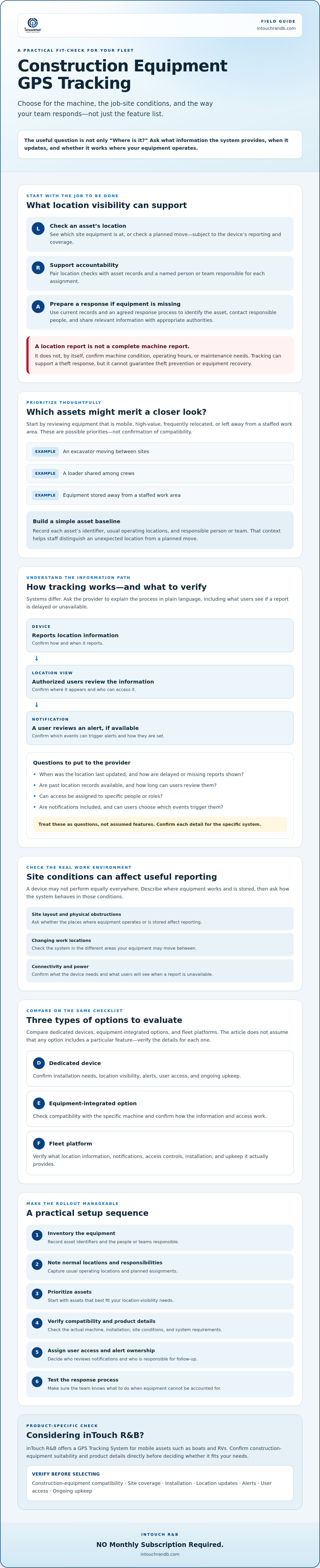
At a basic level, a tracking device reports location information for an authorized user to review. How that information travels from the device to the user depends on the system. Don’t assume all trackers update at the same pace or include the same tools. Ask the provider to explain the full process in plain language, including what the user sees when a report is delayed or unavailable.
Simple tracking flow: Device reports location (confirm how and when) → location view is provided (confirm where and who can access it) → user reviews a notification (confirm whether alerts are available and how they’re set).
What information should a GPS equipment tracker provide?
Start with the information your team needs to act. Ask how a device’s location appears to users and when it was last updated. Then verify possible features with the provider rather than treating them as standard:
- Are past location records available, and how long can users review them?
- Can access be assigned to specific people or roles?
- Are notifications included, and can users choose which events trigger them?
- How are missing or delayed location reports shown to the user?
These are questions to ask, not assumed product features. Clear answers help you check whether the system supports your response process and avoid relying on information the device may not provide.
What can affect GPS tracking at a construction site?
Site layout, equipment storage, changing work locations, connectivity, power, and physical obstructions can all affect whether a device provides useful reports. The impact depends on the device and the conditions, so don’t assume it will work equally well everywhere. Describe where the equipment operates and ask the provider about coverage, reporting, and what users see if a location update isn’t available.
If possible, evaluate the device under conditions similar to those where you’ll use it. Confirm the power requirements and installation considerations for each type of asset. MarketsandMarkets’ heavy equipment telematics market report projects growth from $1.33 billion in 2025 to $3.21 billion by 2032. Market growth doesn’t establish whether a particular tracker suits your machines. Verify compatibility, connectivity, update behavior, and alerts directly with the provider.
Compare GPS tracker options for construction equipment
Trackers generally fall into three categories: dedicated GPS devices, equipment-integrated tracking, and broader fleet platforms. These are starting points for comparison, not guarantees of any product’s capabilities. A dedicated device may be an option for adding tracking to an asset. Some equipment may offer an integrated option, while a fleet platform may bring information about multiple assets into one system. Confirm functions and compatibility with each provider.
Dedicated GPS tracker or equipment-integrated tracking?
There’s no universally better choice. Consider the equipment type, installation process, and how your team needs to view and use location information. Don’t assume a machine has manufacturer-installed tracking or that an existing system includes the functions you need. Ask the provider to confirm support for each asset and explain how the system fits your team’s workflow.
Which comparison criteria matter most to your operation?
Use a side-by-side checklist, and mark unknown details for follow-up. The table lists questions to ask, not features guaranteed in any category.
| Option | Installation and power | Location, alerts, and access | Records, maintenance, and support |
|---|---|---|---|
| Dedicated GPS device | Ask how it’s installed, what power it needs, and whether the equipment type is supported. | Confirm how location is displayed and updated, which alerts can be set, and who can access them. | Ask whether past location records are available, what upkeep is needed, and what support is provided. |
| Equipment-integrated option | Verify which machines are compatible and whether setup depends on the equipment configuration. | Confirm the update timing, alert controls, and user-access process for the specific system. | Ask how records are retained and whether maintenance or support is handled separately. |
| Broader fleet platform | Check what devices or equipment can connect and what installation or power needs apply to each. | Ask whether users can view the assets they’re responsible for and configure relevant notifications. | Confirm record access, ongoing upkeep, and how the provider handles questions or issues. |
Before choosing a gps tracker for construction equipment, write down how often you expect location updates, who needs access, which notifications should prompt action, and how long you need to review past records. Request written confirmation of compatibility, installation, power requirements, and stated capabilities. Comparing the same details across providers makes it easier to spot gaps before rollout.
For broader asset-tracking context, look for guidance that explains how tracking fits into equipment oversight, not just a list of device features. For operations seeking enterprise-level deployment, visit Sicuro Technology to explore specialized fleet and asset tracking platforms. Keep the practical questions in view: what will the system report, who will use that information, and what should your team do next?
Plan a practical GPS tracking rollout across job sites
A smooth rollout starts with a clear purpose and accurate records. Before installing a gps tracker for construction equipment, document where assets normally work and who is responsible for them. This gives your team a baseline for distinguishing planned moves from unexpected ones and for checking whether the system supports daily operations.
Prepare equipment and people before installation
Create an inventory with each asset’s type, identifier, usual locations, and responsible contact. Confirm installation and power requirements with the provider and the equipment documentation. Decide who can view location information, how access will be updated when responsibilities change, and who should receive notifications. Explain these expectations to staff before tracking begins.
Test tracking and agree on a response process
Begin with selected equipment instead of deploying across every site at once. Check location reporting and notifications under representative operating conditions, and record gaps or questions for the provider. Before the pilot, agree on who reviews an alert, who checks whether a move was authorized, and what to do if a location is unexpected or unavailable.
Use this rollout sequence:
- 1. Inventory assets. Record equipment types, identifiers, ownership or responsible contacts, and normal operating locations.
- 2. Prioritize needs. Select equipment based on your location-visibility and accountability goals, and define what an alert should prompt staff to do.
- 3. Verify compatibility. Confirm device fit, installation, power needs, coverage, location updates, and available notifications with the provider.
- 4. Assign access. Give location access to the people who need it, and make clear who is responsible for reviewing alerts.
- 5. Pilot and test. Trial the setup on selected assets. Check reporting and notifications, practice the response steps, and resolve open questions before expanding.
Keep the response plan straightforward. The alert recipient checks the equipment record and contacts the responsible person to verify the move. If the location remains unclear, follow your organization’s escalation process and contact appropriate authorities. Don’t treat a missing update as proof of theft. First check whether the information is current and what the system can report.
Review assignments, access, and response steps when equipment moves between sites or responsibilities change. If you’re considering inTouch R&B’s GPS Tracking System for mobile assets, ask about construction-equipment compatibility and tracking details before planning installation.
Evaluate inTouch R&B for construction equipment GPS tracking
inTouch R&B offers a dedicated GPS Tracking System for mobile assets. The product information describes boats, RVs, and other mobile assets, but doesn’t confirm support for construction equipment. Treat compatibility as an open question. Describe the machines and operating conditions you need to support, and request product-specific answers before considering a gps tracker for construction equipment.
What should you confirm with inTouch R&B?
Ask about the specific equipment and intended use. A general description of mobile assets doesn’t establish compatibility with a particular excavator, loader, or other machine. Confirm details directly with the company, including:
- Whether the GPS Tracking System supports your specific equipment and how it’s used.
- How location is shown and updated, and what connectivity the system needs.
- Whether geofencing, a virtual boundary around a location, and alerts are available, and which events can trigger a notification.
- What power and installation requirements apply to each asset.
- Who can access location information, what support is available, and which subscription or other terms apply.
Request written confirmation of compatibility and any specifications you’ll rely on. If you need to track equipment across different operating environments, describe those conditions and ask how the system is expected to perform there. Don’t infer features from general product descriptions. Verify each one for the GPS Tracking System itself.
Choose a next step with clear expectations
Before contacting the provider, prepare a short summary of equipment types and identifiers, usual operating locations, who needs access, and what you want location information or alerts to help your team do. This makes it easier to discuss fit and identify unanswered questions about installation, connectivity, updates, and alerts.
Explore inTouch R&B’s monitoring solutions, then confirm directly whether the GPS Tracking System is suitable for your construction equipment and intended use. Ask whether the no-monthly-subscription statement applies specifically to this system. The available information doesn’t confirm that term for the GPS Tracking System, so verify it with the company before relying on it.
Before treating this as a confirmed term for the GPS Tracking System, verify that it applies: NO Monthly Subscription Required.
Make your next tracking decision with confidence
A gps tracker for construction equipment is most useful when it suits the asset, site conditions, and your team’s response plan. Compare options by confirming compatibility, location updates, connectivity, installation, alerts, and user access. Before rollout, document equipment locations and responsibilities, then test the process with selected assets before expanding.
inTouch R&B offers a dedicated GPS Tracking System for mobile assets. Its product information describes real-time location and security monitoring for boats, RVs, and other mobile assets, but construction-equipment suitability and specific features still need confirmation. Prepare your equipment details and tracking needs, then explore inTouch R&B’s monitoring solutions and ask the company about fit and terms.
Confirm those details before choosing so you can make a decision based on your equipment and operating needs. Verify whether this statement applies to the GPS Tracking System before relying on it: NO Monthly Subscription Required.
Frequently Asked Questions
Is a GPS tracker for construction equipment worth considering?
It may be worth considering when equipment value, location-management needs, operating conditions, and response procedures justify the added oversight. A gps tracker for construction equipment can give authorized users location visibility and help teams account for assets across work locations. It doesn’t physically prevent theft or guarantee recovery. List the equipment you want to track and the decisions location information should support, then verify that a provider supports those assets.
Can a GPS tracker be installed on any construction equipment?
No. Compatibility depends on the specific tracking device, equipment, installation method, and machine power requirements. Before buying or arranging installation, identify each machine’s make and type, then ask the provider to confirm support. Request clear, product-specific installation and power details so you can check whether the setup suits your equipment.
How does a GPS tracker help protect construction equipment from theft?
A tracker may provide location information that helps an authorized user notice unexpected movement and coordinate a response. It doesn’t physically stop someone from taking equipment, and location information can’t guarantee recovery. Keep asset identifiers, ownership details, and response contacts current so your team can act on clear information. Before choosing a device, ask which movement alerts it supports and how users receive or review them.
What features should I compare in a GPS tracker for construction equipment?
Compare location-update behavior, user access, alert options, location records, connectivity, power needs, installation, and support. Ask the provider about each item, since features vary and aren’t guaranteed across products. Prioritize based on the equipment and where it operates. A team checking asset locations across sites may value different functions from a team focused on movement notifications. Request written confirmation of compatibility and product capabilities.
Will a GPS tracker work at every construction site?
Not necessarily. Performance depends on the tracker and site conditions, including connectivity and possible obstructions. Don’t assume coverage in remote, indoor, underground, or obstructed areas without product-specific evidence. Describe your operating environments to the provider, including where equipment is stored and how it moves between work locations. Test a selected device under representative conditions and confirm how it reports unavailable or delayed location information.
Does inTouch R&B offer GPS tracking for construction equipment?
inTouch R&B offers a dedicated GPS Tracking System described for boats, RVs, and other mobile assets. The available information doesn’t confirm compatibility with construction equipment, so don’t assume the system fits a particular machine. Contact the company with the equipment type and intended use. Ask it to verify compatibility, available functions, installation requirements, and applicable terms before deciding whether the system meets your needs.
Does a GPS tracker for construction equipment require a monthly subscription?
Subscription requirements vary, so don’t assume the answer is the same across products or providers. Ask about the specific GPS Tracking System you’re considering, including service or connectivity requirements and the full billing terms. The available information doesn’t confirm whether a no-monthly-subscription statement applies to inTouch R&B’s GPS Tracking System. Get confirmation directly from the company before relying on that claim. If confirmed for this system, the statement is: NO Monthly Subscription Required.

Article by
Jimmy Nesbitt
Principle
Be the first to comment