

What if your boat loses dock power while you’re miles away? A tripped connection or removed shore-power cable can go unnoticed, leaving batteries to support more of the onboard electrical load. A boat shore power loss alarm can notify you when monitored power is interrupted, giving you a chance to arrange a check before you return to the dock.
A power alert has limits. It can report a detected interruption, while battery monitoring can provide a voltage reading. Neither restores power or confirms that every onboard system is working. Bilge conditions also need separate monitoring, which is why Bilge Minder alerts can add useful information to a broader protection plan.
This guide explains what power-loss and battery alerts can tell you, how to interpret them, and what they can’t detect on their own. You’ll also learn how to prepare a response plan, including who should receive an alert and what to do when one arrives.
Key Takeaways
- A boat shore power loss alarm can alert you to an interruption, but it won’t restore power or fix the cause.
- Use battery-voltage readings alongside power alerts to get more context about what’s happening onboard.
- Power, battery, bilge-pump, and high-water alerts track different conditions. Choose monitoring based on the information your vessel needs.
- Decide in advance who can check the boat and how they’ll receive and respond to an alert.
- Text or email notifications to you and a secondary contact can support a more informed response when the boat is unattended.
What a boat shore power loss alarm detects, and why an outage matters
A boat shore power loss alarm monitors for an interruption in dockside electricity and notifies you when it detects a change. Shore power is the electrical supply brought from the dock to a vessel, as described in this Shore power overview. The alert reports a monitored power condition. It doesn’t restore electricity, identify every possible cause, or guarantee that equipment is safe from damage.
A power-loss alert reports an interruption to dockside power; a high-water alarm reports water reaching a monitored level inside the boat. These alerts describe different conditions. Check which one triggered before deciding what to investigate. One notification rarely explains everything happening onboard.
When dock power stops, batteries may take on more of the electrical load. Their charge can fall if powered equipment continues to run without being recharged. If battery power becomes limited, some onboard systems may not be ready when needed. An alert gives you a chance to respond, but someone still needs to check the vessel and assess what’s happening.
What can interrupt shore power while a boat is unattended?
A power cable removed from the dock pedestal, the shore-side connection point, is one documented cause of lost power. An issue with other equipment or the power supply may also interrupt it. The alarm reports a monitored change, but may not identify the cause. If you’re away, you may not notice the interruption until you receive an alert or see its effects on equipment. That’s where timely notification can help you arrange a check.
Why power loss can affect more than charging
When dockside power is unavailable, the boat’s batteries may support more of the electrical load, depending on the vessel’s setup. Refrigeration, air conditioning, and other powered equipment may also be affected. The impact depends on which systems are running and how they receive power.
Battery condition can also matter to bilge-pump readiness. Some pumps may rely on the boat’s batteries, while others may be arranged differently. A shore-power outage doesn’t mean every pump stops, but if battery charge falls, a battery-powered pump could have less electrical supply available. Monitoring pump activity or high-water conditions adds information alongside power and battery alerts. Bilge Minder monitoring can report bilge-pump or high-water conditions, which are separate from dockside power loss.
When an alert arrives, note its wording and time, then review available battery information and related alerts. This helps you distinguish a power interruption from a developing battery or bilge concern and share useful details with whoever checks the boat. Treat the notification as a prompt for follow-up, not proof that power has been restored or equipment is operating normally.
How boat shore power monitoring follows the alert from outage to battery status
Monitoring is most useful when you know what a notification does and what to check next. A monitored shore-power condition changes, the system sends an alert, and a recipient uses that information to decide what to investigate. inTouch R&B notifications can arrive by text or email. You can also include a secondary recipient, such as a marina manager or service technician.
A power alert identifies a change in dockside electricity, not the cause of every problem that may follow. It’s one piece of information. Related readings and sensor alerts can add context, but a notification alone doesn’t diagnose a fault or confirm that equipment is working normally.
Power status and battery voltage answer different questions
A shore-power alert tells you that the monitored supply has changed. A battery-voltage reading, measured in volts, gives you information about the battery’s electrical condition at the time of the reading. Neither replaces the other: dock power might be interrupted while the battery still has charge, or a battery reading may raise concern without explaining why.
For example, 11.37 VDC (volts of direct current) is an illustrative reading, not a universal low-voltage threshold. Its meaning depends on the battery and vessel. If you receive a power-loss alert, note the time and compare it with available voltage information. A later reading can show whether the condition has changed, but it won’t identify the underlying cause on its own.
How related sensors add context to a power alert
Bilge-pump activity and water-level sensing provide different clues. A pump-activity alert can tell you that a monitored pump has run. Repeated or unexpected activity after an outage may be worth investigating. A high-water sensor reports water reaching its monitored level. Neither alert confirms shore-power status, and a power alert doesn’t tell you whether water is present.
These distinctions help you read multiple notifications without treating them as interchangeable. For vessels within its scope, eCFR rules on bilge pumps address bilge-pump requirements; they shouldn’t be read as a universal rule for every recreational boat. Bilge Minder boat monitoring can complement power and battery information with bilge-pump or high-water monitoring.
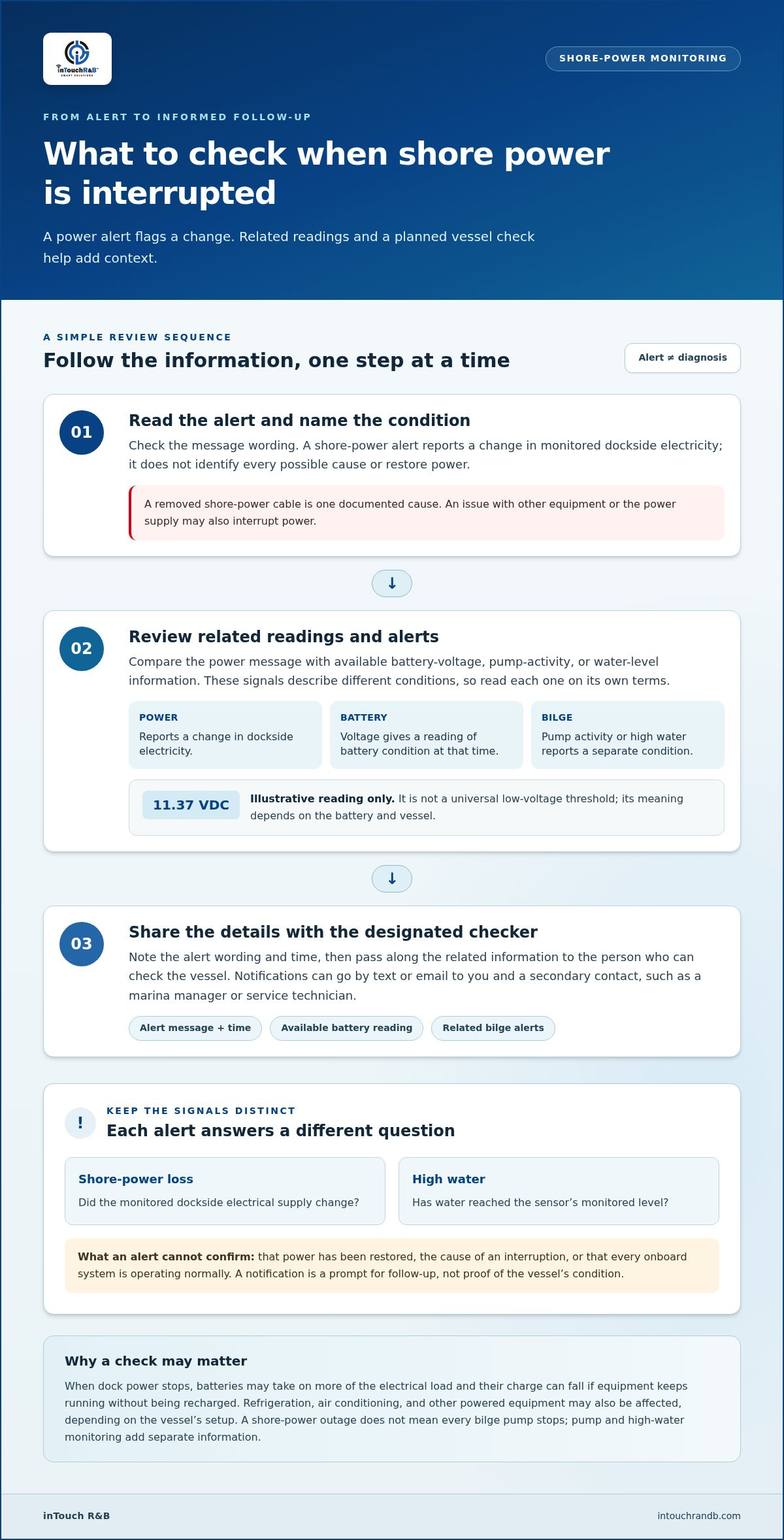
When an alert arrives, follow this simple review:
- Read the message and identify the condition it reports.
- Review related battery-voltage, pump-activity, or water-level information.
- Share the details with the person designated to check the vessel.
This turns notifications into useful context for follow-up. A boat shore power loss alarm can flag a change, while separate readings help the recipient decide what to investigate on site.
Shore power alarm versus battery and bilge alarms: what each one tells you
Several alerts may relate to the same onboard situation, but each reports a different condition. A boat shore power loss alarm can flag an interruption in dockside power. It can’t confirm that the batteries still have charge or that a bilge pump is operating. Read each notification for the specific information it provides, then consider the alerts together.
| Alert type | What it tells you | What it doesn’t confirm |
|---|---|---|
| Power status | Whether monitored dockside power is available or has been interrupted | Battery condition, pump operation, or water level |
| Battery voltage | A voltage reading that offers a snapshot of battery condition | Why the reading changed or whether every onboard system is powered |
| Bilge-pump activity | Whether the monitored pump has operated | Whether the cause is a leak, routine water, or another condition |
| High water | Whether water has reached the sensor’s monitored level | Shore-power status or the cause of the water |
Which alarm answers which question?
Think of the alerts as answers to separate questions: Is dock power present? What voltage is being reported? Has the monitored bilge pump run? Has water reached the high-water sensor? Voltage adds context, but one reading doesn’t explain why it changed or guarantee that a battery can support every load. Pump activity reports operation, while a high-water alert reports a water condition. These alerts are related, not interchangeable.
When combined monitoring provides more useful context
Suppose you receive an outage notice along with a battery reading. The first reports a change in power availability; the second gives you a snapshot of battery voltage. Together, they offer more context than either alert alone, but they don’t identify the fault or confirm that all equipment is functioning.
Add a pump-activity alert or high-water notification, and you have another condition for someone to investigate. It may be a separate concern rather than a direct effect of the power interruption. The messages can help a designated person decide what to check onboard, but they don’t replace an on-site assessment.
Bilge Minder boat monitoring focuses on bilge-pump and high-water conditions. To compare how monitor types address different conditions, use the inTouch R&B monitor comparison matrix. You can also make a short reference for anyone receiving alerts: list what each alert measures, who can check the boat, and how to reach that person. This helps prevent a power notice from being mistaken for proof that batteries or pumps are working as expected.
What to do when your boat shore power loss alarm alerts
A notification is a cue to gather information and arrange a check, not a diagnosis. Follow a response plan you’ve prepared in advance, along with the vessel’s own procedures. A remote alert can’t restore dockside power, examine equipment, or tell you by itself what caused the change.
Prepare an alert-response plan before leaving the boat
Decide who receives the first notification and who can act as a backup. A secondary contact might be a marina manager or service technician who can check the vessel. Make sure each recipient understands their role, knows how to reach the other contact, and knows what to do if they can’t attend.
Before leaving, record useful baseline information, such as the usual power status and recent battery readings. Keep the response plan somewhere recipients can access it, along with relevant vessel-specific instructions. Clear notes give them a comparison point and reduce guesswork when an alert arrives.
Interpret the alert without assuming the cause
First identify what the message reports: shore-power status, battery voltage, bilge-pump activity, or a water-level condition. These alerts describe different things. Compare the notification with other available readings and recent conditions, then share those details with the person checking the boat.
An alert identifies a monitored condition, not necessarily its root cause. A power notice doesn’t establish why the supply changed, and a voltage reading doesn’t explain why the battery is at that level. Keep conclusions grounded in the available information until someone assesses the vessel.
When the boat shore power loss alarm sends a notification, use this sequence:
- Read the full message. Note what condition triggered it and when it arrived. Don’t treat a power alert as confirmation that the battery, pumps, or other equipment are operating normally.
- Review related readings. Compare available battery-voltage, pump-activity, or water-level information with the boat’s recent baseline. Record what is known and what remains uncertain.
- Contact the designated on-site recipient. Share the alert and relevant readings. The recipient should follow the vessel’s procedures and avoid electrical work beyond their qualifications.
- Document the outcome. Record who checked the boat, what they observed, and any follow-up needed. This history can make later notifications easier to interpret.
If the check points to an electrical concern, have someone qualified assess it. A notification can help people make an informed decision, but it doesn’t make the boat safe to approach or repair.
Build a clear response around the monitoring information your vessel needs. Explore inTouch R&B boat-monitoring solutions to see how power and related condition alerts can support a plan for human follow-up.
How inTouch R&B monitoring supports a more informed shore power response
When you’re away from the boat, an alert can give you useful information to act on. inTouch R&B monitoring can report dockside power loss and battery status, helping you understand more than whether a connection has changed. Notifications support awareness and follow-up. They don’t restore shore power, diagnose the cause, or guarantee that someone will reach the vessel.
What inTouch R&B monitoring can help owners keep informed about
inTouch R&B monitoring includes alerts for a shore-power cable removed from a dock pedestal, real-time battery-voltage readings, and low-voltage conditions. Together, these signals can add context: you may learn that dockside power has changed and see a reading that helps assess the battery’s condition. The notification is useful information, not a complete diagnosis of the boat’s electrical system.
Related monitoring can add other kinds of vessel information. Bilge-pump monitoring can report pump activity, while high-water monitoring reports a water condition. These alerts answer different questions from a power notice, but can help a recipient understand what else needs attention. For a wider look at monitoring equipment and conditions, the remote equipment monitoring guide can help you consider how monitoring beyond a single sensor fits into a practical plan.
Turn notifications into a dependable owner-and-recipient routine
Alerts can be sent by text or email to an owner, with an option to include a secondary recipient such as a marina manager or service technician. Before relying on notifications, agree on who will review them, who can check the boat, and how the recipient should reach that on-site contact. Share the plan and vessel-specific procedures with everyone involved.
Keep the response simple: the recipient reads the message, reviews related battery or bilge information, and contacts the person designated to check the vessel. After the visit, that person reports what they observed so you can decide on follow-up. This human step matters. A boat shore power loss alarm can make an unattended-boat response more informed, but it can’t inspect equipment or take action at the dock.
Explore inTouch R&B boat monitoring to find monitoring options for your response plan.
Make your monitoring plan part of regular boat care
Before your next time away, turn your response plan into a short reference someone can use without guessing. Note who is responsible for checking the boat, where to find vessel-specific procedures, and how to report what they find. Update those details whenever a contact or the boat’s setup changes. A current plan is easier to follow when you’re not at the dock.
Decide what information you want at hand when a boat shore power loss alarm arrives. Keep a simple record of relevant observations and follow-up so future decisions can be based on what has actually happened onboard, not assumptions. Monitoring works best as one part of thoughtful vessel care, alongside appropriate inspections and qualified help for electrical concerns.
Ready to consider monitoring for your boat? Explore inTouch R&B boat monitoring solutions and take a practical next step toward staying informed while you’re away. A clear plan can make the time between an alert and an on-site check easier to manage.
Frequently Asked Questions
What happens to a boat when shore power is lost?
The effects depend on how the boat is set up and which equipment is running. Batteries may take on more of the electrical load, and their charge can decline if they power onboard systems without being recharged. Refrigeration, air conditioning, and other equipment may also be affected. If a bilge pump relies on battery power, battery condition can matter to its readiness. A power interruption doesn’t mean every system immediately stops.
Can a shore power loss alarm tell me whether my boat battery is low?
Not by itself in every setup. A power alert reports a change in dockside power, while battery monitoring provides a voltage reading or low-voltage notification. inTouch R&B monitoring includes power-loss and battery-status information, so you can consider them together when both conditions are monitored. If power is interrupted, a battery reading can help the person checking the boat decide what to investigate.
Does a boat power loss alarm restore shore power automatically?
No. A boat shore power loss alarm notifies you about a monitored change. It doesn’t reconnect a cable, reset equipment, or repair a power-supply problem. Treat the alert as a prompt to follow your response plan. If you’re away, contact the person designated to check the vessel. Electrical concerns should be handled according to the boat’s procedures and by someone qualified to assess them.
Can a boat shore power alarm detect a bilge pump problem?
A shore-power alert alone doesn’t confirm whether a bilge pump is operating. Bilge-pump monitoring is a separate function. Depending on the monitoring setup, it can report pump activity or a monitored high-water condition. If you receive a pump alert, use it to guide an on-site check rather than assuming it identifies the cause. Power, pump, and water alerts provide different information.
How are inTouch R&B boat monitoring alerts delivered?
inTouch R&B monitoring alerts can be delivered by text or email. You can also include a secondary recipient, such as a marina manager or service technician, so another designated person receives the information. Decide who will respond to a notification and make sure recipients know how to reach one another. Alerts inform people; they don’t perform an on-site inspection.
What should I do first after receiving a shore power loss notification?
Read the complete message and identify the condition it reports. Then review any related battery or vessel-monitoring information available to you, and contact the person assigned to check the boat. Share the alert details and ask them to report what they observe, following the vessel’s procedures. Record the findings and any follow-up needed. Clear roles make it easier to respond calmly.
Explore inTouch R&B boat monitoring solutions to build a response plan around the conditions you want to monitor. NO Monthly Subscription Required.

Article by
Jimmy Nesbitt
Principle
Be the first to comment