

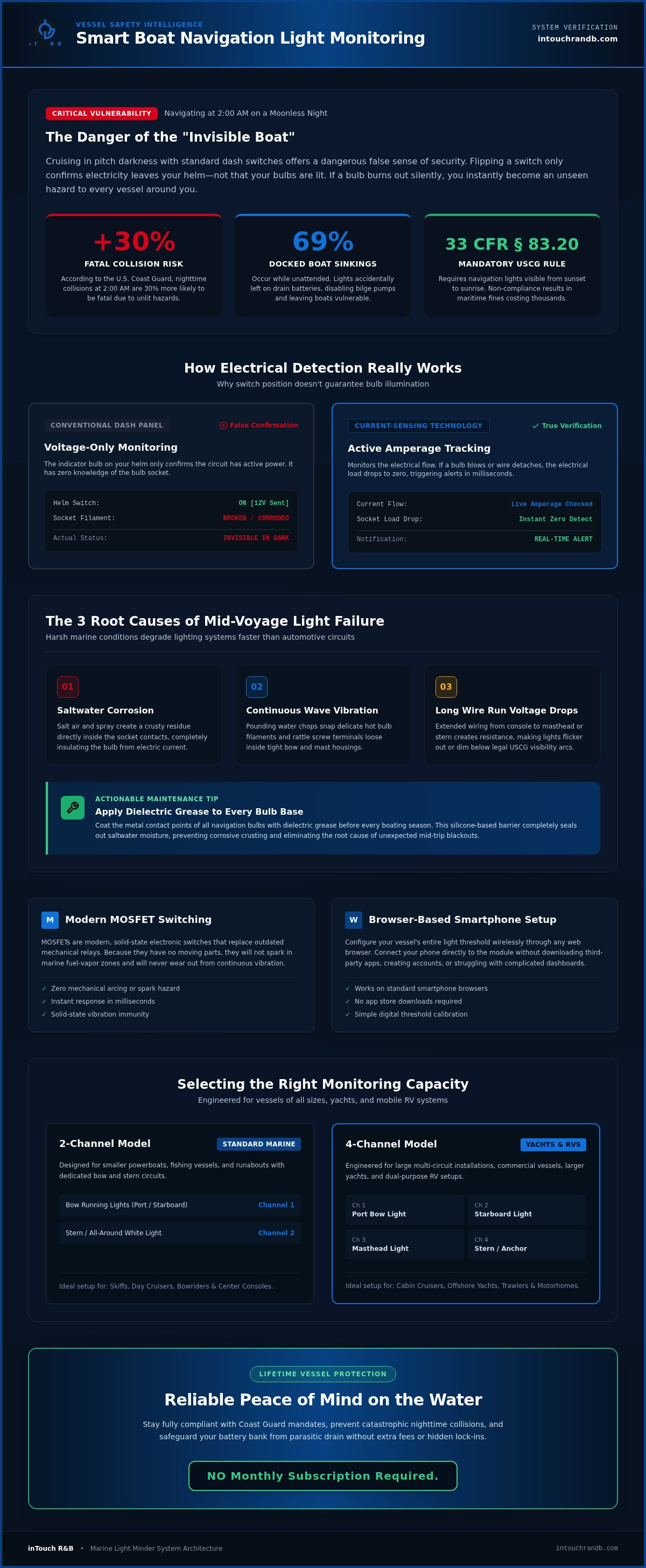
Imagine you're cruising back to the marina at 2:00 AM on a moonless night in 2026. You feel safe because your switches are flipped, but you have no way of knowing your starboard bow light just flickered out. According to the U.S. Coast Guard, accidents at this hour are 30% more likely to be fatal due to unlit hazards and poor visibility. It's a heavy weight to carry, the fear of being invisible to other captains while you're busy at the helm. We all agree that you can't be in two places at once, and manually checking your bulbs every few minutes is both frustrating and impractical.
This is where a smart boat navigation light alarm system steps in as a reliable, ever-present guardian for your vessel. This guide will show you how to stay compliant with USCG mandates and protect your boat from collisions using proactive monitoring. We'll explore how to get instant notifications the moment a bulb fails and how to set up a system using MOSFETs (these are just modern, solid-state electronic switches that replace old mechanical parts so they won't spark or wear out). You'll discover a simple way to ensure your boat is always seen, giving you the relief of being informed without any complex wiring headaches.
Key Takeaways
- Learn how a boat navigation light alarm system ensures you stay compliant with USCG standards and avoids the risk of being "invisible" on the water at night.
- Understand the current-sensing technology that monitors your bulbs in real-time to provide immediate failure notifications before a collision occurs.
- Compare 2-channel and 4-channel models to find the perfect monitoring capacity for your specific boat, yacht, or RV setup.
- Explore the simple browser-based setup that allows you to configure your system from a smartphone without downloading any extra apps.
- Discover a proactive safety solution that protects your vessel while ensuring there is NO Monthly Subscription Required.
Why Navigation Light Reliability is Critical for Every Boat Owner
Operating a vessel after sunset or in heavy fog without proper lighting is like driving a car with the headlights turned off. It's dangerous, and it's also illegal. The U.S. Coast Guard enforces strict rules, such as 33 CFR § 83.20, which requires marine navigation lights to be visible from sunset to sunrise. If your bulbs fail while you're underway, you effectively become an "invisible boat." This creates a massive risk for collisions, especially since other captains rely on your red, green, and white lights to determine your position and direction of travel. A reliable boat navigation light alarm system acts as your eyes when your back is turned, ensuring you never unknowingly go dark.
To better understand how these systems protect you, watch this helpful video demonstrating real-world light testing:
The Legal and Safety Risks of Light Failure
If a stern light fails, a vessel approaching from behind might not see you until it's too late. This often leads to rear-end collisions that cause significant property damage or serious injury. Beyond the physical danger, the legal consequences in 2026 are steep. Maritime fines for non-compliance can cost thousands of dollars. If an accident occurs and your lights were found to be inoperable, you could be held liable for all damages. Insurance companies often look for any sign of negligence, and failing to maintain basic safety equipment is a primary reason for denied claims. Keeping your system in top shape isn't just about safety; it's about protecting your financial assets too.
Common Causes of Navigation Light Malfunction
Most light failures aren't caused by a simple "old" bulb. In the harsh marine environment, several factors work against your electrical system. Corrosion is a major culprit. Saltwater creates a crusty buildup in the socket, which blocks the flow of electricity. Constant vibration from waves can also loosen filaments or rattle wires out of their terminals. Additionally, voltage drops can occur in long wire runs, making lights dim or causing them to flicker out entirely.
One often overlooked risk involves the unattended boat. Since 69% of all boat sinkings occur while the vessel is docked, maintaining battery health is vital. If you accidentally leave your navigation lights on, they can drain your battery bank. This leaves you without the power needed to run bilge pumps or start your engines. A smart monitoring system prevents this by alerting you to the power draw before it becomes a crisis.
Actionable Tip: Apply a small amount of dielectric grease to the base of your bulbs. This specialized grease seals out moisture and prevents the corrosion that causes most mid-trip failures. To see how specialized monitors can help you track these issues, you can review this comparison matrix of marine monitors to find the right fit for your boat.
How a Smart Boat Navigation Light Alarm System Works
Traditional setups often lead to a false sense of security. You flip a switch, a small light on your dash glows, and you assume your bow lights are shining. However, that dash light only confirms the circuit has power, not that the bulb is actually working. A modern boat navigation light alarm system changes this by using current sensing technology. This system monitors the actual flow of electricity to each lamp. If a bulb burns out or a wire corrodes, the "load" or electrical demand drops to zero. The system detects this change immediately and triggers an alert.
Staying compliant with the U.S. Coast Guard Navigation Rules is much easier when you aren't guessing. These rules require specific arcs of visibility that you simply can't verify from the captain's chair. By monitoring the electrical signature of each light, you get a digital confirmation that you are visible to everyone else on the water. This transition from a physical failure to a digital alert happens in milliseconds, giving you the time needed to fix the issue before it becomes a hazard.
Understanding Current Sensing and MOSFET Technology
The "brain" of a smart monitoring system often relies on MOSFETs. This stands for Metal-Oxide-Semiconductor Field-Effect Transistor. While the name is a mouthful, you can think of it as a modern, solid-state electronic switch. Unlike old-fashioned mechanical relays that use moving parts and magnets to click open and shut, MOSFETs have no moving parts. This makes them incredibly reliable in a wet, vibrating marine environment. They don't spark, they don't wear out, and they are much more efficient at measuring the tiny amounts of current used by modern LED navigation lights.
The Role of Real-Time Notifications
In the past, a failure might trigger a loud buzzer at the helm. This is fine if you're standing right there, but it's useless if you've stepped away to help a passenger or if you're down in the galley. By using 2.4GHz WiFi, a smart system can send a notification directly to your smartphone. You'll receive a text or email the moment a failure is detected. This provides the relief of being informed even if you are miles away from the dock. It turns a reactive "I hope they're on" mindset into a proactive "I know they're on" reality.
Actionable Tip: When setting up your monitor, take advantage of customizable naming. Instead of "Channel 1," name it "Port Bow Light." This allows you to know exactly which bulb needs attention the second you get an alert. If you want to see how this fits into a full safety setup, you can check out the comparison matrix of marine monitors to see all your options. For a reliable, all-in-one solution, you might consider the Light Minder to act as your vessel's watchful guardian.
Choosing the Right Monitoring Solution for Your Vessel
Selecting a boat navigation light alarm system doesn't have to be a complicated process involving thousands of dollars in new electronics. While some high-end yachts use fully integrated glass cockpit systems to monitor every circuit, most boaters need something that is both effective and easy on the wallet. The goal is to find a balance between professional-grade reliability and a setup that doesn't require a degree in electrical engineering. In 2026, the best solutions move beyond simple noise-making buzzers to provide a digital safety net, acting as a watchful guardian for your boat even when it's unattended.
Standard Alarms vs. Smart Remote Monitoring
Standard alarms have been around for decades. They usually consist of a simple buzzer wired in series with your light switch. If the bulb fails, the buzzer sounds. This is better than nothing, but it only works if you are standing at the helm to hear it. Modern proactive monitoring sends that alert directly to your phone. This means you can be down in the cabin or even away from the dock and still know your vessel is compliant with the U.S. Inland Navigation Rules. Smart systems also provide historical data, allowing you to see if a light has been flickering or drawing unusual amounts of power before it actually fails.
Evaluating Channel Requirements for Your Boat
The number of "channels" simply refers to how many individual light circuits the system can monitor at once. For smaller day boats or runabouts, a 2-channel system is often plenty. This allows you to monitor your bow lights and your stern light independently. If you own a larger yacht or a trawler, you'll likely want a 4-channel controller. This extra capacity lets you track your steaming lights and anchor lights as well. One of the best features of modern controllers is the ability to use custom naming. Instead of seeing a generic "Channel 1 Failure" on your screen, you can set it to say "Port Side Nav" or "Main Anchor Light." This immediate clarity saves you from hunting through your fuse panel in the dark.
Actionable Tip: Before you buy, count your light switches. If your bow and stern lights are on one switch, they might only need one channel, but separating them gives you better diagnostic data. You can see how different channel options compare by viewing this comparison matrix of marine monitors. Choosing a system with a one-time purchase price is also a smart financial move. Many boaters are tired of monthly fees for every piece of gear they own, so finding a solution where there is no monthly subscription required provides long-term peace of mind.
Best Practices for Installing Your Light Alarm System
Installing your boat navigation light alarm system is a straightforward process that bridges the gap between traditional marine electrical work and modern digital convenience. Before you begin, gather your essential tools, including wire strippers, crimpers, and marine-grade heat-shrink connectors. You'll need a stable 12VDC power source to ensure the logic board functions correctly. It's a good idea to verify the current draw of your existing lights first, as modern LED bulbs draw significantly less power than older incandescent ones. This preparation ensures that once the hardware is mounted, the software side of the setup will be a breeze.
Step-by-Step Configuration Tips
One of the most convenient features of modern monitoring is the browser-based setup, often called a Captive Portal. This is simply a setup webpage that opens directly on your phone or tablet when you connect to the device's WiFi signal. Once you power on the unit, look for the "Light Minder" network on your device and navigate to the default IP address, 192.168.4.1. From here, you can input your boat's name and your local WiFi SSID and password. You'll also see an option for "Lamp Fade" times. Setting this to 5000 milliseconds, for example, allows your lights to dim or brighten smoothly rather than just snapping on or off. This level of customization ensures the system feels like a natural part of your boat's environment.
Actionable Tip: When naming your lamps in the portal, use specific locations like "Stern Light" or "Port Bow" instead of generic numbers. This clarity allows you to identify exactly which circuit needs attention the moment an alert hits your phone. If you're unsure which model fits your specific wiring needs, you can check this comparison matrix of marine monitors to see the differences between 2-channel and 4-channel units.
Placement and Interference Considerations
Where you mount the controller is just as important as how you wire it. Since the system operates on a 2.4GHz WiFi frequency, you should avoid placing the unit directly behind a microwave oven or near high-power radio emitters. These devices can disrupt the signal, potentially delaying a critical notification. Keep the unit in a dry, accessible location where you can easily see the status LEDs. During startup, you'll see the green LEDs light up one by one at 0.5-second intervals to confirm the test cycle. Once operational, a blue LED will provide status updates: two short blinks mean it's connected to your router, while one long blink confirms everything is functioning normally. This visual feedback gives you instant reassurance before you even leave the dock.
To start protecting your vessel with a proactive safety net, get the Light Minder for your vessel today.
Proactive Protection with the inTouch R&B Light Minder
When you step away from your vessel, you shouldn't have to carry the weight of "what if" scenarios. The Light Minder acts as a watchful guardian, providing a 12VDC smart controller that bridges the gap between traditional electrical systems and modern digital security. Whether you choose the 2-channel or 4-channel version, this boat navigation light alarm system ensures that your boat remains visible and compliant with safety standards. By using MOSFET technology (these are modern switches that don't have moving parts to wear out), the system provides reliable monitoring without the risk of mechanical failure. It's a proactive solution designed for boaters who value the relief of being informed over the frustration of reacting to a crisis.
Personalized Control and Custom Naming
One of the most helpful features of this system is the ability to personalize exactly how you receive information. Through the browser-based setup portal, you can assign specific names to every lamp circuit. Instead of a generic alert, your phone might notify you that the "Salon Lights" or "Galley Lights" have experienced a failure. You can even group lights by location, such as "Main Deck" or "Flybridge," making it easy to identify the problem area immediately. As technology advances, your hardware stays current through over-the-air (OTA) firmware updates. These updates are delivered automatically once the device is linked to the internet, ensuring your system always has the latest features and security protocols without you ever having to plug in a cable.
Integrating with a Broader Security Suite
True peace of mind comes from a holistic approach to vessel safety. While monitoring your navigation lights is critical for night operations, protecting your boat from high-water events or HVAC failures is just as vital. The Light Minder is designed to work alongside other specialized sensors, such as the Bilge Minder, which alerts you the moment your bilge pump is overwhelmed. By viewing the Comparison Matrix, you can see how different sensors fit together to create a 24/7 protection suite. This philosophy moves away from simple, isolated alarms toward a connected environment where you have total control over your vessel's health from anywhere in the world.
Actionable Tip: When you first set up your suite of monitors, create a dedicated folder on your smartphone's home screen for your browser-based shortcuts. This gives you one-tap access to check the status of your lights, bilge, and HVAC systems before you even leave your house. It's a simple way to turn your phone into a comprehensive remote helm. Most importantly, this entire safety network is built on a one-time purchase model that respects your budget. You get professional-grade monitoring and real-time alerts with NO Monthly Subscription Required.
Take the Helm with Proactive Safety
Staying visible at night is about more than just flipping a switch. It's about having the absolute certainty that your vessel is seen by everyone else on the water. By choosing a modern boat navigation light alarm system, you transition from a reactive approach to a stance of protective vigilance. You've learned how current-sensing technology detects failures instantly and how simple it is to configure custom alerts through a browser-based portal.
Receiving simple text and email alerts ensures you're never caught off guard by a burnt-out bulb or a corroded socket. If you ever need a hand during setup, our expert support team is ready to help at 231-INTOUCH. Embracing this technology means you can finally enjoy the relief of being informed without the stress of manual checks. Safe boating starts with being informed and prepared for the unexpected.
Secure Your Vessel Today with the Light Minder
NO Monthly Subscription Required.
Frequently Asked Questions
Do I need a special app to monitor my boat navigation lights?
No, you don't need to download anything from an app store. The Light Minder uses a browser-based setup page known as a Captive Portal. You simply connect your phone or tablet to the device's WiFi signal and type 192.168.4.1 into your browser. This allows you to name your lights and set fade times without worrying about app updates or compatibility issues with your phone's operating system.
Will a navigation light alarm work with LED bulbs?
Yes, this boat navigation light alarm system is perfectly compatible with modern LED bulbs. While older systems sometimes struggle with the low electrical draw of LEDs, the Light Minder uses MOSFET technology. These solid-state electronic switches are highly sensitive and can accurately monitor the tiny amount of current that LEDs use. This ensures you get an instant notification if a bulb fails, regardless of whether it's an incandescent or an LED.
Can I get alerts on my phone if I'm not on the boat?
You absolutely can receive notifications while you're away from the dock. As long as the controller is connected to a stable 2.4GHz WiFi network with internet access, it can send real-time text and email alerts to your smartphone. This allows you to act as a watchful guardian for your vessel from anywhere. It's a proactive way to ensure your boat stays safe and compliant with maritime regulations even when you're at home.
What happens if my boat loses WiFi connection?
The system relies on a stable 2.4GHz WiFi signal to send remote notifications to your phone. If the connection is lost, the device won't be able to push alerts to the cloud. However, you can easily check the connection status by looking at the blue LED on the unit. Two short blinks confirm it's successfully linked to your router. We recommend mounting the unit away from metal obstructions to maintain a strong signal.
Is there a monthly fee for the Light Minder alarm system?
There is no monthly fee for the Light Minder. Once you purchase the hardware, you own it completely without any recurring costs or hidden charges. We believe in providing a high-value safety tool that doesn't add to your monthly subscription fatigue. You get 24/7 protection and real-time alerts for your boat navigation light alarm system without ever having to worry about a bill hitting your credit card every single month.
How many lights can one alarm system monitor?
The number of lights depends on which model you choose. We offer both 2-channel and 4-channel versions of the Light Minder. A 2-channel unit is great for smaller boats where you only need to monitor bow and stern lights. Larger yachts typically benefit from the 4-channel model, which allows you to track additional circuits like steaming lights and anchor lights. Each channel can be custom-named for easy identification during an alert.
What does the blue flashing LED on the Light Minder mean?
The blue LED is your primary indicator for operational status. If you see two short blinks, it means the device is successfully connected to your WiFi router and is ready to send alerts. If you see one long blink, it confirms the device is functioning normally and monitoring your circuits. These visual cues are designed to give you pragmatic reassurance that your safety system is active and protecting your vessel before you head out.
Can I install this system myself or do I need a pro?
The Light Minder is designed for a straightforward DIY installation. Each unit comes with a Quick Start-up Guide, an Installation Manual, and a User's Manual to walk you through the 12VDC wiring and software setup. We also provide searchable instructional videos on our YouTube channel for extra guidance. While many owners find the process simple and rewarding, you can always have a professional marine technician handle the installation if you prefer.
NO Monthly Subscription Required.

Article by
Jimmy Nesbitt
Principle
Be the first to comment