

What if the power goes out at your vacation home, but the first alert comes only after the temperature drops or a leak starts? An outage can be easy to miss when you’re away, especially if the home’s Wi-Fi or the alarm itself depends on household power. Choosing a cellular power failure alarm for vacation home use means looking beyond the outage alert: the device also needs a way to stay powered and send a message when the home connection is down.
Before choosing a system, compare how it detects an outage, stays powered and sends alerts. Also consider whether you need separate monitoring for unsafe temperatures or water. For example, the HVAC Minder monitors AC voltage, temperature, humidity, dew point and water, which can add information about conditions inside the home. This guide explains what to check so you can compare options and plan monitoring for an unattended property.
Key Takeaways
- A cellular power failure alarm for vacation home use needs to do more than detect an outage: consider how the device stays powered and how it sends alerts.
- Compare cellular and Wi-Fi as separate ways to deliver alerts, then check what the monitoring device relies on for power during an outage.
- Pair power-status monitoring with sensors for conditions such as temperature, humidity or water to spot potential knock-on problems.
- Before leaving, identify the circuits and areas to monitor, set alert recipients, and test the sensors and notifications.
- The HVAC Minder monitors AC voltage and home conditions, with text or email alerts available for an owner and a secondary contact.
What a cellular power failure alarm can tell you about a vacation home
A power failure alarm detects an interruption to electrical power and sends an alert through a communication route, such as a cellular connection. At a vacation home, that message can tell you an outage has occurred even when nobody is there to see it. But an alarm is not automatically a whole-property monitoring system. “Cellular” describes how an alert may be sent, not how the device stays powered.
Compare three separate functions: detecting the outage, keeping the monitor operating, and delivering its message to you. A device might detect lost power, but if it loses its own power or can’t connect to its network, it may not send an alert. These connected tools are part of the broader world of home automation systems, which link sensors and devices with remote communication.
For a helpful example of the questions remote owners consider, watch:
What happens after a vacation home loses power?
When power is interrupted, equipment that relies on electricity may stop working. If the HVAC system is affected, for example, the home may no longer be actively heated or cooled. What follows depends on the home, the equipment and how long the interruption lasts. An outage alert alone won’t tell you whether the indoor temperature has changed or what action is needed.
At an occupied home, someone might notice that the HVAC has stopped and investigate. At a vacant property, the interruption may go undiscovered until an owner, neighbor or caretaker checks in. A timely notification gives you an earlier opportunity to assess the situation and decide whether someone should look at the home.
Power-loss alerts versus broader property monitoring
A power-loss alert answers one question: has power been interrupted at the monitored point? Separate sensors can report specific conditions, such as temperature, humidity or water. A temperature sensor may show that the indoor environment has changed, while a water sensor can detect water where it’s placed. Neither sensor prevents a problem, and each only reports the condition it’s designed to detect.
When comparing a cellular power failure alarm for vacation home use, check what each alert actually tells you. Pairing an outage notification with relevant condition monitoring can give you more context and help you judge what may need attention sooner. Match each sensor to the area or condition you want to monitor rather than assuming one alarm covers the whole property.
Cellular, Wi-Fi, and backup power: how an outage alarm stays connected
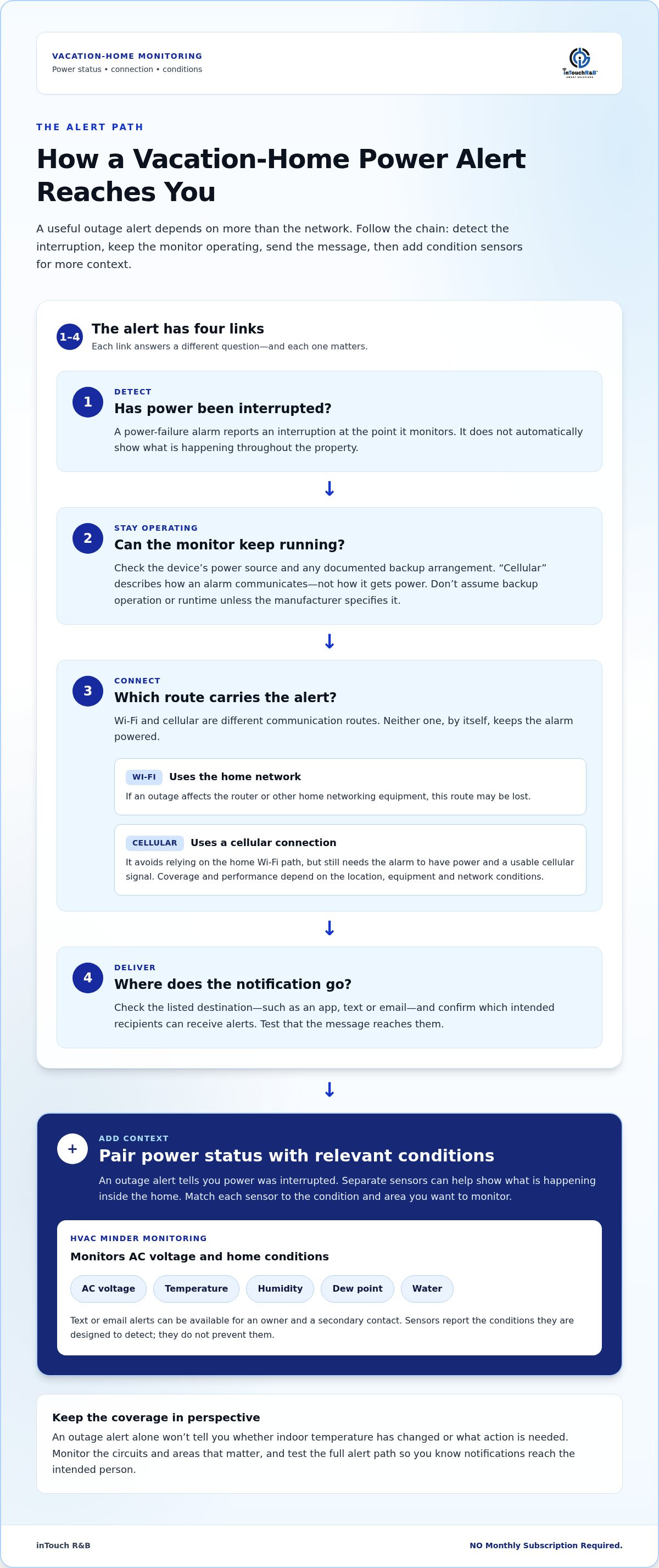
An alert has to pass through a chain: the alarm detects a change, has enough power to operate, connects to a network, then sends a notification to its destination. Cellular and Wi-Fi are different routes for that message. Neither route, by itself, keeps the alarm running during an outage.
Compare each part separately. A Wi-Fi monitor may rely on a home router, which can stop working if it loses power. A cellular monitor sends alerts over a cellular network instead, but still needs its own power and a usable signal at the property. Coverage and performance depend on the location, equipment and network conditions.
| What to check | Why it matters |
|---|---|
| Device power during an outage | Determines whether the monitor can continue operating. Review its power source and any documented backup arrangement. |
| Communication route | Wi-Fi uses the home network; cellular uses a cellular connection. Either route can be affected by its own conditions. |
| Notification destination | Check whether alerts go to the app, text, email or another listed destination, and which recipients can receive them. |
Does a cellular alarm still need power?
Yes. “Cellular” describes how the alarm communicates, not where it gets power. Before choosing a cellular power failure alarm for vacation home use, identify how the device itself is powered and look for documentation about backup power. Don’t assume a cellular connection means the alarm can keep operating during an outage or infer a backup runtime that the manufacturer hasn’t specified.
When can Wi-Fi or cellular alerts be interrupted?
If an outage affects the router or other home networking equipment, a Wi-Fi-based alarm may lose its route to the internet. Cellular communication avoids reliance on the home Wi-Fi path, but still depends on the alarm being powered and able to reach a working cellular connection. Signal strength can vary within a property, so consider the actual spot where the monitor will be installed.
As part of your broader plan to prepare for a power outage, consider what happens if each link fails: the home’s power, its internet equipment, the monitor’s power source or the available network. Test the alert path and confirm that notifications reach the intended person. For home-condition monitoring, the HVAC Minder monitoring system monitors HVAC and environmental conditions, including AC voltage, temperature, humidity, dew point and water.
What should a vacation-home power failure alarm monitor?
Power status tells you whether electricity is present at the point being monitored. It doesn’t show what’s happening elsewhere in the home. For a more useful picture, consider which conditions could change after an outage and whether separate sensors can report them. HVAC-related readings may be especially helpful in an unoccupied home, where a heating or cooling interruption might otherwise go unnoticed. Sensors provide information, but they don’t prevent the conditions they detect.
Monitor more than the electrical supply
Match each sensor to the question you want answered:
- AC voltage: Indicates whether electrical power is present at the monitored circuit or point. It doesn’t automatically confirm the status of every circuit or appliance in the home.
- Temperature: Measures the temperature where the sensor is placed. This can help show whether indoor conditions are changing after an HVAC interruption.
- Humidity: Measures moisture in the air at the sensor location. It’s a separate reading from temperature and may add useful context about indoor conditions.
- Dew point: Describes when moisture in the air may begin to condense on a surface. This reading can help provide context alongside temperature and humidity.
- Water: Detects water at the sensor location, such as near an area or appliance you want to monitor. Placement matters: a sensor can’t report water somewhere it can’t reach.
The HVAC Minder monitors AC voltage, temperature, humidity, dew point and water. That combination can complement an outage alert with readings about HVAC power and environmental conditions. For example, a voltage alert may indicate an interruption at the monitored point, while a temperature reading can help you assess whether the indoor environment has changed. Neither reading alone tells you the cause or guarantees that damage has occurred.
Plan who receives the alert and what happens next
A notification is more useful when someone can act on it. Route alerts to yourself and a designated secondary contact, such as a person who can check the property. The HVAC Minder can send alerts by text or email to an owner and a secondary recipient.
Before leaving, agree on a simple response: who will review the alert, who can access the home, and what conditions would prompt an in-person check. If a water alert arrives, the sensor location can help guide where to look first. For additional planning, review the American Red Cross’s Power outage safety tips and consider how power interruptions could affect equipment connected to water. A cellular power failure alarm for vacation home use can report an outage, while targeted sensors and a clear response plan help you understand what may need attention.
How to prepare a vacation home for power-loss monitoring
A little setup before you leave can make an alert easier to interpret and act on. Start with the equipment and areas that matter in your home, then configure monitoring around those specific needs. A cellular power failure alarm for vacation home use is only one part of the plan: sensor placement, alert recipients and a tested response path matter too.
Set up monitoring around the property’s risks
Use the system’s installation and user documentation for setup, placement and testing. Before departure, work through this sequence:
- Identify critical equipment and rooms. Note which circuits or equipment you want to monitor, such as the supply associated with HVAC, and which areas could benefit from temperature or water sensing.
- Choose the conditions to track. Decide whether you need power status, temperature, humidity or water detection. Each reading answers a different question, so don’t assume one sensor covers the whole property.
- Place sensors where they can detect the condition. Position a water sensor near the specific appliance or area of concern. Put temperature and humidity sensors in the rooms you want to assess, following the device instructions.
- Set alert recipients. Add yourself and a designated secondary contact who can help check the home. Make sure each recipient knows what the alerts mean and how to reach you.
- Test the alert path. Use the system’s documented test conditions, then confirm that notifications arrive and identify the monitored condition clearly.
For HVAC power and environmental monitoring, the HVAC Minder monitors AC voltage, temperature, humidity, dew point and water. These readings can add context to an outage alert, but they don’t make the system a cellular power-failure alarm.
Test the alert path before leaving
Don’t wait until you’re away to find out whether an alert reaches the right person. Confirm that the monitoring device and its communication route are operating under normal conditions, then check that both you and the secondary contact receive the expected test notifications. A successful test confirms the alert path at that moment; it doesn’t guarantee how the system will behave during every outage.
Agree on a straightforward response plan: who will review an alert, who can inspect the property, and how that person should report what they find. This turns a notification into a practical next step. To explore home and HVAC monitoring options, visit inTouch R&B.
How inTouch R&B monitoring supports vacation-home awareness
A cellular power failure alarm for vacation home use focuses on detecting an outage and sending a notification over a cellular connection. inTouch R&B’s HVAC Minder provides a complementary layer by monitoring HVAC and environmental conditions, giving owners more context about an unattended property. It monitors conditions rather than providing cellular outage alerts, so consider its readings separately from an outage device’s communication and backup-power arrangements.
What HVAC Minder can help owners keep track of
The HVAC Minder monitors AC voltage, temperature, humidity, dew point and water. AC voltage can indicate power status at the monitored HVAC circuit, while the other readings describe conditions around their sensors. If HVAC power is interrupted, for example, voltage monitoring may report a change at the monitored point. Temperature readings can then provide context about the room, while humidity and dew point add information about moisture conditions. A water sensor detects water where it is placed.
These measurements don’t identify every cause or prevent every consequence. Their value is in helping an owner see distinct conditions and decide whether someone should check the property. Alerts can be sent by text or email to the owner and a secondary contact. Explore the HVAC Minder system to learn more about monitoring connected equipment.
Choose a monitoring layer that fits the property
An outage alarm reports a power interruption at the point it monitors. Broader property-condition monitoring adds separate readings, such as temperature or water, that can help explain what may be happening after power changes. Think about which rooms and equipment matter at your home, then choose monitoring based on the conditions you want to observe. Sensor placement and alert recipients are part of that plan.
inTouch R&B uses wireless reporting through secure cloud servers, with text or email alerts. These details describe its reporting approach, not cellular connectivity or continued operation during a power outage. Review the inTouch R&B monitoring comparison matrix to see how its monitoring systems differ, then explore the documented approach at inTouch R&B.
Choose monitoring that gives you useful information and a clear next step when an alert arrives.
Choose monitoring that gives you useful answers
A cellular power failure alarm for vacation home use can report an outage, but reliable planning means considering more than the alert route. Check separately how the device detects lost power, stays powered and communicates. Then decide whether you also need sensors that show what’s happening inside the home.
inTouch R&B’s HVAC Minder supports broader home-condition awareness by monitoring AC voltage, temperature, humidity, dew point and water. Alerts can be sent by text or email to the owner and a secondary contact. This monitoring can add context to a power alert, but it doesn’t provide cellular outage alerts.
Before you leave, choose the conditions and areas you want to monitor, set up recipients, and test that alerts reach the right people. A clear response plan helps turn a notification into a useful next step.
Explore inTouch R&B home and equipment monitoring to see how condition monitoring can support your vacation-home plan. NO Monthly Subscription Required.
Frequently Asked Questions
Can a cellular power failure alarm send alerts when the Wi-Fi is down?
Yes, if the alarm sends notifications over a working cellular connection, it doesn’t need the home’s Wi-Fi to deliver them. A cellular power failure alarm for vacation home use still depends on the device having power and being able to connect to a cellular network at the property. Coverage and performance vary by location, so test the device where it will be installed and confirm that alerts reach your phone.
Will a power failure alarm still work if the vacation home loses electricity?
It depends on how the alarm itself is powered and whether it has a documented backup power source. The communication method, such as cellular or Wi-Fi, doesn’t keep the monitor operating. Check the product documentation for its power arrangement and any stated backup behavior. Don’t assume the alarm will continue detecting outages or sending alerts during a loss of household electricity unless its instructions explain how it handles that situation.
What should I monitor in a vacation home besides power?
Consider monitoring temperature, humidity and water in locations that matter to your home. Temperature readings can help you notice changes in a room if HVAC operation is interrupted. Humidity adds a separate measure of indoor conditions, while a water sensor can detect water where it’s placed. These sensors report specific conditions, not every possible problem, so choose locations based on the risks and equipment you want to keep an eye on.
Can an HVAC monitor alert me if my vacation home loses power?
An HVAC monitor that measures AC voltage can report power status on the circuit it monitors, and some systems can send text or email alerts. inTouch R&B’s HVAC Minder monitors AC voltage along with temperature, humidity, dew point and water. It can send alerts to an owner and a secondary contact. It provides HVAC and condition monitoring; whether alerts continue during an outage depends on the system’s power and communication setup.
How do I test a power failure alarm before leaving my vacation home?
Follow the device’s user instructions and use only its documented test method. Confirm that the monitor reports the expected condition and that notifications reach each intended recipient, including a secondary contact if you’ve set one. Check the communication connection at the device’s installed location, too. Avoid disconnecting circuits or interrupting power unless the manufacturer’s test instructions specifically call for it, and restore normal operation after testing.
Can a power failure alarm prevent damage to a vacation home?
No. An alarm detects and reports a monitored condition; it doesn’t restore power, repair equipment or stop a leak. Timely alerts can give you or a designated contact a chance to assess what’s happening and decide whether the property needs attention. Pair power monitoring with relevant temperature or water sensors, then make a response plan so someone knows who will check the home and what to do after an alert.
Explore inTouch R&B monitoring for your home and choose the readings and alert recipients that fit your vacation-home plan. NO Monthly Subscription Required.

Article by
Jimmy Nesbitt
Principle
Be the first to comment